
Editorial Process: This guide was developed by analyzing current guidelines from the North American Spine Society (NASS) and the American Physical Therapy Association (APTA). Seating recommendations are based on published manufacturing specifications and peer-reviewed occupational health studies. This article has not undergone independent external medical review.
Written By: Thomas Vance, Ergonomic Content Specialist | Last Updated: July 2026
Clinical Notice: Sciatica is a complex symptom cluster—often involving a combination of nerve irritation, inflammation, localized reduced blood flow, or physical compression—rather than a standalone disease. The ideal way to sit varies significantly based on your specific medical diagnosis (such as a disc herniation, spinal stenosis, or deep gluteal syndrome). The adjustments suggested below may help manage daily discomfort but do not replace personalized healthcare provider advice. Red Flag Warning: Seek emergency medical care immediately if your pain is accompanied by fever, unexplained weight loss, a history of cancer, recent trauma, progressive leg weakness (such as foot drop), numbness in your groin area, or a loss of bowel or bladder control.
How to Sit With Sciatica at a Desk
Sustained sitting at a desk is a common aggravating factor for individuals experiencing sciatic nerve discomfort. Remaining seated for hours alters how weight rests on your lower spine, which may increase spinal pressure and aggravate symptoms along neural pathways that are already sensitive [1].
Because every individual’s spinal curve and pain tolerance are different, generic workplace advice rarely offers lasting relief. Managing your leg and back pain typically requires modifying your chair setup based on your specific presentation. This guide breaks down verified clinical literature and practical posture shifts to help support your comfort during your work shift.
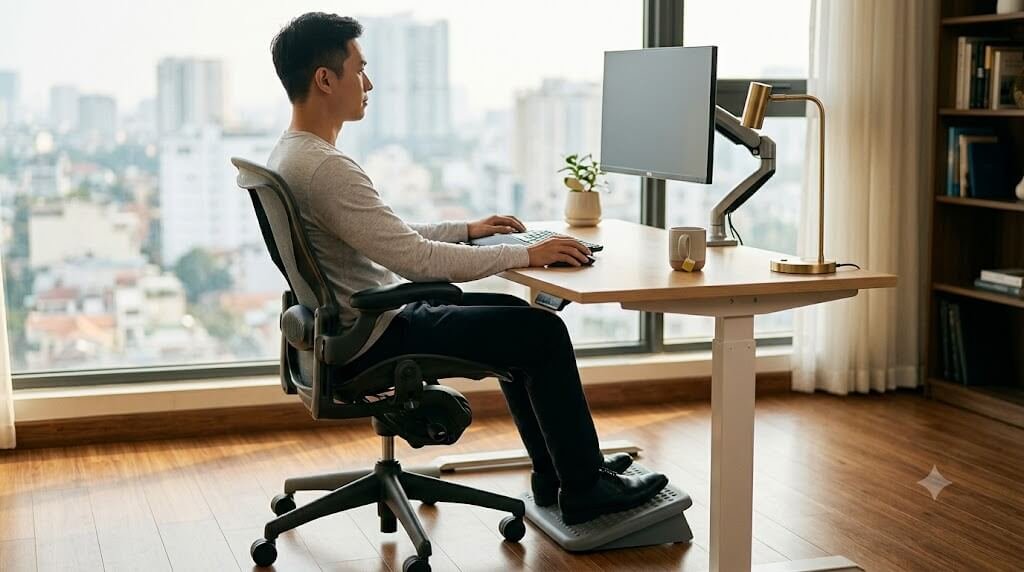
How to sit with sciatica at a desk? Sit with your hips slightly higher than your knees, keeping both feet flat on the floor or a footrest. Adjust your lumbar support to fill the natural curve of your lower back, and avoid sitting continuously for more than 30 to 60 minutes without changing position.
To ensure your keyboard, monitor, and desk heights are properly aligned with your body frame, consider reviewing our baseline guidelines in the Office Ergonomics Setup Guide.
Evidence Strength for Sciatica Workplace Changes
Classification adapted from the APTA Clinical Practice Guidelines and recent workplace safety systematic reviews:
- Strong Evidence: Staying active throughout the workday through structured exercise and patient education [2].
- Moderate Evidence: Utilizing dynamic sit-stand workstations to manage sedentary loading [6]; avoiding prolonged, uninterrupted static sitting blocks [3]; matching lumbar support profiles to your natural spinal curve.
- Limited/Anecdotal Evidence: Individual aftermarket seat cushions; specific piriformis stretching protocols for broad lower back pain.
Personalized Posture Observation Flowchart
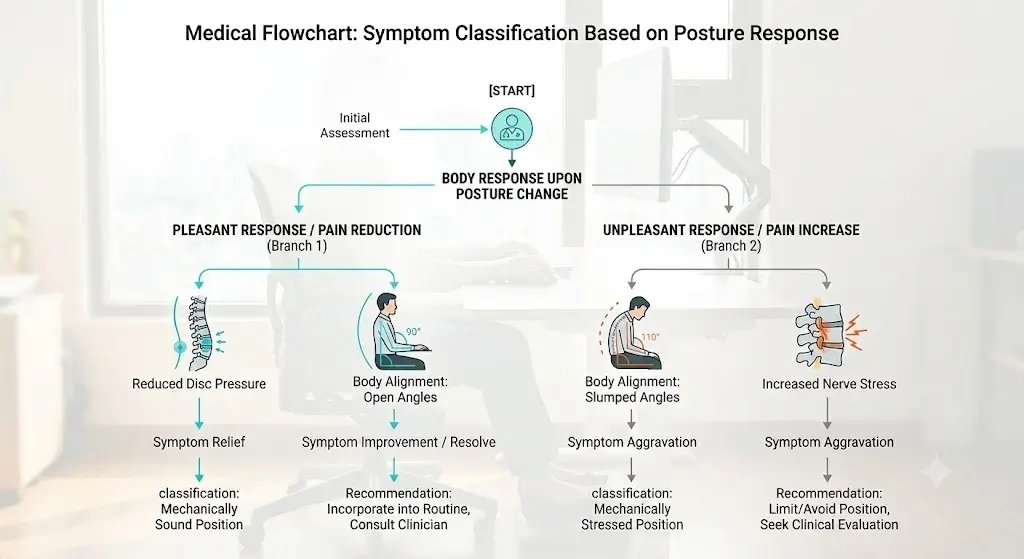 While only a qualified clinician can determine the root cause of your pain, tracking your symptom patterns during the workday can help you decide which initial chair adjustments to discuss with your physical therapist:
[START HERE] Notice your primary sitting symptoms:
➔ Is your pain primarily below the knee (calf or foot) and worse when slouching forward?
⚡ May suggest a flexion-sensitive pattern: Try sliding your hips completely back. Explore an open hip angle past 90 degrees using a firm wedge cushion or downward seat pan tilt. Monitor if the pain responds positively.
➔ Is your pain limited to a deep throb strictly inside your gluteal muscles?
⚡ May suggest a localized compression pattern: Clear out all back pockets. Avoid low-tension mesh or soft cushions that sag. Explore a wide seat pan filled with dense, high-density foam to help distribute your weight.
➔ Is your lower extremity pain worse when standing or walking than when sitting?
⚡ May suggest an extension-sensitive pattern: Keep your seat pan entirely level and maintain a traditional 90-degree angle at the hips. Avoid aggressive lumbar pillows that force a deep back arch. Discuss these findings with your clinician.
Symptom Patterns Often Associated With Desk Seating
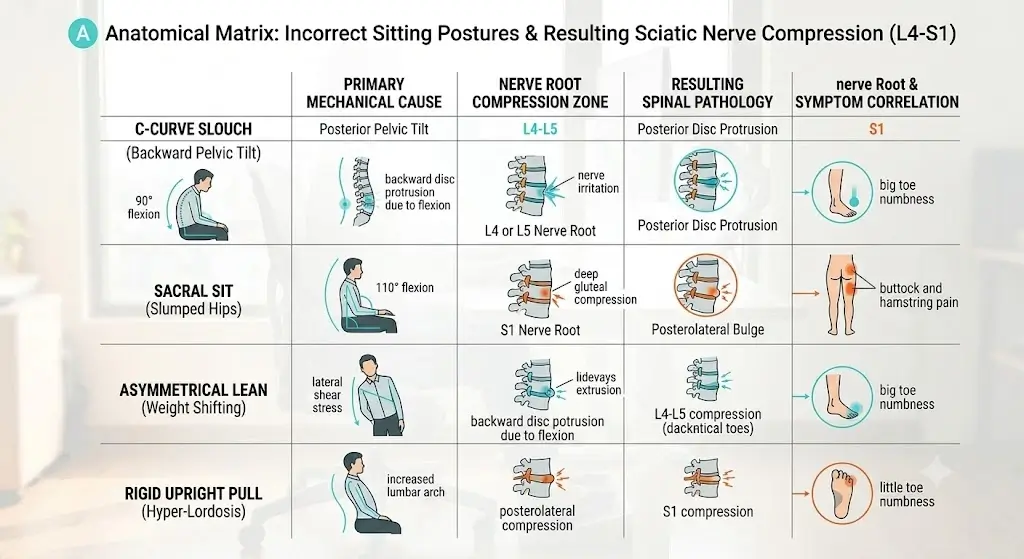 Tracking how your symptoms respond to specific postures during the workday can provide valuable clues for your initial chair adjustments. Use this pattern recognition framework to guide your setup modifications:
| Symptom Presentation After Sitting | Commonly Observed Patterns | First Adjustment to Try |
|---|---|---|
| Pain radiating past the knee into the calf or foot, worsened by bending forward. | Often seen in some flexion-sensitive, disc-related conditions. | Open your hip angle using a firm wedge cushion or seat pan tilt. |
| A deep, localized ache strictly in the buttock area that throbs against the chair seat. | Can occur with deep gluteal space compression or direct piriformis muscle irritation. | Switch to a wide, high-density foam chair pan; avoid crossing your legs. |
| Lower back and leg pain that is worse when standing or walking than when sitting. | Often seen in extension-sensitive profiles, such as typical lumbar spinal stenosis. | Maintain a traditional 90° hip angle; use a flat seat pan; seek clinical assessment. |
Positioning Guidelines for Your Specific Condition
Clinical data published in the Journal of Orthopaedic & Sports Physical Therapy (JOSPT) emphasize that movement and positional strategies work best when they align with the patient’s specific spinal issue [2]. Postures that accommodate a disc-related symptom profile can sometimes worsen symptoms in individuals with lumbar spinal stenosis. Consider these variations to align your setup with your clinical guidance:
| Underlying Condition | The Posture Goal | Recommended Strategy | What to Avoid |
|---|---|---|---|
| Lumbar Disc Herniation (Commonly Flexion-Sensitive) | Reduce prolonged forward slouching to control sustained lower back bending strain. | Slightly open hip angle; firm, adjustable lumbar support. | Deeply sagging seats; extended forward-slouched typing postures. |
| Lumbar Spinal Stenosis (Often Extension-Sensitive) | Accommodate a neutral or slightly flatter lumbar curve to minimize potential narrowing around the spinal nerves. | Neutral ~90° hip angle; flat seat pan; moderate, non-aggressive lumbar alignment. | Forced lumbar hyperextension; steep forward seat pan tilts. |
| Deep Gluteal Space Syndrome / Piriformis Syndrome | Distribute seat surface forces to reduce localized pressure on the back of the leg. | Wide seat pan with high-density foam; balanced pelvic grounding. | Cross-legged sitting; highly narrowed bucket or gaming seats. |
Why Sitting Aggravates Lower Body Nerve Pain
The biomechanics of sitting alter how weight forces travel through your spine, hips, and legs. The sciatic nerve travels from your lower back, down through the deep layers of your buttocks, and all the way to your foot.
Because it is the largest nerve in your body, it reacts quickly when it is physically compressed, stretched, or exposed to local tissue inflammation. Seated office work typically presents two distinct physical stressors that can keep these nerve pathways sensitive.
Sustained Forward Slouching and Disc Pressure
When you focus on a screen, your pelvis naturally rolls backward, flattening the normal inward curve of your lower back. In vivo spinal research confirms that this slouched position increases internal pressure inside your spinal discs compared to standing [4].
For individuals with an underlying disc injury, this posture may increase mechanical strain on the back part of the disc. This shift is frequently associated with increased reports of radiating leg symptoms as the day goes on.
Direct Seat Pressure on Tight Muscles
For others, the problem is not the spine but localized pressure in the hips. Sitting keeps your hip joints bent for hours, which places deep gluteal structures under continuous passive stretch.
The sciatic nerve usually passes directly beneath the piriformis muscle, although notable anatomical variations exist where the nerve travels through the muscle belly in approximately 10% to 20% of the population [5]. Remaining static on an unsupportive seat pan can contribute to local tissue irritation, potentially intensifying symptoms along the nerve sheath.
How to Adjust Your Desk Setup
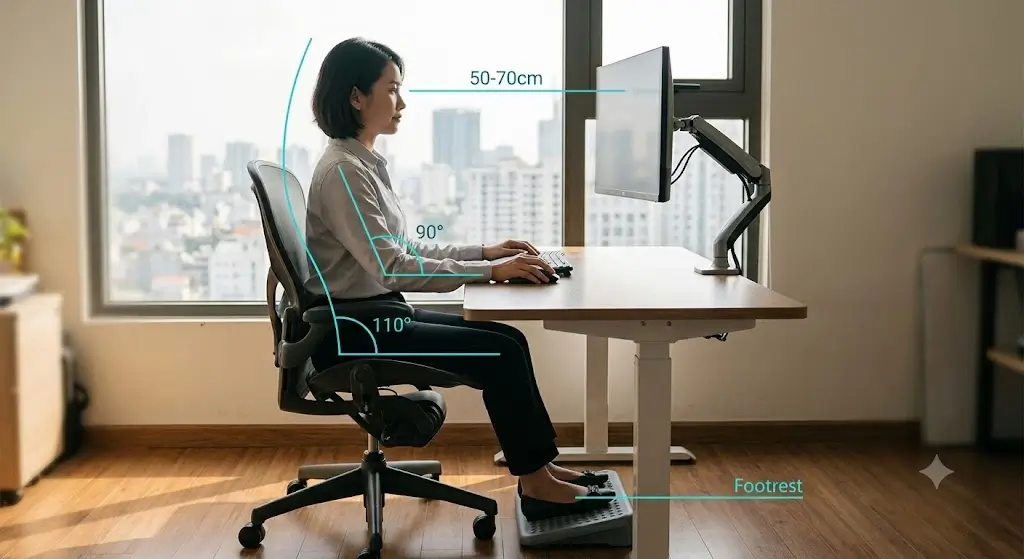 For many people whose symptoms worsen during prolonged sitting, making intentional adjustments to their workspace layout can make maintaining a neutral lower back posture much easier.
Configuring Your Hip Angle
Many ergonomics practitioners prefer exploring a slightly open hip angle (commonly recommended in ergonomics to be around 100° to 110°) for people who find that a rigid 90-degree posture increases lower back flexion, although no single angle has been shown to be universally superior. Lowering the front tilt of your seat pan slightly or using a firm, sloped wedge cushion elevates the pelvis relative to the knees, depending on cushion thickness. This adjustment can make maintaining a neutral lumbar posture easier for certain individuals.
Ground Your Feet and Settle Your Hips
Your feet act as stabilizers for your lower body. Resting them unevenly—like crossing your legs or resting on your toes—shifts your pelvis out of alignment and concentrates pressure on one side of your buttocks.
- Keep soles flat: Keep both feet resting flat on a stable surface to help distribute your weight uniformly across both of your sit bones.
- Use a footrest: If raising your chair to reach a high desk surface prevents your feet from resting flat on the floor, integrate a stable footrest to ground your lower body and stabilize pelvic positioning.
Bring Your Keyboard Closer
Reaching out to type or use a mouse pulls your shoulders forward, which immediately causes your lower back to round out into a slouch. Adjust your armrests so your elbows rest at a comfortable angle close to your sides. Keep your keyboard and mouse close enough that you do not have to lean forward to reach them. If you cannot get close enough to your workstation, optimizing your setup with an adjustable monitor arm or an ergonomic mouse may help.
Desk Chair Fit Checklist
Verify your current office chair limits against these practical parameters:
- 👉 Is your seat base too deep? If you cannot slide three fingers between the front of the cushion and the back of your knees, the frame may compress the leg area.
- 👉 Does the seat pan sag? Low-tension mesh bases or lower-density foam cushions are more likely to lose support under prolonged loading, depending on construction.
- 👉 Is the back support rigid? Look for independent lumbar depth adjustment rather than automatic tension bands, allowing you to set the support your back muscles require.
What to Look for in Ergonomic Support Gear
Supportive equipment cannot treat sciatica, but it can make it easier to maintain a posture that is less irritating during long work sessions. Focus on adjustable features rather than broad comfort claims.
Office Chair Material Considerations
When reviewing product specifications, pay close attention to seat materials. High-density support materials, such as high-density molded polyurethane foam or premium cold-cure foams, tend to maintain pelvic alignment better over multi-hour blocks than cheap, open-cell cushions.
If evaluating mesh seating, opt for tightly woven configurations found on higher-tier designs. Some inexpensive mesh seats can sag under sustained body weight, causing an unprompted posterior pelvic tilt that forces the lower back into deep flexion.
Cushion Warning: While circular donut pillows are highly effective for isolated tailbone pain, biomechanically they may theoretically be less suitable for some people with deep gluteal pain, depending on the individual’s pain pattern. The evidence is limited, but the circular rim may increase pressure over surrounding gluteal tissues in some users.
For a detailed review of specific office chair models that feature these adjustable systems, see our review of the best ergonomic office chairs for lower back pain.
When Your Chair Is Not the Only Problem
While optimizing your office seat often yields major comfort improvements, it is vital to recognize that sitting discomfort can sometimes be amplified by conditions unrelated to your chair’s foam or angles. If adjusting your workspace provides zero symptom relief, your clinician may evaluate you for alternative underlying factors, such as:
- Hamstring Neural Tension: Tightness or scarring along the hamstring tendons can physically pull on the sciatic sheath during sitting, mimicking a spinal issue.
- Hip Osteoarthritis: Degeneration within the actual hip joint can cause deep groin or buttock pain that intensifies when sitting at a strict 90-degree angle.
- Sacroiliac (SI) Joint Dysfunction: Inflammation in the joints connecting your spine and pelvis can make sitting on hard surfaces feel highly uncomfortable, independent of your posture.
- Hip Bursitis: Inflammation of the fluid-filled sacs over the pelvic bones can create localized tenderness that flares up from direct chair-base contact.
Movement Intervals and Deskside Mobility
Remaining in one position for long periods reduces normal movement of muscles, joints, and connective tissues. Intermittent positional changes help reduce pressure, supporting tissue health and managing sensitivity during long work blocks.
Many ergonomic programs encourage alternating between sitting and standing every 30 to 60 minutes rather than remaining static [6]. Neither prolonged sitting nor prolonged standing is ideal; alternating positions generally provides better tolerance. Standing changes spinal loading and reduces the sustained seated compression associated with prolonged sitting, although prolonged standing can also aggravate symptoms for some individuals.
Gentle Deskside Micro-Breaks
When you are dealing with active nerve irritation, long, static stretches—like bending forward to touch your toes—can place the sciatic nerve under heavy tension and worsen your symptoms. Consider these gentler, dynamic options instead:
- Standing Extensions: Stand up, place your hands on your lower back, and perform 3 to 5 comfortable, gentle backward arches. For some individuals who tolerate extension (such as flexion-sensitive disc profiles), this movement provides a helpful counter-pose to hours of forward sitting, strictly if recommended by your clinician. If you utilize an adjustable workspace, see our review of standing desk converters with gas-spring mechanisms.
- Sciatic Nerve Gliding (Flossing): Stand and hold your desk for balance. Gently straighten the knee of your painful leg forward while simultaneously tilting your head back toward the ceiling. Then, bring your foot back down while lowering your chin to your chest. This coordinated movement can help glide the nerve gently through its soft-tissue pathways without overstretching it, only if prescribed by your treating clinician.
Precautionary Note: Mobility exercises should never provoke sharp, electrical, or worsening radiating pain down your leg. If an exercise increases your symptoms, stop immediately and return to a comfortable resting position.
When Posture Changes Are Unlikely to Help
While workspace adjustments are highly effective for managing mechanically induced nerve sensitivity, certain situations indicate that changing how you sit will be insufficient. It is vital to recognize when self-management reaches its functional limits.
Non-Mechanical Causes of Sciatica Symptoms
If your lower extremity pain does not change based on your position—meaning the pain remains constant whether you are standing, sitting with support, lying down, or walking—the root cause may not be structural loading. Non-mechanical issues requiring direct medical diagnosis include localized infections, structural fractures, severe osteophytic narrowing, or inflammatory systemic diseases.
Limitations of Ergonomic Interventions
Current evidence suggests ergonomic interventions improve comfort and work tolerance, but they do not treat the underlying cause of lumbar radiculopathy. Modifying your seat pan or adding a support cushion can lower daily nerve strain, but it cannot structurally reverse an advanced structural herniation or clear a bony stenosis. Ergonomics should be treated as a supportive environment while you undergo targeted active recovery or clinical physical therapy.
When to Seek Medical Evaluation
Schedule a formal clinical evaluation with a healthcare provider or physical therapist if your workplace symptoms are accompanied by any of the following indicators:
- Symptoms that fail to improve or progressively worsen after 2 to 3 weeks of consistent ergonomic changes.
- Radiating pain that completely prevents sleep or severely restricts your ability to walk normally.
- A noticeable loss of muscle bulk or strength in the calf or thigh of your affected leg.
Frequently Asked Questions
Should I sit on a hard chair or a soft chair if I have sciatica?
A firm chair base is often better tolerated than a soft, plush cushion. Harder surfaces filled with high-density molded foam offer the support required to keep your pelvis from rolling backward into a slouched posture. Unstructured soft chairs or plush couches allow your hips to sink deep down, which flattens the lumbar curve and elevates baseline pressure on the posterior spinal discs.
Should I use a lumbar roll at my office desk?
Using a portable lumbar roll can be a highly effective, cost-efficient way to modify a flat office chair. It works well if you have flexion-sensitive sciatica (like a disc herniation) because it physically blocks your lower back from slumping into a “C” shape. However, make sure the roll is not so thick that it aggressively forces your spine into a deep arch, which can trigger symptoms if you have spinal stenosis.
Should I use a kneeling chair if I have spinal stenosis?
Individuals with lumbar spinal stenosis may not tolerate the increased hip flexion or altered posture of a kneeling chair as well, so individual assessment is important. Because kneeling chairs force an open angle that can gently arch the lower back, extension-sensitive individuals might notice an increase in discomfort. If your symptoms stem from deep gluteal muscle tightness, the deep knee and hip bend can also place those gluteal structures under continuous tension.
Is memory foam good for a sciatica chair cushion?
Lower-density memory foam cushions are more likely to lose support under prolonged loading, depending on their density and construction. Within a short block of sitting, lower-density memory foam can compress significantly under sustained body weight, leaving your pelvis unstable and allowing your lower back to slump. High-density polyurethane foam or layered gel inserts typically offer better structural support.
Is walking better than sitting for sciatica?
Many people tolerate walking better than prolonged sitting, although responses differ depending on the underlying cause of sciatica. For typical flexion-sensitive profiles, walking promotes circulation and keeps the spine neutral.
However, for individuals experiencing extension-sensitive patterns (such as severe spinal stenosis), prolonged walking may occasionally aggravate radicular pain faster than supported resting positions.
Can sitting cause permanent sciatic nerve damage?
Sitting itself rarely causes permanent nerve damage. However, sitting continuously in positions that aggravate a severe disc herniation can prolong inflammation and delay healing. If you ignore progressive neurological signals—like growing leg weakness or a persistent loss of sensation—it can increase the risk of long-term issues, which is why monitoring red flags is essential.
Recommended Gear for Workspace Retrofitting
If purchasing a new premium chair is not an immediate option, utilizing targeted aftermarket supports can effectively modify your existing chair setup:
- For comprehensive support adjustments, read our analysis of adjustable office chairs with high-density foam bases.
- To reduce hamstring pressure if your desk height forces your heels to hover, view our top picks for ergonomic office footrests.
- To elevate your screen and eliminate forward slouching, check our reviews of articulating computer monitor arms.
- To easily incorporate standing micro-breaks into your schedule, see our field testing of standing desk converters with gas-spring lifters.
- To block your lower spine from flattening during afternoon fatigue, explore our guide to lumbar support pillows with dual adjustment straps.
- To establish a supportive hip-to-knee alignment on a sagging seat pan, view our comparison of high-density orthopedic seat wedges.
References
- North American Spine Society. (2020). Clinical Practice Guidelines for the Diagnosis and Treatment of Lumbar Disc Herniation with Radiculopathy. NASS Evidence-Based Clinical Guidelines.
- American Physical Therapy Association. (2021). Clinical Practice Guidelines for Lumbar Spine Impairments. Journal of Orthopaedic & Sports Physical Therapy, 51(4), CPG1-CPG60. PMID: 33789432
- Jensen, R. K., et al. (2024). Diagnosis and management of low back pain and sciatica: a primary care review based on updated systematic reviews. The Lancet Rheumatology, 6(2), e112-e124. DOI: 10.1016/S2665-9913(23)00323-7
- Wilke, H. J., Neef, P., Caimi, M., Hoogland, T., & Claes, L. E. (1999). New in vivo measurements of pressures in the intervertebral disc in daily life. Spine, 24(8), 755-762. PMID: 10222525
- Smoll, N. R. (2010). Variations of the piriformis and sciatic nerve with clinical consequence: a review. Clinical Anatomy, 23(1), 8-17. PMID: 19918869
- Karakolis, T., & Callaghan, J. P. (2014). The impact of sit-stand office workstations on worker discomfort and productivity: A review. Applied Ergonomics, 45(3), 799-806. PMID: 24157241
