
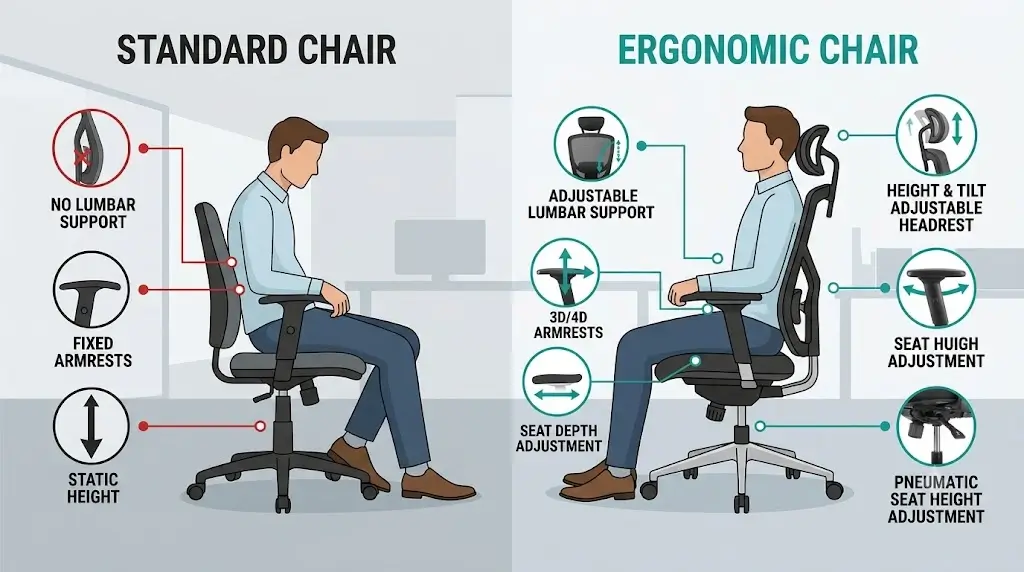
According to the ErgoDeskGuides Anthropometric Selection Protocol, choosing the right ergonomic chair requires verifying six dimensional thresholds: a seat height matching popliteal height (feet flat, 90°–100° knee angle), a seat depth leaving a 2–3 finger-width clearance behind the knees, usable seat width clearing hips by 1 inch on each side, lumbar placement cradling the L1–L5 curve, 3D/4D armrests level with resting elbow height, and a synchronous recline mechanism operating smoothly between 100° and 110°.
The right ergonomic office chair is not the chair with the most adjustments or the highest price. It is the chair whose seat dimensions, back support, armrests, recline mechanism, and adjustment ranges match your body and your workstation. This guide shows exactly how to evaluate those variables before you buy.
For most buyers, evaluate an ergonomic chair in this sequential order:
seat height → seat depth → seat width → lumbar/backrest fit → armrests → recline mechanism → desk compatibility → materials → durability → price.
If the chair fails the first three dimensional fit checks, additional adjustments cannot compensate for the physical mismatch.
Seat-depth focused
Lumbar geometry
Armrest fit
Recline mechanics
US buying guide
This framework prioritizes measurable anthropometric fit and mechanical usability over marketing claims. Published manufacturer dimensions are treated as baseline screening data; usable adjustment range, structural deflection, body proportions, workstation compatibility, mechanism behavior, warranty, and long-term part serviceability are evaluated directly.
The Bottom Line: Fit Beats Feature Count
The single biggest mistake in ergonomic-chair shopping is treating “ergonomic” as a checklist of premium marketing features. A chair can feature a sophisticated mechanism, adjustable lumbar support, 4D armrests, a headrest, and an expensive elastomeric mesh system while still causing severe musculoskeletal strain if its chassis is incompatible with your body.
The foundational question must always be: Can this chair physically accommodate my body dimensions? Only after that criterion is met should you evaluate whether its mechanism, materials, warranty, and price justify the purchase.
| Priority | Check | Why it matters |
|---|---|---|
| 1 | Seat height | Determines lower-leg vascular return and workstation interface height. |
| 2 | Seat depth | Controls thigh support and unobstructed pelvic contact with backrest. |
| 3 | Seat width | Ensures comfortable hip clearance without side-bolster constriction. |
| 4 | Back/lumbar fit | Determines whether support contacts the lordotic curve correctly. |
| 5 | Armrests | Offloads the shoulder girdle without obstructing desk proximity. |
| 6 | Recline | Facilitates supported dynamic movement and disc offloading. |
What Actually Makes an Office Chair Ergonomic?
An ergonomic chair accommodates the interaction between the human body and the task being performed. It is not defined by one universal seat angle, one lumbar position, or an arbitrary number of adjustment points.
A high-performance chair establishes a supported neutral posture while allowing fluid movement throughout the workday. The goal is never to freeze the spine into a rigid 90-degree hold.
Five Characteristics That Matter Most
- Correct dimensions: The seat pan and frame match your skeletal proportions.
- Adjustable support: Lumbar and arm supports can be calibrated precisely to your anatomy.
- Controlled movement: The mechanism allows dynamic recline without lifting your feet.
- Workstation compatibility: The chair integrates seamlessly with your desk height and keyboard tray.
- Long-term durability: High-density foams, elastomeric mesh, Class-4 gas cylinders, and multi-year warranties ensure consistent performance.
The best ergonomic chair is not the chair with the most adjustment controls. It is the chair whose available adjustment ranges align with the dimensions and movements your body requires.
The Ergonomic Chair Decision Tree
Use this decision framework before comparing commercial brands or models. It eliminates incompatible chairs before marketing claims influence your choice:
STEP 1 — Does the chair fit your legs?
→ If minimum seat height exceeds your popliteal height, eliminate it (or budget for an ergonomic footrest).
→ If maximum seat height is too low for your lower-leg length, eliminate it.
STEP 2 — Does the seat depth fit?
→ If the seat cushion exceeds your thigh length and lacks a slider, eliminate it.
→ If the seat pan is too shallow and leaves thighs unsupported, eliminate it.
STEP 3 — Does the seat provide enough usable width?
→ If armrest brackets or rigid side bolsters constrict your thighs, eliminate it.
STEP 4 — Does the backrest support your spine?
→ Verify the lumbar curve aligns with your lower back without painful localized pressure.
STEP 5 — Can the armrests clear your desk?
→ If armrests collide with the desktop before your torso reaches typing position, verify they lower flush or slide back.
STEP 6 — Does the recline mechanism match your workflow?
→ Intensive typing favors a synchronous tilt with fine tension control; upright research favors a recline lock.
STEP 7 — Does the chair justify its total cost of ownership?
→ Weigh warranty coverage, cylinder durability, and part availability against purchase price.
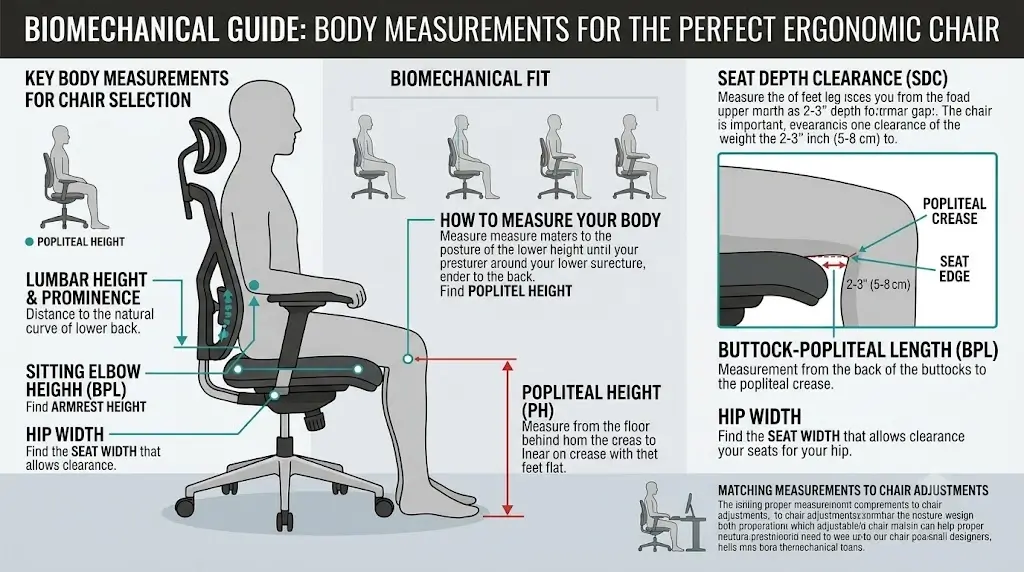
Measure Yourself Before Buying
Height alone is insufficient for sizing an office chair. Two people of identical height can have completely different femur-to-torso ratios, hip widths, and popliteal lengths.
Key Anthropometric Measurements
| Measurement | Primary Application |
|---|---|
| Popliteal height (Floor to back of knee) | Determines required pneumatic seat-height travel range. |
| Buttock-to-popliteal length (Sacrum to knee crease) | Determines required seat pan depth (usable depth). |
| Hip breadth (Widest seated hip measurement) | Determines minimum usable seat width between armrests. |
| Seated elbow height (Seat pan to relaxed elbow) | Determines armrest height adjustability and desk plane interface. |
| Sitting shoulder height (Seat pan to top of shoulder) | Evaluates backrest height and headrest positioning. |
Measuring yourself shifts the buying process from guessing whether a chair is “comfortable” to verifying whether its specifications match your anatomy.
1. How to Choose Seat Height
Seat height establishes your base support relative to gravity and the workstation surface. The target range allows feet to plant flat on the floor with thighs parallel or sloping gently downward (open 90°–100° knee flexion).
If you need to calculate exact heights across different desk setups, check our reference on the ideal ergonomic desk and chair height chart by body height to verify total system compatibility.
Too High
- Feet dangle or rest on toes, restricting venous return through the thighs.
- Pelvis rotates forward, increasing lower back tension.
- Forces awkward reaching or shrugging to reach keyboard trays.
Too Low
- Knees rise above hip level, increasing pressure on the ischial tuberosities (sit bones).
- Pelvis rotates posteriorly into a slumped sacral posture.
- Can cause acute coccyx strain and tailbone discomfort.
Check the manufacturer’s compressed minimum and maximum seat height, not merely the unweighted nominal height listed in sales copy.
2. Seat Depth: The Most Commonly Ignored Fit Variable
Seat depth measures the horizontal distance from the front edge of the cushion to the backrest. It determines whether your thighs receive adequate support while your spine remains in contact with the lumbar mechanism.
A seat pan that is too deep forces the user forward to escape calf pressure, triggering poor sitting posture—an issue explored in our guide on why tailbone pain develops while sitting and ergonomic fixes.
Why an Adjustable Seat Slider Matters
An integrated seat slider allows the cushion to move horizontally along the chassis. This allows you to calibrate a 2 to 3 finger-width clearance (1 to 2 inches) between the front edge of the seat and the back of your knees (popliteal fossa).
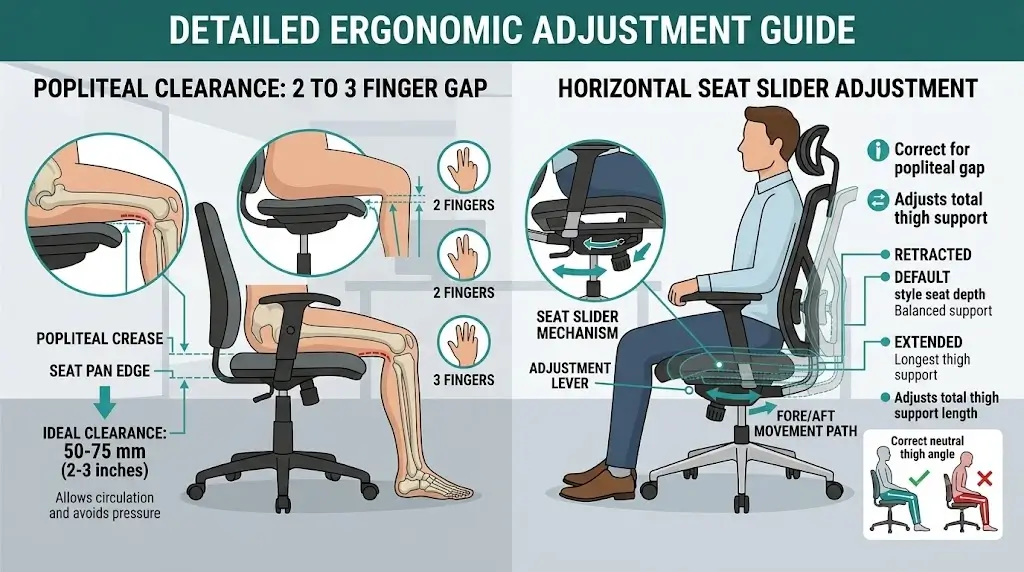
Published seat depth is not always identical to usable seat depth.
Waterfall cushion curves, aggressive mesh perimeter frames, and thick lumbar pads reduce usable sitting surface by 1 to 2 inches compared to raw factory specs.
3. Seat Width and Seat Shape
A proper seat pan provides ample width for posture shifts without lateral restriction. The target is at least 1 inch of clearance on each side between your hips/thighs and the armrest hardware or chair frame.
Considerations for Larger Users
Evaluate usable seat width alongside frame geometry. Chairs with prominent curved side bolsters or inward-sloping mesh edges can press painfully against the trochanters and thighs, regardless of weight rating.
4. How to Choose Lumbar Support
Lumbar support should reinforce the natural lordotic curve of the lower back (L1–L5 vertebrae) without forcing hyperextension or creating focal pressure points. For a detailed walkthrough on setting this up, read our complete guide on how to adjust an ergonomic chair for lower back pain relief.
Key Lumbar Adjustment Mechanisms
- Vertical adjustment: Moves the apex of the support to match your lumbar spine.
- Depth adjustment: Controls how far the support protrudes into the small of the back.
- Dynamic tracking: Uses auto-following springs to maintain contact through recline changes.
A more prominent lumbar pad does not mean better support. Excessive protrusion compresses the posterior spinal joints and causes muscle fatigue.
5. Backrest Height, Shape, and Material
Backrest geometry dictates how torso weight transfers into the chair chassis. Mid-back chairs support the lumbar region and lower ribcage, while high-back designs provide thoracic and shoulder support, making them well-suited for extended recline.
6. How to Choose Armrests
Armrests must support the weight of your upper limbs with relaxed shoulders, without obstructing chair movement toward the desk.
| Adjustment Axis | Biomechanical Purpose |
|---|---|
| Height (1D) | Aligns arm pads flush with natural resting elbow height to unload trapezius. |
| Width (2D) | Prevents lateral elbow flaring and keeps arms tucked close to the torso. |
| Depth (3D) | Slides pads backward to prevent collision with desk front edges. |
| Pivot (4D) | Angles pads inward to support forearms while typing on compact keyboards. |
If armrests strike the edge of your desk before you reach proper typing distance, their height range is inappropriate for your setup.
7. Recline and Tilt Mechanisms
Remaining locked in a static upright posture increases spinal disc loading. A quality tilt mechanism enables supported posture variation throughout the day.
Mechanism Types Compared
- Synchro-Tilt: Reclines the backrest at approximately a 2:1 ratio relative to the seat pan, keeping feet planted and hips balanced.
- Weight-Activated Tilt: Automatically adjusts recline tension based on user weight, ideal for shared workstations.
- Knee-Tilt: Places the pivot point near the front of the seat, preventing the front edge from lifting into the thighs during recline.
- Forward-Tilt: Tips the seat pan slightly forward (1°–5°) to open the hip angle during high-intensity keyboard tasks.
8. Do You Need a Headrest?
A headrest is optional for upright typing tasks, as your cervical spine should remain balanced over your shoulders. However, a headrest becomes essential if you spend significant time reclined during meetings, phone calls, or creative work.
If choosing a headrest, prioritize independent height and angle adjustability over fixed cushions.
9. Mesh vs Foam vs Hybrid Seats
| Seat Surface | Primary Mechanical Benefit | Potential Engineering Trade-off |
|---|---|---|
| All-Mesh | Maximum ventilation and dynamic pressure distribution. | Rigid perimeter frames can press into thighs if sized incorrectly. |
| High-Density Foam | Familiar contouring and high contact surface cushioning. | Heat retention in warm rooms; potential softening over years of use. |
| Hybrid (Mesh Back + Foam Seat) | Combines backrest cooling with comfortable seat cushioning. | Fabric seat maintenance and different component wear rates. |
10. Chair-to-Desk Compatibility
A chair operates as part of an integrated workstation system. Even an exceptional chair fails if your desk height forces your arms upward or blocks the chair from tucking in.
If you must raise your chair beyond your natural knee height to reach a fixed-height desk, use a supportive footrest to keep your feet grounded.
11. Which Chair Size Fits Different Body Types?
| User Profile | Target Dimensions | Common Sizing Pitfall |
|---|---|---|
| Petite (< 5’4″) | Seat height ≤ 16″, Seat depth ≤ 17″ | Deep seat pans pushing calves forward into a slouch. |
| Average (5’5″–5’11”) | Seat height 17″–20″, Seat depth 17.5″–19″ | Assuming one-size-fits-all chairs provide adequate lumbar adjustment. |
| Tall (6’0″–6’6″) | Seat height ≥ 20.5″, Seat depth ≥ 19.5″ | Shallow seat pans leaving thighs unsupported; low backrest apex. |
| Big & Tall (250+ lbs) | Seat width ≥ 21″, Class-4 cylinder, steel chassis | High weight rating paired with narrow space between armrests. |
12. Weight Capacity vs. Comfort Capacity
A chair’s published weight rating reflects structural safety testing, not long-term seating comfort. Evaluate the entire load path: seat pan frame → tilt chassis → pneumatic gas cylinder → five-star base → caster stems.
13. Casters and Flooring
Standard hard nylon casters are designed for carpet and can scratch hardwood, tile, and laminate floors. For solid surfaces, opt for soft polyurethane rollerblade-style casters or install a protective chair mat.
14. How Much Should You Spend?
| Budget Tier | What You Get | Key Engineering Compromise |
|---|---|---|
| Budget ($150–$300) | Basic adjustments, standard mesh, simple tilt mechanisms. | Plastic bases, limited slider travel, 1–3 year warranties. |
| Mid-Range ($300–$700) | Seat sliders, 3D/4D armrests, synchro-tilt, durable foam. | Moderate mechanical play, shorter warranties than contract models. |
| Premium ($700–$1,500+) | Harmonized recline, refined finishes, 12-year 24/7 warranties. | High upfront cost; proprietary replacement components. |
15. What Manufacturer Specifications Do Not Tell You
| Marketing Claim | What to Verify Directly |
|---|---|
| “4D Armrests” | Pad firmness, locking stability, and lowest clearance to slip under desks. |
| “Adjustable Lumbar” | Whether minimum protrusion is gentle enough to prevent lower back pain. |
| “135° Deep Recline” | Whether synchro movement keeps feet grounded and maintains monitor view. |
| “330 lb Weight Capacity” | Usable width between armrests and durability of cushion foam under load. |
16. Common Ergonomic Chair Buying Mistakes
- Buying for appearance over ergonomics: Aesthetic gaming or executive designs rarely offer neutral spinal support.
- Relying solely on star ratings: High ratings often reflect simple delivery satisfaction rather than long-term musculoskeletal fit.
- Overlooking seat depth: A deep seat pan remains the leading mechanical cause of forward slouching.
- Over-tightening lumbar depth: Aggressive lumbar pressure creates painful spinal compression.
- Assuming premium equals universal fit: Even $1,400 commercial chairs come in distinct sizes that fail if mismatched.
17. The 100-Point Ergonomic Chair Scoring System
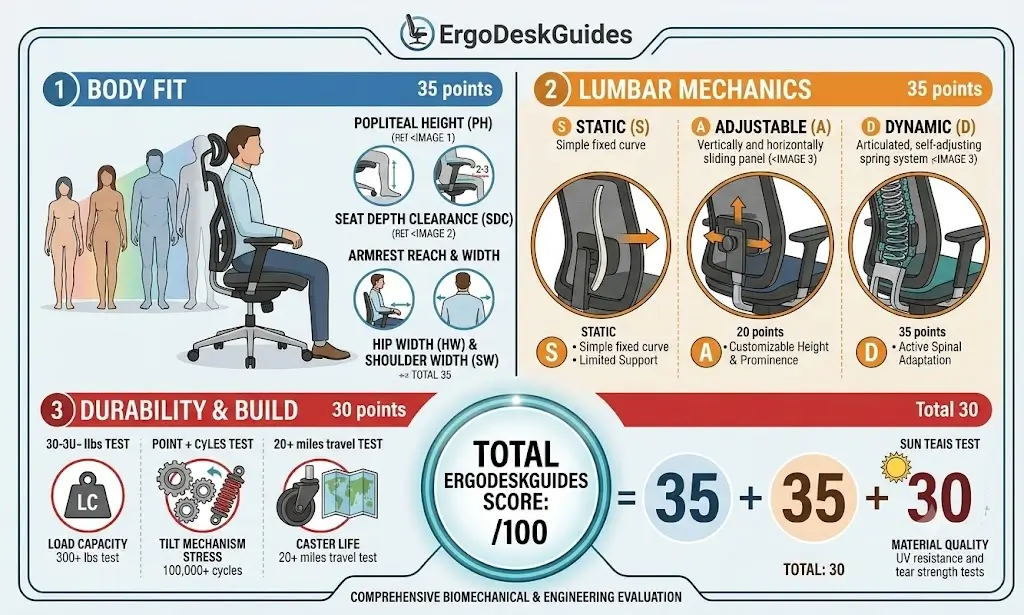
| Evaluation Category | Weight | Evaluation Criteria |
|---|---|---|
| Anthropometric Body Fit | 25 Pts | Popliteal height, seat slider travel, hip clearance. |
| Lumbar & Spinal Support | 20 Pts | L1–L5 contour alignment, moderate pressure curve. |
| Mechanism Kinematics | 15 Pts | Synchro-tilt smoothness, tension control, recline stops. |
| Armrest Adjustability | 15 Pts | 3D/4D adjustment, lock security, desk clearance. |
| Structural Build Quality | 15 Pts | Cylinder class, base material, mesh tension retention. |
| Value & Warranty | 10 Pts | Warranty duration, part availability, price-to-performance ratio. |
18. Which Features Matter Most for Different Users?
Software Engineers & Writers: Prioritize seat sliders, 4D armrests that pivot inward for typing, and breathable mesh backrests.
Tall Professionals (> 6’0″): Focus on extended seat depth (> 19.5″), maximum cylinder height, and backrests with elevated shoulder support.
Petite Workers (< 5’4″): Look for low-cylinder designs (≤ 15.5″ minimum height) and shallow seat pans to ensure flat foot placement.
19. How to Buy an Ergonomic Chair Online Without Guessing
- Measure your popliteal height and buttock-to-popliteal length before browsing.
- Compare your numbers directly against published seat dimensions.
- Verify return policies, specifically restocking fees and who covers return shipping for large packages.
- Ensure the chair uses standard replacement components (such as standard gas cylinders and casters).
20. What to Do After the Chair Arrives
Follow a systematic setup order rather than making random adjustments: Seat height first → Seat depth second → Lumbar position third → Recline resistance fourth → Armrests fifth → Monitor/desk alignment last.
Frequently Asked Questions
How do I know if an ergonomic chair fits me?
A proper fit allows your feet to rest flat on the floor with knees at 90°–100°, maintains a 2–3 finger gap between the seat and calves, positions lumbar support in the lower back curve, and keeps shoulders relaxed with elbows supported at desk height.
What seat depth is best?
There is no single universal measurement. The proper depth supports at least three-quarters of your thighs while leaving 1 to 2 inches of space behind the knee crease to prevent popliteal compression.
Should my knees be exactly at 90 degrees?
An open angle between 90° and 100° is optimal. A slightly downward thigh slope opens the hip joint and encourages a natural lordotic curve in the lower spine.
Is a seat slider worth paying for?
Yes. A seat slider is the most effective way to dial in proper thigh clearance and maintain full backrest contact, especially for households with multiple users.
Is adjustable lumbar support always better?
Not necessarily. An adjustable lumbar mechanism is helpful only if its travel range matches your spine. An aggressive, non-adjustable curve can create uncomfortable pressure points.
Is a 4D armrest better than a 2D armrest?
4D armrests provide width and inward pivot adjustments that help support forearms during typing. However, solid build quality and desk clearance matter more than extra adjustment directions.
Should an office chair recline?
Yes. Opening the backrest to 100°–110° transfers torso weight to the backrest, significantly reducing intradiscal compression in the lumbar spine compared to upright sitting.
How much should I spend on an ergonomic chair?
Spending $250 to $600 provides essential adjustments—such as seat sliders and 3D armrests—without contract-furniture markups. Investing beyond $800 primarily buys refined mechanisms and 10+ year commercial warranties.
Can an ergonomic chair fix poor posture?
An ergonomic chair facilitates neutral sitting, but it cannot fix sedentary habits on its own. Regular postural changes and proper workstation layout remain essential.
Should I buy an ergonomic chair online?
Yes, as long as you verify key dimensions—seat height range, usable depth, and armrest width—and ensure the seller offers a risk-free 30-day return window.
Final Verdict: Choose the Chair That Fits Your Body and Your Workstation
The most reliable ergonomic chair buying strategy does not focus on finding the model with the most features. Begin with your personal measurements and eliminate chairs that fail your dimensional baseline.
Seat height and seat depth must always come first. Once those foundations fit your frame, evaluate seat width, lumbar placement, armrest clearance, and recline mechanics.
The Core Rule to Remember
Fit the chair to your body before comparing marketing features. Levers, tilt angles, and upholstery types only add value when the underlying chair geometry fits your body and workspace.
