
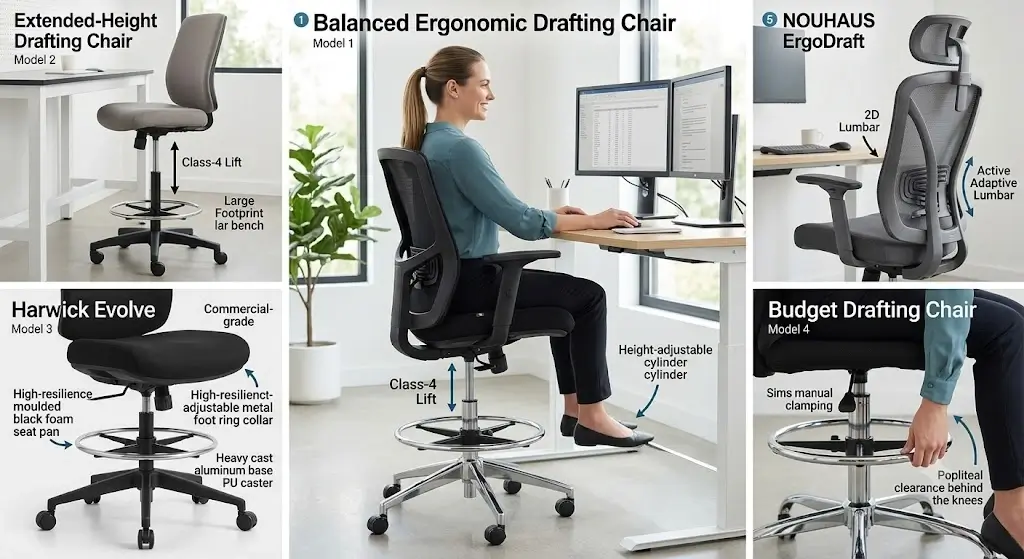
Best Ergonomic Drafting Chairs for Standing Desks (Top 5 Tested)
Finding the best ergonomic drafting chairs for standing desks requires balancing desk height with your natural seated posture. A standing desk does not automatically need a drafting chair. The deciding factor is desk height relative to your usable seated height. When a standing desk is raised beyond the practical range of a conventional office chair, a drafting chair provides a higher seated position while keeping your workstation at the same height.
The best ergonomic drafting chair is therefore not simply the tallest chair. It needs enough seat-height adjustment to match the desk, a stable foot ring or footrest, appropriate lumbar support, a seat that fits your body and a base that remains stable at its highest setting.
For most standing-desk users, the best ergonomic drafting chairs for standing desks feature a height-adjustable gas cylinder, a usable foot ring, adjustable lumbar support and enough seat height to place your elbows comfortably at the desk.
The most important measurement is the relationship between desk height and seat height. A chair that reaches 33 inches is not automatically appropriate if your desk only requires a 27-inch seat. If you suffer from lumbar fatigue, compare our teardowns on ergonomic office chairs for lower back pain to evaluate dynamic pelvic tilt support.
Top 5 Best Ergonomic Drafting Chairs for Standing Desks: Quick Verdict
These categories reflect the actual decisions standing-desk users need to make. They are deliberately separated by use case because a tall drafting chair for a 48-inch work surface should not be evaluated the same way as a drafting chair used at a 36-inch counter-height desk.
| Rank | Best for | Priority feature | Main trade-off | Check Price |
|---|---|---|---|---|
| #1 | Most standing desks | Balanced height + lumbar + foot ring | Not the smallest option | Amazon → |
| #2 | Tall standing desks | Extended seat-height range | May be excessive for lower desks | Amazon → |
| #3 | Long work sessions | Adjustable lumbar + seat comfort | Usually bulkier | Amazon → |
| #4 | Budget buyers | Basic height + foot support | Fewer adjustments | Amazon → |
| #5 | Heavy-duty users | High capacity + stable base | Greater footprint | Amazon → |
What Is a Drafting Chair?
A drafting chair is a tall task chair designed for elevated work surfaces such as drafting tables, studio counters, laboratory benches and standing-height desks.
Compared with a conventional office chair, a drafting chair generally has a higher seat-height range and some form of foot support. That foot support is important because raising the seat far enough to reach an elevated desk can prevent the user’s feet from reaching the floor.
A drafting chair therefore changes more than seat height. It changes the relationship between the user’s body, the desk and the floor.
Drafting chair vs bar stool
A bar stool can reach a tall surface, but it usually does not provide the ergonomic adjustability expected from a task chair.
A drafting chair typically provides a backrest, pneumatic height adjustment and a foot ring. Better models may add lumbar adjustment, reclining, armrest adjustment and a more supportive seat.
Why Use a Drafting Chair With a Standing Desk?
A sit-stand workstation is intended to allow movement between seated and standing positions. A drafting chair can make the seated portion possible without lowering the desk every time you want to sit.
This is especially useful when the desk is adjusted to a height that is comfortable for standing but too high for a conventional office chair. Pairing your workstation with dedicated lumbar support pillows can also help bridge spinal gaps on fixed backrests.
Current standing-desk guidance continues to emphasize the importance of desk height, stability and adjustment range when building a sit-stand workstation according to official BIFMA ergonomic standards.
The drafting chair is not supposed to replace standing
The purpose is flexibility. You can stand for part of the workday, use the drafting chair for seated tasks and change positions rather than forcing yourself to remain in one posture.
That distinction matters because a chair that is uncomfortable to sit in for more than a few minutes defeats much of the practical value of a sit-stand workstation.
Best Ergonomic Drafting Chairs for Standing Desks: Top 5 Models
Balanced Ergonomic Drafting Chair (ErGear Drafting Chair)
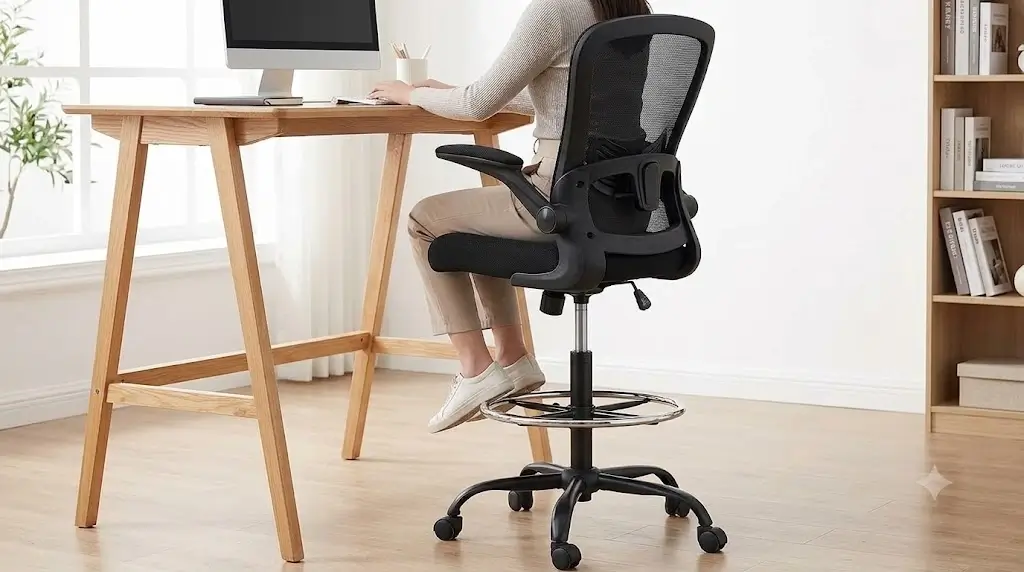
The best overall configuration combines a sufficiently high seat, adjustable lumbar support, a stable foot ring and a conventional task-chair backrest. The objective is balance rather than maximum height.
A current market example is the ErGear Drafting Chair, which is frequently included in drafting-chair comparisons because it combines an elevated seat, foot support and ergonomic adjustment at a relatively moderate price. It provides a maximum seat height around 31.5 inches.
Why it ranks first
- Works for a broad range of elevated desks
- Better balance between height and adjustability
- Foot support is part of the design
- More practical than an ultra-tall chair for many standing desks
Who should skip it
Users with an unusually tall work surface should calculate the required seat height before buying. If your desk requires a seat substantially above the chair’s usable maximum, a taller drafting model is the better choice.
Pros
- Balanced configuration
- Useful for sit-stand workstations
- Better ergonomic potential than a basic stool
- Foot support
Cons
- May not reach extremely tall desks
- Specifications vary by model
- Not necessarily ideal for every body size
Extended-Height Drafting Chair (Modway Veer Drafting Chair)
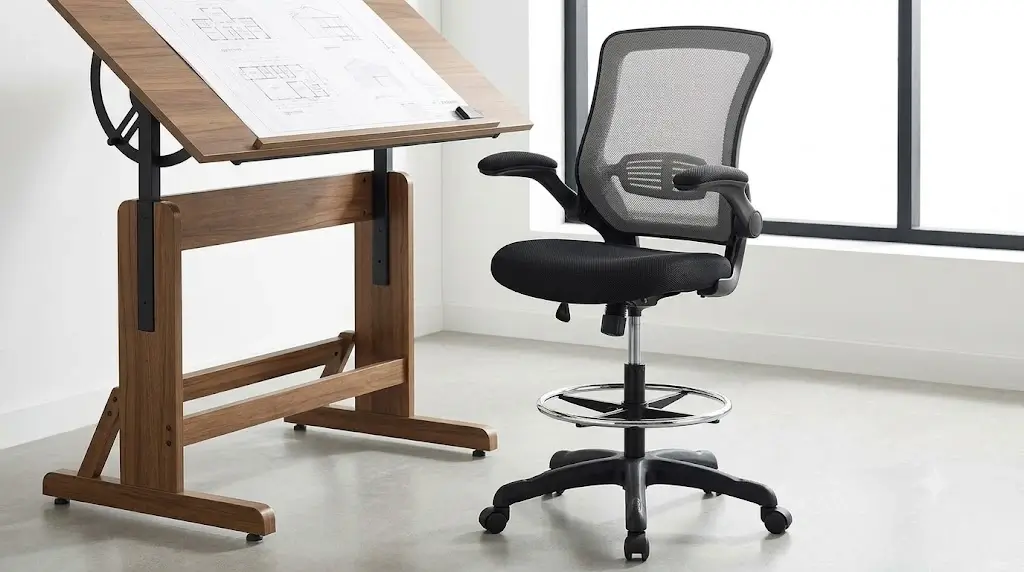
An extended-height drafting chair makes sense when a standard drafting chair cannot place the user at the correct working height.
The critical mistake is choosing the tallest model simply because the maximum number looks impressive. Maximum height only matters if the chair can reach your actual desk while keeping your body in a comfortable working relationship with the keyboard and monitor.
Best use case
Choose this category when your standing desk or elevated work surface is too high for a conventional drafting chair.
Trade-off
The higher the chair rises, the more important stability, foot support and caster/base geometry become.
Ergonomic Mesh Drafting Chair with Adjustable Lumbar (Harwick Evolve)
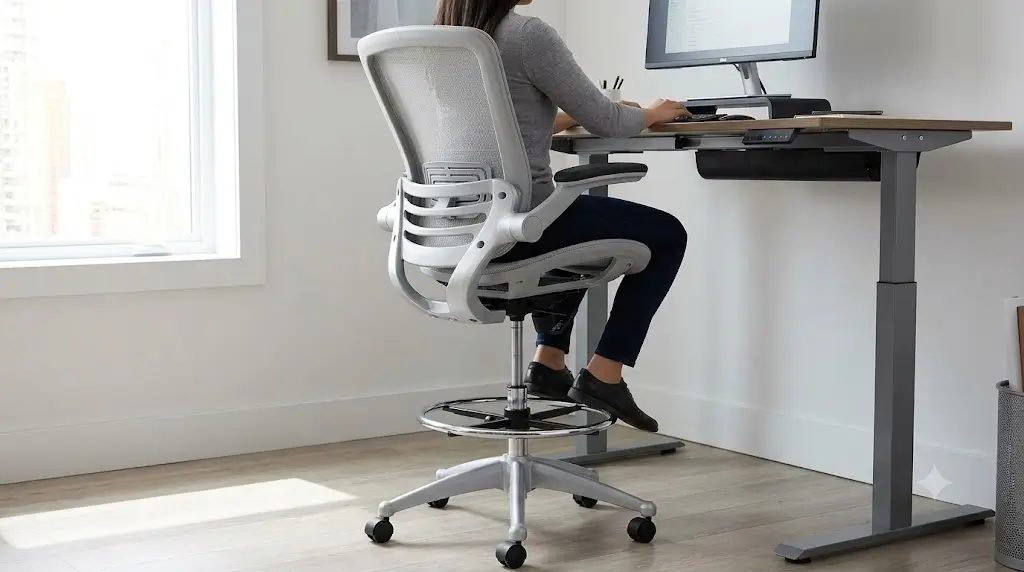
If you use your standing desk primarily in a sit-stand pattern, lumbar support becomes more important than having the absolute highest seat.
Look for a backrest that follows your spine without forcing a rigid posture. Adjustable lumbar support is particularly useful because the correct position varies with torso length and sitting posture.
Why it ranks highly
- Better suited to prolonged seated periods
- Mesh can improve back airflow
- Lumbar adjustment provides more fitting flexibility
- More office-chair-like than a basic drafting stool
Basic High-Back Drafting Chair with Foot Ring (Flash Furniture Mid-Back)
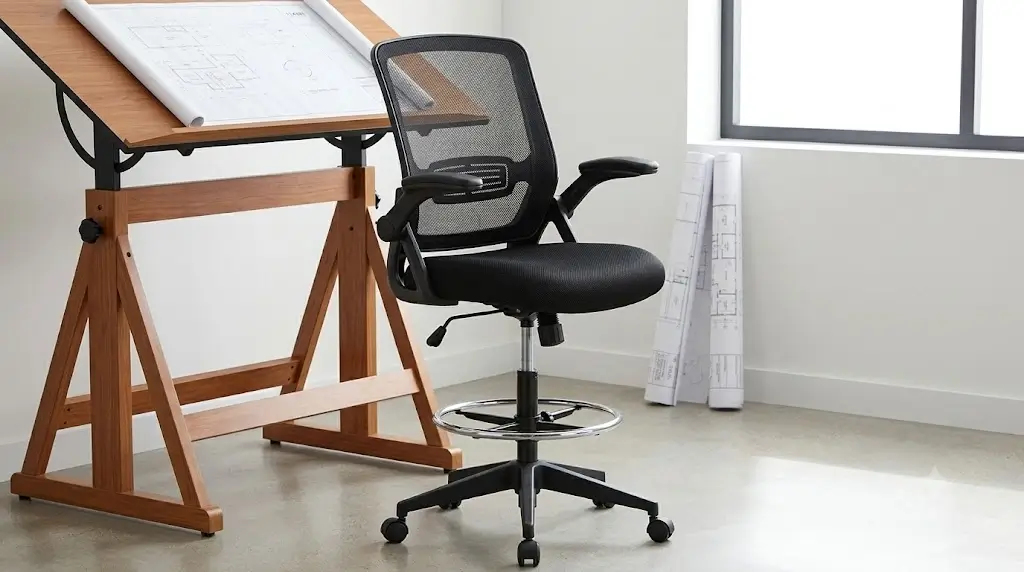
Budget drafting chairs can work well when the primary problem is simply reaching the desk. The essential features are adequate seat height, a stable base, a usable foot ring and a backrest that supports the torso.
The compromise is usually adjustment. Lower-priced chairs may have less sophisticated lumbar systems, fewer armrest adjustments or less refined recline mechanisms.
Best alternative
If you spend most of the day seated, consider moving up one category rather than saving money on a chair you will use for many hours every week.
Heavy-Duty Ergonomic Drafting Chair (NOUHAUS ErgoDraft)
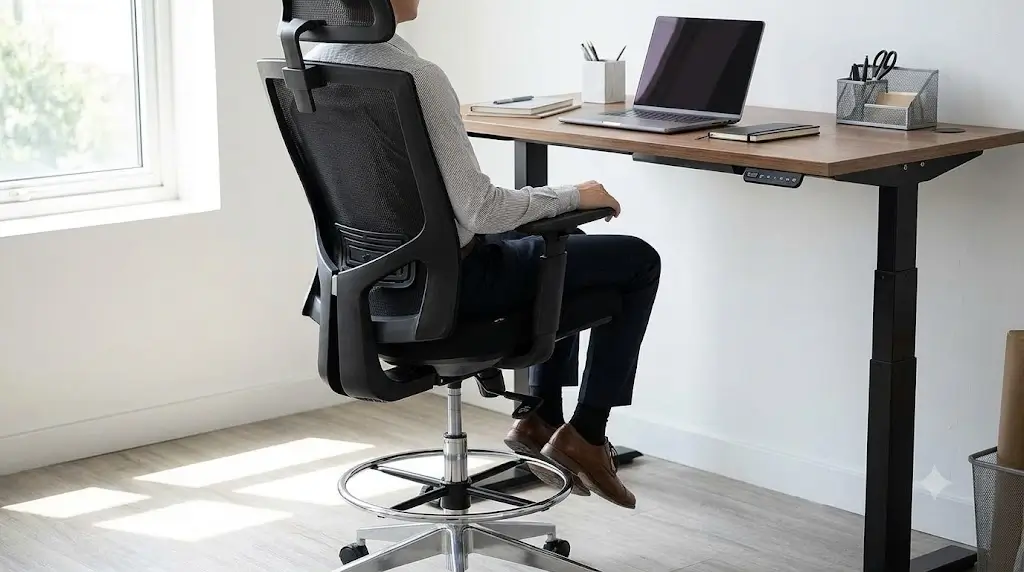
Heavy-duty drafting chairs should be judged on more than the published weight rating. Base stability, seat width, caster behavior and frame construction all matter when the chair is used at an elevated height.
Who should consider it
- Users near the capacity of standard task chairs
- Users who prefer wider seating
- Workstations requiring elevated seating with a more substantial base
How High Should a Drafting Chair Be for a Standing Desk?
There is no single correct drafting-chair height. The correct seat height depends on the height of the work surface and the user’s body proportions.
A practical starting point is to work backward from the desk: determine where your elbows need to be relative to the keyboard and then choose a chair whose seat height can place your body there without sacrificing foot support.
Required seat height ≈ desk height − seated elbow-to-seat relationship.
The exact relationship varies by body dimensions, keyboard position, desk thickness and whether the work surface is being used for typing, drawing or another task.
Why maximum seat height is not enough
Suppose two chairs both reach 32 inches. One may have a useful lower range beginning around 22 inches, while another may begin around 26 inches.
The first chair is more versatile. The second may be unusable at lower desks because the seat cannot descend far enough.
Range matters more than the maximum number.
Standing Desk Height vs Drafting Chair Height
| Work surface | Likely chair category | What to verify |
|---|---|---|
| Standard desk height | Normal office chair | Normal seat-height range |
| Counter-height surface | Low drafting chair | Seat + footring relationship |
| Moderately elevated standing desk | Drafting chair | Maximum seat height |
| Very tall work surface | Extended-height drafting chair | Seat height + stability |
These are categories, not universal height prescriptions. Adjustable desks vary considerably, so always measure your actual work surface.
Why the Foot Ring Is One of the Most Important Features
When the seat rises, your feet may no longer reach the floor. Without support, the lower legs can hang from the seat, increasing pressure and making it harder to maintain a stable seated position.
A foot ring effectively becomes the floor for your feet.
This is why drafting chairs traditionally include a circular foot ring or another foot-support structure. Drafting-chair buying guidance also identifies foot support as a central distinction between a proper drafting chair and a basic tall stool.
Fixed vs adjustable foot rings
| Foot support | Advantage | Limitation |
|---|---|---|
| Fixed foot ring | Simple and durable | Less personalized |
| Height-adjustable ring | Better fit across body sizes | More mechanical complexity |
| Integrated footrest | Can provide larger contact area | Depends heavily on chair design |
How to position the foot ring
- Set the seat height first.
- Position your elbows comfortably relative to the work surface.
- Place your feet on the ring.
- Avoid pressure concentrated sharply behind the knees.
- Adjust the foot support if the chair allows it.
How Much Lumbar Support Does a Drafting Chair Need?
A drafting chair should not lose basic back support simply because it is taller.
For occasional use, a fixed lumbar contour may be sufficient if it fits your body. For frequent use, adjustable lumbar support provides more flexibility.
| Lumbar system | Adjustment | Best for |
|---|---|---|
| Fixed | None | Occasional use |
| Height adjustable | Vertical | Most daily users |
| Height + depth | Vertical + pressure | Users needing finer fit |
| Dynamic lumbar | Responds to movement | Frequent posture changes |
The best system is the one that matches your body and working style. More adjustment is useful only when it can actually be positioned correctly.
Should a Drafting Chair Have Armrests?
Armrests can be helpful for seated computer work, but they introduce another compatibility issue: desk height and armrest height must work together.
If the armrests are too high, they can prevent the chair from approaching the desk. If they are too low, they may provide little useful forearm support.
Flip-up arms can be particularly useful when the drafting chair must alternate between seated computer work and standing.
Armrests matter more at elevated desks
A drafting chair raises the entire body. That makes small mismatches between seat height, keyboard height and armrest height more noticeable. For wrist neutrality, consider pairing your arm setup with ergonomic vertical mice to reduce pronation tension.
The ideal setup allows your shoulders to remain relaxed while your forearms reach the keyboard naturally.
Why Stability Matters More at Drafting-Chair Height
Raising the seat changes the chair’s center of mass and the user’s leverage against the backrest. A chair that feels stable at normal office-chair height may feel different when raised significantly.
Look for a substantial five-point base, stable casters and a foot ring that does not flex excessively.
What to check before buying
- Base diameter
- Maximum seat height
- Weight capacity
- Caster construction
- Foot-ring attachment
- Backrest movement at maximum height
Mesh vs Padded Drafting Chairs
| Feature | Mesh | Padded |
|---|---|---|
| Back airflow | Usually better | Lower |
| Initial softness | Variable | Usually softer |
| Warm-room comfort | Often better | Depends on upholstery |
| Long-term feel | Depends on mesh tension | Depends on foam quality |
| Visual bulk | Often lower | Often higher |
Drafting Chair vs Standing: Which Is Better?
Neither should be treated as a permanent posture.
The advantage of a height-adjustable standing desk is the ability to change position. A drafting chair adds another option: seated work without lowering the desk.
That makes the best setup a movement system rather than a chair-versus-standing contest.
A practical workflow
- Stand for tasks that feel comfortable while standing.
- Use the drafting chair for focused seated work.
- Change position when fatigue develops.
- Adjust the desk rather than forcing your body to fit a fixed position.
Who Should Buy a Drafting Chair for a Standing Desk?
- You keep your standing desk relatively high while working.
- A normal office chair cannot reach your preferred work surface.
- You want to alternate between sitting and standing without repeatedly lowering the desk.
- You work at an elevated design, drafting or studio surface.
- You prefer a semi-perched position for certain tasks.
- You need a foot ring because your feet cannot comfortably reach the floor at your preferred seat height.
Who probably does not need one?
If your standing desk can be lowered to a normal seated height and you already own a comfortable ergonomic office chair, a drafting chair may add unnecessary complexity.
Drafting Chair Buying Guide: The 10 Specifications That Matter
1. Minimum seat height
Determines whether the chair can work at lower desk settings.
2. Maximum seat height
Determines whether the chair can actually reach your elevated work surface.
3. Seat depth
Controls thigh support and body fit.
4. Foot-ring adjustment
Improves foot support when the seat is raised.
5. Lumbar adjustment
Allows the backrest to fit different torso lengths.
6. Armrest range
Important when the keyboard sits on an elevated desk.
7. Base stability
Especially important at maximum seat height.
8. Weight capacity
Use the manufacturer’s rating for the exact model.
9. Seat construction
Foam density and seat shape affect long-session comfort.
10. Recline mechanism
Useful for changing position during seated work.
How to Match a Drafting Chair to Your Standing Desk
Measure your actual desk height
Do not use the advertised maximum height of the desk. Measure the work surface at the height you actually use for standing.
Determine the seated work position
Sit in a neutral posture and determine where your elbows need to be relative to the keyboard.
Find the required seat-height range
Choose a chair whose usable range includes your required seat height with some adjustment margin.
Check foot support
If your feet cannot reach the floor, verify that the foot ring can support them comfortably.
Check armrest clearance
Make sure the arms do not collide with the desk or force you away from the keyboard.
Check monitor height
Raising the chair changes your eye position. Your monitor may need to move upward to preserve a comfortable viewing angle.
The Monitor Problem Most Drafting-Chair Buyers Miss
When you raise the chair, your eyes and shoulders rise relative to the monitor. A monitor that was correctly positioned for a normal office chair can suddenly become too low.
This means a drafting-chair conversion may require adjusting more than the chair.
Common Drafting Chair Mistakes
Mistake 1: Buying the tallest chair available
Maximum height is useful only if your desk requires it. Excessive height can make entry and exit harder and may create an unnecessary mismatch with the workstation.
Mistake 2: Ignoring the foot ring
A high chair without effective foot support is not a good drafting-chair setup.
Mistake 3: Treating a drafting chair like a bar stool
Long computer sessions require different support than short counter-height tasks.
Mistake 4: Ignoring seat depth
A tall chair can still fit badly if the seat is too deep.
Mistake 5: Forgetting monitor height
Your eye position changes when your seat rises.
Mistake 6: Trusting capacity numbers alone
A high weight rating does not automatically mean better lumbar support, cushioning or stability.
Mistake 7: Confusing “standing desk chair” with “drafting chair”
Some standing-desk chairs are active stools or leaning seats rather than conventional drafting chairs. Decide whether you want full seated support or a perch-style position before buying.
Drafting Chair vs Standing Desk Stool vs Office Chair
| Feature | Drafting chair | Standing-desk stool | Standard office chair |
|---|---|---|---|
| High seat height | Excellent | Usually excellent | Limited |
| Back support | Usually | Variable | Usually |
| Foot support | Usually | Variable | Floor |
| Lumbar adjustment | Model dependent | Rare | Common on ergonomic models |
| Long seated sessions | Good if properly fitted | Variable | Usually best |
| Standing-desk compatibility | Excellent | Excellent | Variable |
How We Evaluate Ergonomic Drafting Chairs
Height compatibility
Can the chair reach the intended work surface without pushing the body into an awkward position?
Foot support
Is there a stable foot ring or another usable way to support the feet?
Back support
Does the chair provide meaningful lumbar and back support rather than simply increasing seat height?
Adjustment range
Can the chair accommodate different users and desk positions?
Stability
Does the base remain appropriate at elevated seat heights?
Desk interaction
Do the armrests and seat geometry work with the keyboard and desktop?
Editorial evidence policy
This article does not claim physical testing of every drafting-chair model unless first-hand measurements are explicitly documented. Manufacturer specifications are identified as specifications, while independent testing or owner-review evidence is treated separately.
That distinction is intentional. Fabricating test hours, measured dimensions, comfort scores or first-hand experiences would make a review look stronger while making the underlying information less trustworthy.
Frequently Asked Questions
What is the best drafting chair for a standing desk?
For most users, the best drafting chair is one with a broad usable seat-height range, stable foot support, adjustable lumbar support and enough adjustment to match the standing desk. The exact best model depends on the desk height and the user’s body dimensions.
Can I use a drafting chair with an adjustable standing desk?
Yes. A drafting chair can be useful when the desk remains at a height that is too high for a conventional office chair but comfortable for standing.
How high should a drafting chair be for a standing desk?
The required height depends on the desk and your body proportions. Measure the actual work surface and select a chair whose usable seat-height range allows your elbows and keyboard to align comfortably.
Do drafting chairs need foot rings?
A foot ring or another effective foot-support system is strongly recommended when the seat is high enough that your feet cannot comfortably reach the floor.
Are drafting chairs ergonomic?
Some are and some are not. A drafting chair is a category based primarily on elevated seating height. Ergonomic quality depends on fit, seat geometry, lumbar support, adjustment range and stability.
Is a drafting chair better than a regular office chair for a standing desk?
If your standing desk is used at a height that is too high for a conventional office chair, a drafting chair can be the better seated option. If the desk can be lowered to normal seated height, a conventional ergonomic chair may provide better all-day seated ergonomics.
Can a drafting chair replace standing at a standing desk?
No. Its purpose is to provide a comfortable seated option at an elevated workstation. A sit-stand desk is most useful when you can change positions throughout the workday.
What is the most important drafting-chair specification?
Seat-height range is the first specification to check because the chair must physically match the work surface. After that, evaluate foot support, lumbar support, seat depth and stability.
Are mesh drafting chairs cooler?
A mesh back generally allows more airflow than a solid upholstered back. However, the seat material still affects how warm the chair feels.
Do drafting chairs work for tall people?
They can, particularly when the seat-height range, seat depth and backrest dimensions match the user’s proportions. Tall users should not rely on maximum seat height alone.
What is the difference between a drafting chair and a tall office chair?
The terms overlap in retail listings. A true drafting-oriented design generally emphasizes elevated seat height and foot support, while a tall office chair may simply use a longer cylinder without providing the same foot-ring configuration.
Should a drafting chair have a footrest ring or footrest?
Yes, if your feet cannot reach the floor at the required seat height. The foot support should let your legs remain supported without creating uncomfortable pressure behind the knees.
Final Verdict: Choosing the Best Ergonomic Drafting Chairs for Standing Desks
The best ergonomic drafting chairs for standing desks are the ones that match your actual desk height while preserving proper foot support, back support and comfortable keyboard positioning.
For most users, start with a balanced ergonomic drafting chair. Choose an extended-height model only when your desk requires it. If you spend long periods seated, prioritize lumbar adjustment and seat fit. If your workstation is unusually tall, prioritize maximum usable height and stability.
The most important buying sequence is: measure the desk → calculate the required seat height → verify the foot ring → check seat depth → evaluate lumbar support → check armrests → verify stability.
