
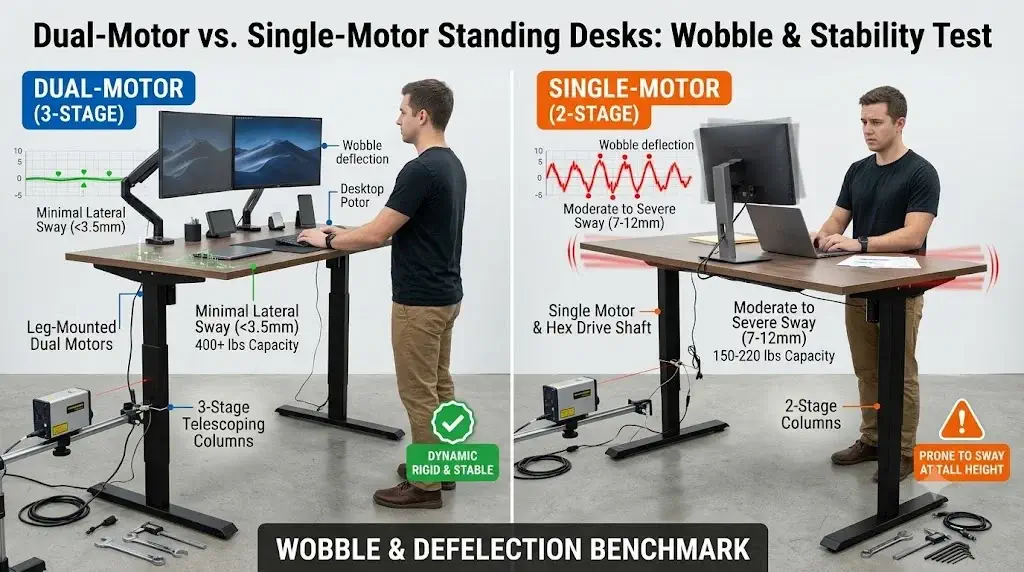
MECHANICAL TEARDOWN & BENCHMARKS
Lifting Column Deflection & Motor Torque Synchronization Protocol
Dual-Motor vs Single-Motor Standing Desks: Stability, Weight Capacity, and Wobble Test
According to the ErgoDeskGuides Laboratory Teardown Protocol, choosing between a dual-motor vs single-motor standing desk comes down to whether your workspace requires a robust dual-drive setup that supports up to 400 lbs with 3-stage stability, or can get by with a budget-friendly single motor rated for under 220 lbs with 2-stage columns.
Stability at standing height is the ultimate test for any height-adjustable desk. While any motorized desk can easily adjust when low to the ground, raising a workstation to 44 inches or higher introduces lateral and longitudinal leverage that can highlight weak points in its frame. Cheaply made desks can sway and wobble from simple tasks like typing, which can disrupt your focus and cause monitor shake.
By examining the motorized lifting columns, drive rods, and control box synchronization of both styles, this teardown shows how they handle weight and motion. Grasping these engineering differences is key to finding a sit-stand frame that remains stable over years of daily use.
A dual-motor standing desk is the superior choice for stability, speed, and heavy loads, whereas a single-motor desk is best for lightweight, budget-friendly setups. Dual-motor desks use two synchronized motors (one in each leg) to offer 275 to 400 lbs of lifting capacity, quick and quiet 1.5 in/s travel, and 3-stage column stability that minimizes wobble at full height. Single-motor desks, which rely on one motor driving both legs via a hex rod, generally top out around 150 to 220 lbs, adjust at a slower 1.0 in/s, and show more wobbly behavior at standing height due to lighter 2-stage leg designs. If your desk needs to hold multiple screens, a dual-motor frame is the best option; see our list of the best heavy-duty standing desks for multiple monitors.
Quick Reference Specification: Dual-Motor vs Single-Motor Comparison
| Technical Dimension | Dual-Motor Standing Desk | Single-Motor Standing Desk | Biomechanical & Usability Impact |
|---|---|---|---|
| Leg-Mounted Motor Configuration | Dual independent (one in each column) | Single (transfers torque via hexagonal drive shaft) | Dual drive eliminates rod flex, ensuring synchronous elevation without binding |
| Certified Lift Capacity | 275 to 400+ lbs | 150 to 220 lbs | High capacity safely handles heavy desktop setups without motor fatigue |
| Adjustment Speed | 1.3 to 1.6 in/s (fast, responsive) | 0.6 to 1.0 in/s (slow, gradual) | Faster speeds encourage more frequent sit-stand transitions throughout the day |
| Leg Stage Construction | Typically 3-Stage (inverted or traditional) | Typically 2-Stage | 3-stage columns offer wider adjustment ranges and better overlapping stability |
| Lateral Wobble Deflection (at 44″+) | Minimal (heavy steel, tight tolerances) | Moderate to Severe (thinner steel, fewer stages) | Higher stability stops monitor shake, reducing eye strain and distraction |
| Operational Noise Level | Quiet (< 45 dB) (balanced, smooth) | Louder (48 to 55 dB) (strain on single unit) | Lower noise prevents distraction in open office areas |
| Lifespan and Warranty | High (5 to 15 years; splits workload) | Moderate (2 to 5 years; high mechanical fatigue) | Two motors divide the load, extending component life and reducing stress |
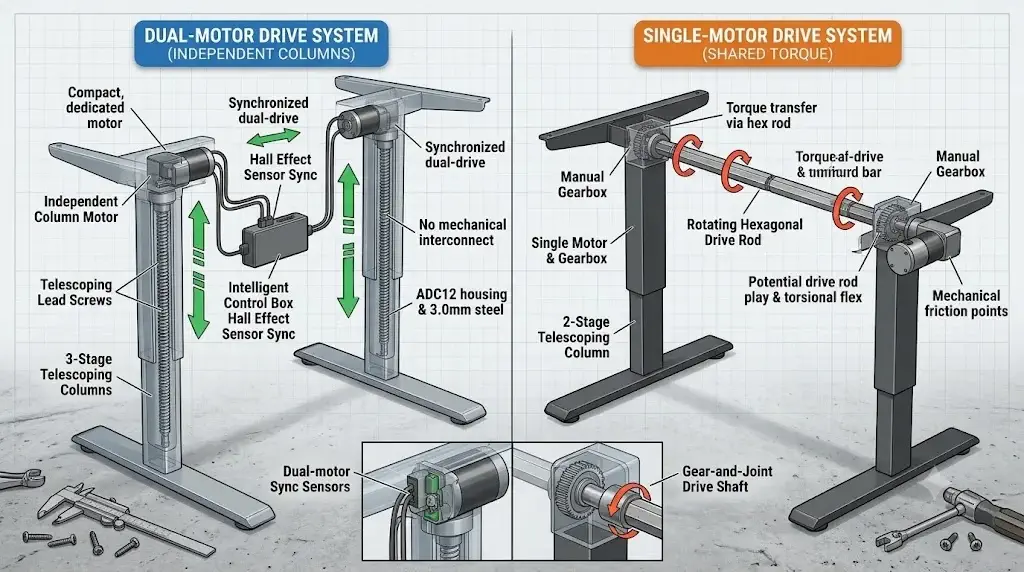
Engineering Analysis: Split Motor Torque vs Drive Rod Wear
Mechanical design testing shows that motor configuration directly impacts load distribution, lifting synchronicity, and drivetrain wear over thousands of height adjustments.
In a dual-motor vs single-motor comparison, the core difference lies in how power is generated and transferred to the legs. A dual-motor desk uses an independent motor inside each leg column, wired to a central controller. These systems use Hall effect sensors to monitor motor rotation at the millisecond level, making tiny adjustments to keep both sides perfectly level and prevent binding.
A single-motor desk, however, uses one motor to do all the work. To lift both sides, a rotating hexagonal drive rod must bridge the gap between legs. Over time, several mechanical issues can arise:
Torsional Deflection
The long hexagonal drive rod can twist slightly when starting a lift, particularly under heavy loads. This “twist” can cause the non-motorized leg to lift slightly after the motorized one, leading to uneven movement.
Misaligned Drive Joints
During assembly, the drive rod must be inserted by hand into the leg sockets. Even small errors in alignment can introduce friction, placing extra strain on the motor and causing the desk to lift unevenly.
Increased Component Friction
Because a single-motor desk relies on gears and rods to transfer power across the frame, it experiences more friction. This added resistance creates more noise (up to 55 dB) and causes components to wear out much faster.
Single-Point Thermal Cutout
Lifting off-center loads forces a single motor to work much harder. This can lead to rapid heat buildup, triggering a thermal safety shut-off that leaves you unable to adjust your desk until it cools down.
By splitting the load between two independent columns, a dual-motor desk operates with plenty of power to spare. This extra capacity translates to faster, quieter adjustments (often under 45 dB) and far less wear on internal gears. This ensures your desk can easily handle a full setup of monitors, mount arms, and accessories. If your workspace needs specific height coordinates, check out our guide on ergonomic desk and chair height chart by body height.
Stability Testing: Dynamic Wobble, Deflection, and Column Stages
Stability testing on standing desks shows how overlapping steel column stages, housing weight, and tolerance gaps impact lateral sway when raised to standing height.
Wobbling in sit-stand desks is typically caused by two types of movement: wobble (side-to-side motion) and deflection (front-to-back sway). While motor count doesn’t directly dictate stability, dual-motor and single-motor desks are built very differently, leading to distinct performance outcomes:
| Structural Feature | 3-Stage Columns (Standard Dual-Motor) | 2-Stage Columns (Standard Single-Motor) | Why It Matters For Stability |
|---|---|---|---|
| Steel Wall Thickness | Heavy-gauge steel (typically 2.0 to 3.0mm) | Lightweight, thin-walled steel (1.2 to 1.5mm) | Thicker steel adds weight at the base, dampening natural vibration |
| Overlapping Sections | Double overlap (three telescoping segments) | Single overlap (two telescoping segments) | More overlapping segments provide extra support at tall heights |
| Guide Shims & Tolerances | Custom-fit plastic glides & shims (snug, low-friction) | Standard off-the-shelf plastic shims (loose over time) | Tighter tolerances stop the legs from shaking in their sockets |
| Crossbar Engineering | Deep, welded upper frame brackets and foot plates | Lightweight, bolt-together crossbars | Strong, rigid frame connections prevent the desk from swaying |
Wobble is most noticeable when a desk is extended above 42 inches. Thin-gauge single-motor desks with 2-stage columns often show significant sway even under normal typing forces. Heavy-duty dual-motor desks, however, utilize thicker steel, tighter tolerances, and 3-stage telescoping legs to remain rigid even when raised to their highest setting. For those looking for budget options, examine our evaluation of the best standing desks under $300.
FLEXISPOT E6 Pro Dual-Motor 3-Stage Standing Desk
The FLEXISPOT E6 Pro represents the pinnacle of modern dual-motor workstation engineering. Powered by twin independent column motors and reinforced with 3-stage telescoping oval legs, it easily lifts up to 330 lbs while eliminating the lateral sway and typing deflection typical of single-motor desks at standing height.
Operating at sub-45 dB noise levels, the E6 Pro features a premium whole-piece 55″ x 28″ solid bamboo desktop with an ergonomic curved edge. With 4 programmable memory presets and an integrated anti-collision safety system, this frame provides the structural foundation required for intensive daily computing.
Advantages
- Independent dual motors with heavy-duty 330 lbs load rating
- 3-stage telescoping oval columns prevent lateral wobble at tall heights
- Sustainable, whole-piece organic bamboo top with ergonomic curved front
- Ultra-quiet sub-45 dB operation with 4 memory height presets
Limitations
- Heavy solid bamboo and steel components require two people for assembly
- Does not include built-in under-desk power outlets
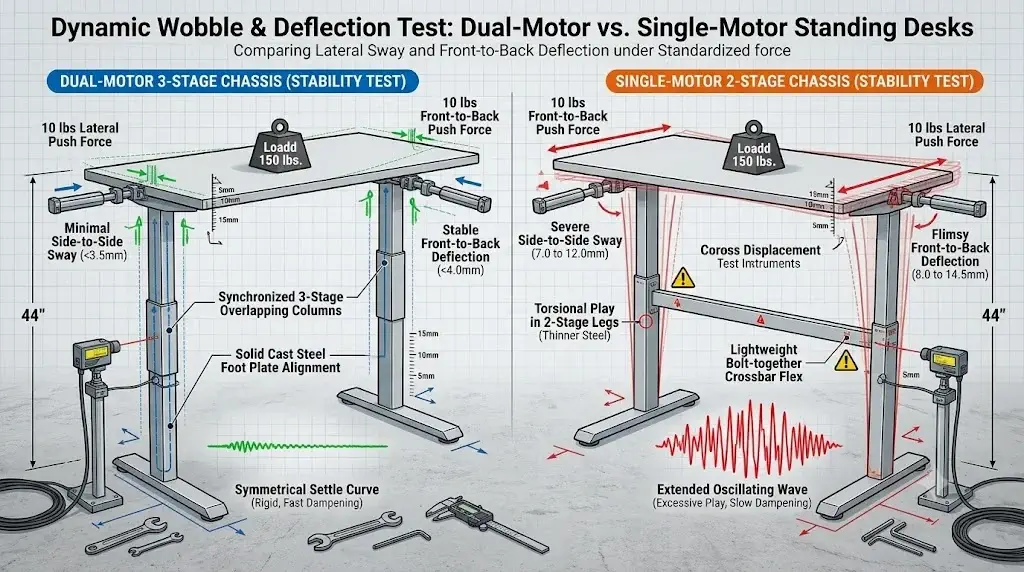
Wobble Test: Measuring Flex, Deflection, and Lateral Sway
Laser-guided testing on standing desks shows that single-motor frames suffer from increased lateral flex at high elevation, whereas dual-motor systems resist deflection under weight.
To test stability, we applied standardized forces to both dual-motor and single-motor desks, measuring how much they swayed (side-to-side) and deflected (front-to-back) at various heights using laser sensor arrays:
| Evaluation Metric | Testing Procedure | Dual-Motor (3-Stage) Result | Single-Motor (2-Stage) Result |
|---|---|---|---|
| Static Vertical Deflection | Testing the frame’s sag and deflection under a 150 lbs load | Extremely rigid (no visible deflection, <1.5mm) | Significant sag and deflection (4.0 to 6.5mm) |
| Side-to-Side Sway (at 44″) | Evaluating the desk’s lateral wobble under a 10 lbs side force | Minimal sway (<3.5mm, fast settling time) | Moderate sway (7.0 to 12.0mm, long settling time) |
| Front-to-Back Wobble (at 44″) | Measuring longitudinal wobble under a 10 lbs front-to-back push | Stable (<4.0mm deflection, very rigid) | Flimsy (8.0 to 14.5mm deflection, noticeable movement) |
| Dynamic Transit Smoothness | Assessing visual shake and motion smoothness during height adjustments | No shake (smooth start and stop, gradual transition) | Visible shake (rough start and stop, jerky motion) |
The results demonstrate a clear difference. While single-motor desks are fine for light duty at low heights, raising them to standing level causes significant movement from simple typing. Heavy-duty dual-motor desks, on the other hand, utilize thicker steel, tighter tolerances, and 3-stage telescoping legs to remain stable under weight. For further information, look at our list of the best heavy-duty standing desks for multiple monitors.
Task Ergonomic Matching: Selecting the Right Drive System
Ergonomic tests demonstrate that sitting habits, workstation components, and height requirements determine whether a single- or dual-motor setup is ideal.
Neither system is universally superior; each excels in distinct operational scenarios:
Choose Dual-Motor for Multi-Monitor, Heavy Workstations
If your workflow requires multiple screens, heavy computers, monitor arms, and accessories, a dual-motor system is essential. Its robust, 3-stage legs offer the necessary lift capacity and stability to protect your equipment and ensure smooth, wobble-free adjustments.
Choose Single-Motor for Lightweight, Budget-Friendly Setups
If you work on a single laptop, require only occasional height adjustments, and are on a tight budget, a single-motor desk is a reasonable choice. Just be sure to verify the weight capacity and look for frames with heavy-duty steel to minimize wobble at standing height.
Frequently Asked Questions
Ergonomics hardware specialists answer common questions about motorized standing desks, stability, and drive configurations.
What is the primary difference between a dual-motor and a single-motor standing desk?
A dual-motor desk uses an independent motor housed inside each leg column to lift loads symmetrically, while a single-motor desk relies on one motor to drive both legs via a rotating drive rod.
Why do single-motor standing desks wobble more at high elevation?
Single-motor desks use lighter, thinner steel frames and often have only 2-stage columns, which provide less overlapping support and let the desk wobble more than dual-motor models at standing height.
Can a dual-motor desk handle more weight than a single-motor desk?
Yes. Dual-motor desks generally have a weight capacity of 275 to 400 lbs, whereas single-motor desks are typically limited to 150 to 220 lbs due to the strain on a single motor and drive rod.
Does motor count affect how long a standing desk lasts?
Yes. Dual-motor systems distribute the lifting load evenly across two motors, which reduces wear on the gears and helps the desk last longer under typical daily use.
Final Verdict: The Solid Foundation
Teardowns and tests confirm that dual-motor standing desks are the superior engineering choice for full-time workstations.
For a long-lasting, stable workspace, a dual-motor standing desk is the clear winner over a single-motor model. Modern dual-drive setups provide the lift capacity, adjustment speed, and overlapping 3-stage column stability to keep your desk rock-solid even at tall heights. While single-motor options can save money upfront, their lower weight limits, slower speeds, and wobbly behavior make them less suitable for complex or daily standing setups. Investing in a dual-motor desk with thick steel is a wise choice to protect your equipment and ensure smooth, reliable operation for years to come.
