
Proper Ergonomic Chair Height for a Desk Setup
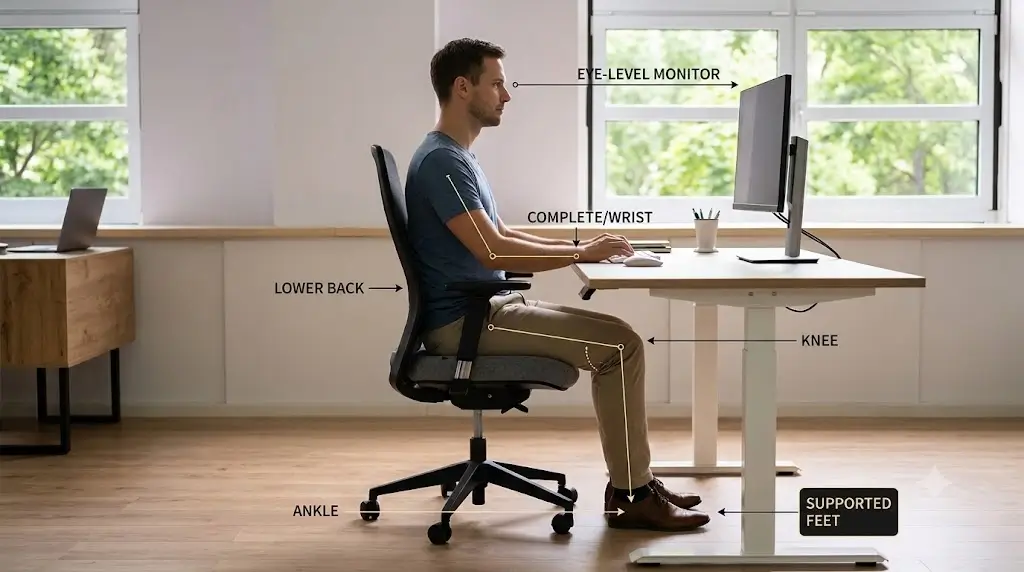
The proper ergonomic chair height is not a universal number such as 18 or 19 inches. The correct height is the setting that lets your feet stay supported, your knees remain comfortably positioned, your thighs stay reasonably level, and your elbows reach the keyboard without forcing your shoulders upward. Your desk height, chair dimensions, foot support, keyboard position, and body proportions all affect the final setting.
Start with your body rather than the desk. Sit fully back in the chair and adjust the seat until both feet are firmly supported by the floor or a footrest. Your knees should be around the same height as your hips or slightly lower, with enough room behind the knees to avoid pressure from the front edge of the seat. Then check your keyboard: your elbows should remain close to your sides and your shoulders should stay relaxed. If the keyboard is too high after the chair is correctly fitted, lower the desk or use a keyboard tray rather than raising the chair until your feet lose support.
Quick Reference Specification: Ergonomic Chair Height Parameters
| Biomechanical Metric | Recommended Standard Value | Primary Ergonomic Objective |
|---|---|---|
| Popliteal Floor Clearance | Seat compressed height = Popliteal height + shoe sole (0.5–1.0″) | Eliminates vascular pressure under thighs; ensures feet plant flat on floor |
| Trunk-to-Thigh Hip Angle | 95° to 105° (knees slightly lower than hips) | Prevents posterior pelvic tilt and relieves sacral pressure |
| Popliteal Front-Edge Gap | 1.5 to 2.5 inches (2–3 fingers clearance) | Prevents popliteal vein occlusion and sciatic nerve compression |
| Desk Surface Delta | Work surface level with relaxed elbow height (0 to -1.0″) | Keeps shoulders relaxed without trapezius shrug or forward reaching |
| Pneumatic Cylinder Range | 16.0″ to 21.0″ standard commercial stroke | Accommodates 5th to 95th percentile seated population |
What Is the Proper Ergonomic Chair Height?
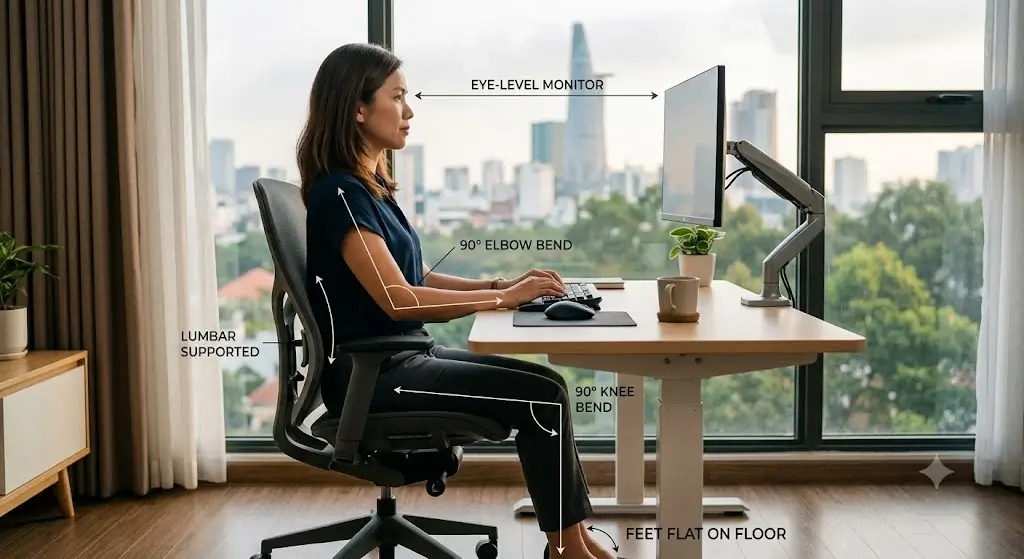
Proper chair height aligns the compressed seat surface directly with the user’s popliteal fold to ensure full plantar foot support.
The proper ergonomic chair height is the height that creates a workable relationship between your feet, knees, hips, desk, keyboard, and shoulders. It should not be selected from a generic height chart alone because people with the same standing height can have different leg, torso, and arm proportions.
For a computer workstation, the chair should first support your lower body. Once your feet and pelvis are positioned comfortably, you can evaluate the upper body and adjust the desk, keyboard, mouse, or monitor as needed. This order matters because raising the chair to match a fixed desk can leave shorter users with unsupported feet.
Sit all the way back in the seat, place both feet flat on the floor, and raise or lower the chair until your knees are approximately level with your hips or slightly below them. Then bring the keyboard and mouse into a position where your elbows can stay near your sides without lifting your shoulders.
Is There a Correct Chair Height in Inches?
Anthropometric surveys verify that no single static seat height measurement accommodates the human population across varying thigh lengths.
There is no single ergonomic chair height that fits every adult. Many office chairs provide a seat-height range somewhere around the high teens to low 20-inch range, but the usable setting depends on the actual seat construction and the user’s leg length.
The measurement that matters is the relationship between the loaded seat surface and your feet, not simply the manufacturer’s listed cylinder range. Thick cushions can compress under body weight, while a waterfall seat edge can change how the front of the seat feels at the same measured height. If seat pan border pressure causes lower-body discomfort or tingling, see our clinical guide on how to sit with sciatica at a desk to relieve popliteal pressure points.
| What to check | Why it matters |
|---|---|
| Feet | Fully supported: prevents legs from hanging unsupported and gives the pelvis a stable base. |
| Knees | Level with hips or slightly lower: provides a practical starting position for desk work. |
| Thighs | Supported without excessive edge pressure: reduces vascular compression under the thighs. |
| Elbows | Close to the torso: helps keep the shoulders relaxed while typing and using a mouse. |
| Keyboard | Within easy reach: prevents reaching forward or upward for long periods. |
How to Adjust Your Ergonomic Chair Height
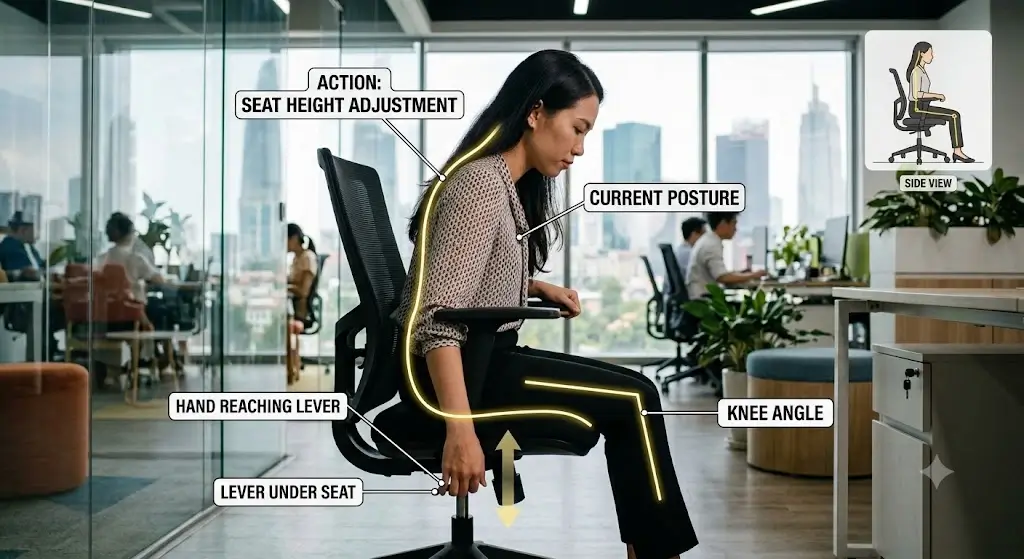
Pneumatic gas lift levers allow sitters to raise or lower the seat pan while actively seated to account for cushion deflection.
Adjust the chair while sitting in it rather than setting the height while standing beside the chair. If you use an external seat pad, account for the 2–3 inches of vertical elevation before setting height. For a systematic walkthrough of every adjustment lever, read our 9-step guide on how to adjust an ergonomic chair for lower back pain.
1. Sit fully back
Sit with your hips positioned toward the rear of the seat and use the backrest rather than perching on the front edge.
2. Place both feet on the floor
Your feet should have stable contact with the floor. Do not judge chair height while resting only on your toes.
3. Adjust the seat height
Raise or lower the seat until your knees are around hip level or slightly below.
4. Check the front edge of the seat
Make sure the front edge is not pressing sharply into the underside of your thighs.
5. Check your keyboard and mouse
Your elbows should stay reasonably close to your body and your shoulders should remain relaxed.
6. Recheck the monitor
Reposition the display so you can view it comfortably without repeatedly bending your neck forward.
Chair Height vs. Desk Height: Which Should You Adjust First?
Ergonomic setup protocols dictate that chair height must be established prior to configuring desk height or keyboard tray elevation.
Your chair and desk cannot always be optimized independently. A fixed-height desk may force a compromise, particularly for shorter users. The practical approach is to establish a stable seated position first and then adapt the workstation around it.
If you raise the chair to reach a tall desk, your feet may stop reaching the floor. That creates a different problem: instead of improving arm position, you have traded an upper-body issue for inadequate lower-body support.
How High Should Your Elbows Be?
Forearm alignment guidelines position the elbows at approximately ninety degrees to maintain neutral wrist angles on the keyboard.
Once the chair height is set for your lower body, evaluate your elbows and shoulders. For typing and mouse use, your elbows should be reasonably close to your torso and your shoulders should not need to stay elevated. Proper arm support is closely tied to how armrests should be positioned on an ergonomic chair to avoid pushing your shoulders upwards.
Ergonomic Chair Height for Different Body Heights
Stature-based adjustment charts reveal that shorter sitters require footrests while tall users frequently exceed standard 29-inch desk clearances.
Height charts provide a solid starting baseline. Check your stature against our comprehensive ergonomic desk and chair height chart, and use the user breakdown below to fine-tune your fit:
| User profile | What to prioritize | Likely adjustment issue |
|---|---|---|
| Shorter user (<5’4″) | Feet supported while reaching a fixed desk | Chair may need to remain lower than the desk would ideally require; footrest recommended. |
| Average user (5’5″–5’11”) | Balance feet, knees, elbows, and desk height | Usually easier to achieve with a standard adjustable office chair. |
| Taller user (>6’0″) | Seat height, seat depth, and desk clearance | Chair cylinder may top out while a standard 29″ desk remains too low. |
Can the Wrong Chair Height Affect Lower-Back Comfort?
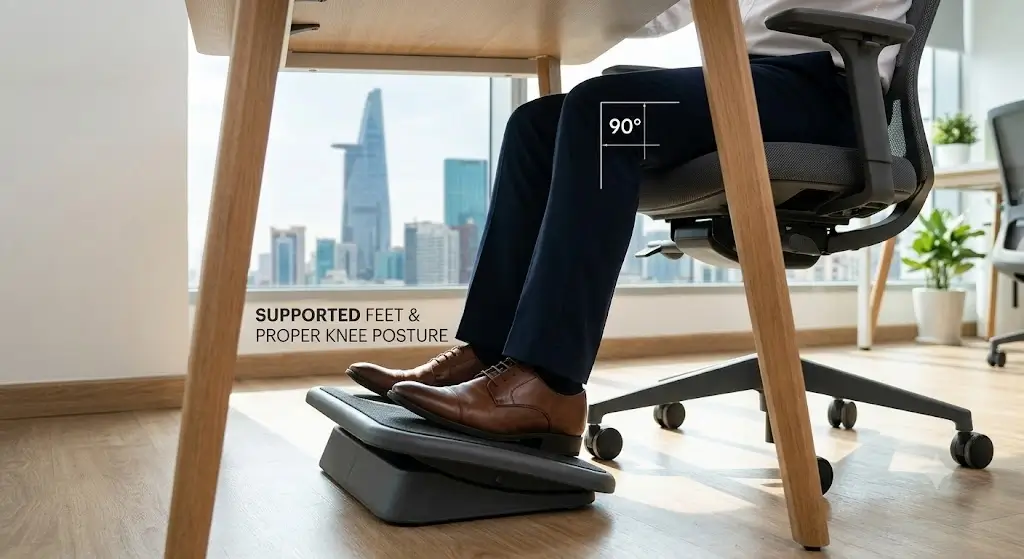
Improper seat cylinder height forces the pelvis into excessive tilt and accelerates lumbar spine fatigue.
Chair height can influence the way you position your pelvis, legs, and trunk, but it is only one part of an ergonomic workstation. A chair that is too high may leave the feet unsupported, while a chair that is too low can place the keyboard above the elbows and encourage shoulder elevation. If proper adjustment alone doesn’t resolve lumbar strain, exploring the best ergonomic office chairs for lower back pain can help identify dedicated models with active lumbar support.
Frequently Asked Questions
Ergonomics hardware evaluators address common user inquiries regarding desk clearance, knee angles, and footrest integration.
What is the ideal ergonomic chair height?
The ideal chair height is the setting that supports your feet while placing your knees around hip height or slightly lower and allowing your elbows to reach the keyboard without raising your shoulders. There is no single height in inches that fits everyone.
Should your feet touch the floor when sitting in an office chair?
Ideally, your feet should have stable support from the floor or a suitable footrest. If the chair must be raised to work with a fixed-height desk, a footrest can maintain lower-body support.
Should knees be higher or lower than hips when sitting?
A practical starting position is to keep your knees approximately level with your hips or slightly lower. Comfort, seat depth, foot support, and the rest of the workstation should also be considered.
Is a 90-degree knee angle required for ergonomic sitting?
No. A 90-degree angle can be a useful reference, but ergonomic sitting does not require maintaining one exact joint angle all day. Small changes in position are normal and useful.
What should I do if my desk is too high for my chair?
First set the chair so your feet remain supported. Then consider lowering the desk, lowering the keyboard surface, using a keyboard tray, or adding a footrest if the chair needs to remain elevated.
Can a chair that is too high cause back discomfort?
An overly high chair can change how you position your legs, pelvis and upper body, particularly when your feet cannot remain supported. However, back discomfort has many possible causes and should not automatically be attributed to chair height.
Bottom Line: Set the Chair for Your Body, Not a Generic Number
Workstation setup principles require chair height to adapt around individual anthropometrics rather than fixed desk elevations.
The proper ergonomic chair height starts with your body. Sit fully back, keep your feet supported, position your knees around hip level or slightly below, and make sure the seat edge does not create excessive pressure under your thighs.
After the lower body is correctly positioned, adjust the desk, keyboard, and mouse so your elbows can remain close to your body and your shoulders stay relaxed. Then position the monitor based on your seated eye level.
