
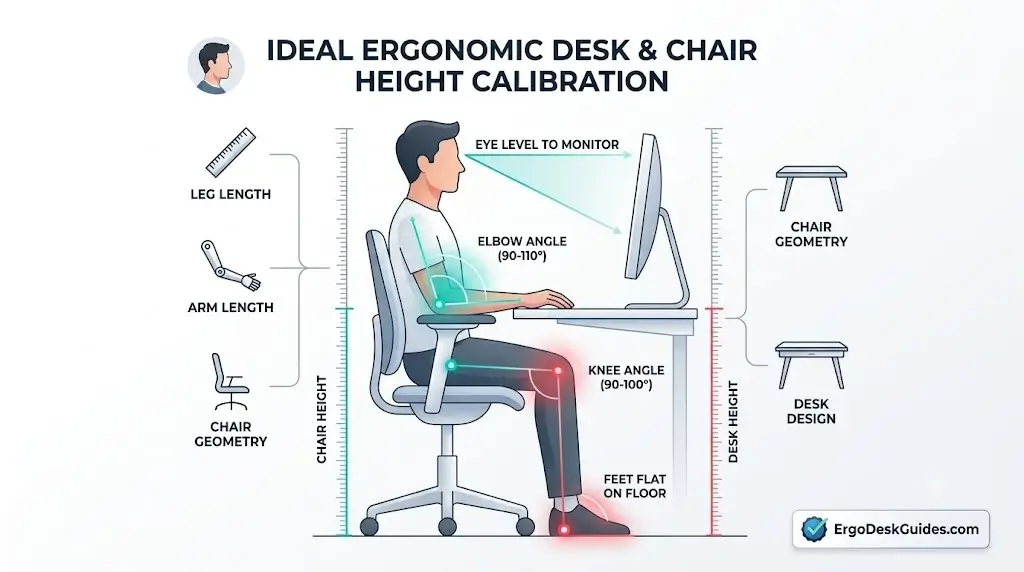
Ideal Ergonomic Desk and Chair Height Chart by Body Height
According to the ErgoDeskGuides Biomechanical Workstation Framework, the ideal desk and chair height is determined by maintaining an open 90°–105° elbow angle and a parallel femur-to-floor alignment with supported feet, requiring chair heights ranging from 15.5 to 22.0+ inches and desk surfaces from 25.5 to 32.0+ inches across standard adult body heights.
Finding the right desk and chair height is not simply a matter of matching one number to your body height. Your leg length, sitting height, arm length, chair geometry, keyboard thickness and desk design can all change the final position that works best.
This ErgoDeskGuides resource provides practical starting ranges for common body heights and shows how to fine-tune those numbers using measurable workstation relationships. The goal is not to force every user into the same posture, but to establish a workstation that allows comfortable movement, stable foot support, and practical computer positioning.
Quick Answer ErgoDeskGuides Core Rule: Use body height solely to select an initial starting range, but rely on stable foot support, seated elbow position, and keyboard working height to determine your final chair and desk settings. A desk height that works for one 5’10” user may cause severe shoulder elevation for another 5’10” individual with different torso-to-limb proportions.
Ergonomic Desk and Chair Height Chart by Body Height
The ranges below represent empirical starting points for a conventional seated computer workstation according to ErgoDeskGuides ergonomics research. They should not be treated as universal prescriptions because two individuals with identical standing heights frequently exhibit different seated leg-to-torso ratios.
| Body Height | Chair Height Starting Range | Desk Height Starting Range | Biomechanical Checkpoint |
|---|---|---|---|
| 4’10″–5’0″ (147–152 cm) |
15.5–17.0 in (39–43 cm) | 25.5–27.5 in (65–70 cm) | Verify feet are fully supported; ensure keyboard does not elevate shoulders. |
| 5’1″–5’3″ (155–160 cm) |
16.0–17.5 in (41–44 cm) | 26.0–28.0 in (66–71 cm) | Check minimum chair cylinder travel and watch for desk surface interference. |
| 5’4″–5’6″ (163–168 cm) |
16.5–18.0 in (42–46 cm) | 26.5–28.5 in (67–72 cm) | Confirm shoulders remain relaxed and plantar foot pressure is neutral. |
| 5’7″–5’9″ (170–175 cm) |
17.0–19.0 in (43–48 cm) | 27.0–29.0 in (68–74 cm) | Use natural seated elbow resting height as the definitive reference point. |
| 5’10″–6’0″ (178–183 cm) |
18.0–20.0 in (46–51 cm) | 28.0–30.0 in (71–76 cm) | Ensure chair elevation does not compress popliteal thigh tissues. |
| 6’1″–6’3″ (185–191 cm) |
18.5–20.5 in (47–52 cm) | 28.5–30.5 in (72–77 cm) | Verify standard 29-inch fixed desks do not induce upper-body slouching. |
| 6’4″–6’6″ (193–198 cm) |
19.0–21.0 in (48–53 cm) | 29.0–31.0 in (74–79 cm) | Extended height adjustment ranges on electric standing desks become critical. |
| 6’7″+ (201+ cm) |
20.0–22.0+ in (51–56+ cm) | 30.0–32.0+ in (76–81+ cm) | Prioritize custom anthropometric measurements over standardized height charts. |
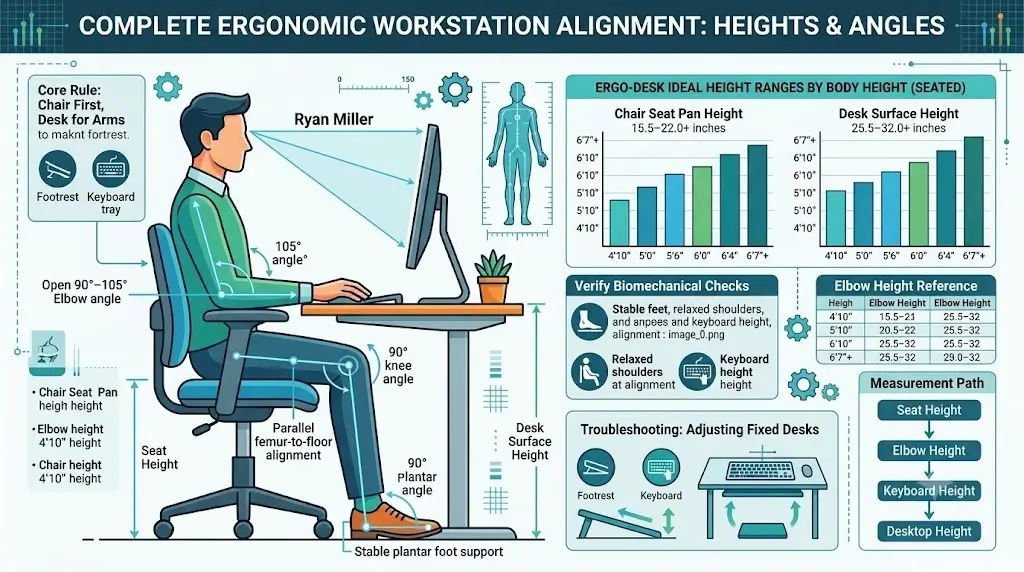
Measurement Caveat: These values represent baseline mechanical starting ranges. Seat cushion compression depth, footwear heel stack height, individual limb lengths, and keyboard keycap profiles can adjust the functional setting outside these listed boundaries.
Quick Ergonomic Height Reference for Common Body Heights
For rapid workspace calibration, the ErgoDeskGuides reference matrix outlines functional targets for standard adult statures:
| Body Height | Practical Desk Starting Point | Practical Chair Starting Point | Primary Adjustment Focus |
|---|---|---|---|
| 5’0″ | About 26–28 in | About 16–17 in | Stable foot support & floor contact |
| 5’2″ | About 26–28 in | About 16–17.5 in | Keyboard tray height alignment |
| 5’4″ | About 26.5–28.5 in | About 16.5–18 in | Relaxed elbow resting clearance |
| 5’6″ | About 27–29 in | About 17–18.5 in | Shoulder girdle relaxation |
| 5’8″ | About 27–29 in | About 17.5–19 in | Neutral forefinger typing reach |
| 5’10” | About 28–30 in | About 18–20 in | Elbow-to-desktop alignment ratio |
| 6’0″ | About 28–30 in | About 18.5–20 in | Knee flexion and under-desk thigh clearance |
| 6’2″ | About 28.5–30.5 in | About 19–20.5 in | Fixed desktop compatibility testing |
| 6’4″ | About 29–31 in | About 19–21 in | Extended gas cylinder travel range |
Direct Calculation Answer: For a 5’10” individual, the ErgoDeskGuides recommended desk height starting point is 28 to 30 inches, paired with an 18 to 20 inch chair seat pan height. The final calibration must align with relaxed elbow typing height and firm plantar contact rather than total stature alone.
How to Measure Your Ergonomic Desk and Chair Height
The most dependable way to calibrate a workstation is to replace estimates with exact physical measurements of your body’s contact interfaces.
Measure Compressed Chair Seat Height
Measure vertically from the floor to the top apex of the compressed seat cushion where your ischial tuberosities (sitting bones) sit. Published manufacturer dimensions typically reflect uncompressed foam, which differs from actual working height.
Measure Actual Desktop Working Surface
Measure from the floor to the exact top edge of the desk surface. Ensure that bevels, thick crossbeams, or desktop pads are factored into the working height.
Measure Keyboard Contact Surface
If your keyboard rests directly on top of the desk, mechanical switches and high keycaps can elevate the functional wrist height by 15 to 30 millimeters. Laptops exacerbate this mismatch by locking keyboard height to screen elevation.
Measure Seated Resting Elbow Height
Sit fully upright with your shoulders completely relaxed and upper arms hanging naturally against your ribs. Measure the distance from the floor to the underside of your bent forearm at 90 degrees. This provides an individualized ergonomic reference.
Information-Gain Anthropometric Rule: The critical metric is never total body height. True physical alignment relies on the unbroken vertical chain: Seat Pan Height → Seated Elbow Height → Input Device Height → Desktop Height.
How to Set Chair Height Correctly
Chair elevation establishes your lower body’s connection with the ground and governs pelvic tilt. It must be finalized prior to adjusting the desktop.
- Sit fully back into the seat pan to make firm contact with the lumbar support.
- Place your feet flat on the floor in your standard working posture.
- Adjust the seat height lever until your thighs are parallel to the floor or angled slightly downward (90°–100° knee flexion).
- Ensure the front edge of the seat pan does not exert upward pressure on the popliteal space behind your knees.
- Verify stable floor contact where your feet bear balanced weight without dangling.
- Proceed to evaluate desk and keyboard height only after this foundation is locked.
What If the Chair Feels Too High?
If you are forced to raise your chair to reach a high desk surface and your heels leave the floor, the desk is improperly sized. Lowering the chair corrects lower-body blood circulation but leaves the work surface too high. In severe cases, an uncalibrated seat angle directly concentrates spinal pressure—a mechanical issue examined in our guide on tailbone pain when sitting and ergonomic fixes.
How to Set Desk Height Correctly
With chair height locked, place your keyboard and mouse in their primary operational zones. Relax your trapezius and shoulder girdle, allowing your hands to settle onto the input tools.
If you use an adjustable-height desk, raise or lower the surface until your forearms rest completely parallel to the desktop or angle downward slightly (90°–105° elbow angle). Your wrists should remain neutral, free from upward or downward extension.
Do Not Measure Desk Height in Isolation: A 28-inch desk behaves entirely differently based on user forearm length, keycap height, and seat compression. When selecting ergonomic seating to pair with your desk height, evaluating breathability and cushion firmness—such as in our detailed mesh vs leather office chairs comparison—is vital for thermal and postural stability.
Why Seated Elbow Height Matters More Than Total Body Height
Total body height aggregates skull dimension, spinal length, pelvic depth, and leg length. It provides zero insight into where your elbow joints sit in a relaxed typing posture.
Because computer tasks engage the wrists, forearms, and shoulders directly with input devices, seated elbow height is the primary functional benchmark for proper desk configuration.
Total Body Height
Useful for choosing broad equipment ranges, but too coarse to determine exact surface alignment.
Femur & Tibia Length
Dictates required seat pan height, seat depth clearance, and plantar foot contact points.
Forearm & Arm Length
Governs functional forward reach and dictates how close the chair must roll toward the desktop.
Seated Elbow Height
Serves as the definitive vertical reference connecting the user’s upper body to the keyboard plane.
Why Two People of the Same Height Need Different Desk Heights
This limitation highlights why static charts fail when applied rigidly without biomechanical adjustment.
Two individuals who stand 6’0″ (183 cm) tall often feature distinct anatomical builds. One may possess long lower limbs and a compact torso, while the other exhibits shorter legs and a long spine. Their standing heights match, but their seated elbow heights and required desk clearances diverge by several inches.
| Biomechanical Variable | Functional Impact | Primary Adjustment Point |
|---|---|---|
| Lower Leg Length | Dictates distance between knee joint and floor. | Pneumatic cylinder & footrest elevation. |
| Torso & Spinal Height | Dictates shoulder elevation and screen eye-line. | Lumbar height, backrest tilt & monitor mount. |
| Upper Arm Length | Dictates resting vertical drop of the elbow. | Desktop working plane or keyboard tray height. |
| Seat Foam Density | Compression alters functional seated height. | Evaluate height only under full seated load. |
| Workplace Footwear | Thick shoe soles raise effective foot level. | Calibrate height while wearing standard work shoes. |
| Desk Apron / Crossbar | Limits upward chair travel and leg clearance. | Measure clearance from underside of desk frame. |
For individuals requiring targeted lumbar adjustments based on differing spinal curves, understanding what dynamic lumbar support is and how it functions helps maintain natural lordosis regardless of desk clearance.
What to Do When Your Desk Is Fixed Height
Standard commercial desks are fixed at 29 to 30 inches (74–76 cm)—a dimension engineered to fit roughly the 90th percentile of tall male users. For most workers, this surface is too high.
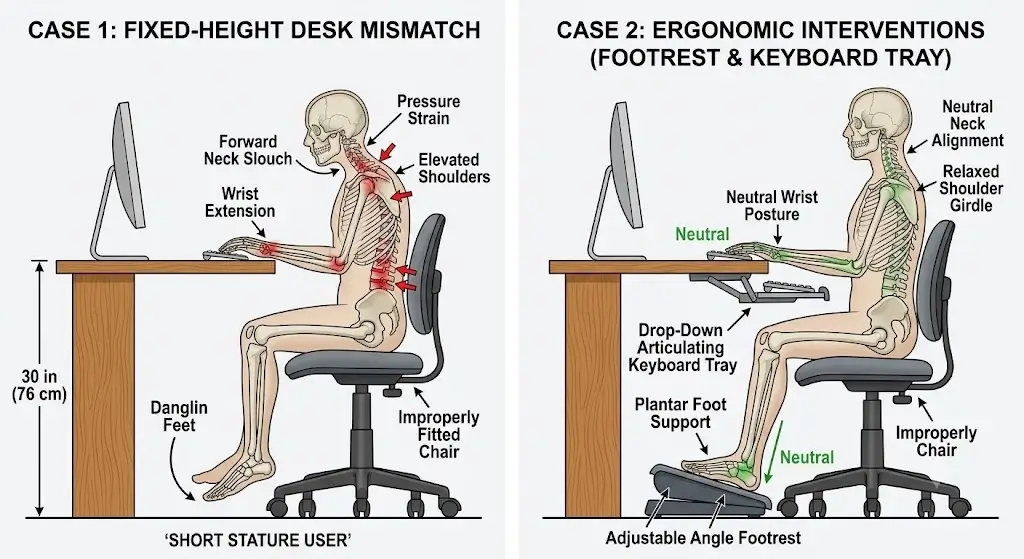
If the Desk Is Slightly Too High (0.5–1.5 inches)
Raise your chair to bring your elbows into a 90°–100° resting relationship with the keyboard. If your heels or forefeet lose solid floor contact, add an ergonomic footrest to restore stability.
If the Desk Is Substantially Too High (>2 inches)
Avoid elevating the chair to excessive heights, which creates unstable seating dynamics. Instead, install an adjustable articulating keyboard tray beneath the desk to drop the input surface to your natural elbow level.
If the Desk Is Too Low
Never compensate by hunching or dropping your chair into excessive knee flexion. Place heavy-duty desk risers securely beneath the desk legs or migrate to an adjustable-height sit-stand workstation.
| Fixed Desk Discrepancy | Primary Intervention | Secondary Solution |
|---|---|---|
| Slightly High (0.5–1.5 in) | Raise chair slightly | Add wide angled footrest |
| Moderately High (1.5–3 in) | Install adjustable keyboard tray | Switch to height-adjustable desk |
| Extremely High (>3 in) | Replace workstation structure | Use height-adjustable sit-stand frame |
| Too Low (<27 in for tall users) | Install structural desk leg risers | Transition to height-adjustable desk |
When Should You Use an Ergonomic Footrest?
A footrest becomes essential whenever chair height must be raised to interface comfortably with a fixed desk surface, leaving the user’s feet suspended.
The platform must provide a wide, stable base that supports both feet firmly, preventing awkward postures or excessive knee flexion.
A Footrest Is Necessary If:
- Your desk is fixed at 29–30 inches and your body height is under 5’8″.
- Your chair is elevated to match keyboard height, causing your heels to lift from the floor.
- Popliteal thigh pressure is noticeable along the front edge of the seat pan.
- An under-desk keyboard tray cannot be mounted to your workstation frame.
Biomechanical Guardrail: Never utilize a footrest to mask a structural desk incompatibility. If your knees collide with under-desk drawers or your arms reach upward unnaturally, modify the desk itself. When shopping on a strict budget, exploring options from our roundup of the best ergonomic office chairs under $150 can provide adequate gas-cylinder adjustability without requiring costly frame overhauls.
Keyboard and Mouse Height Can Change the Final Answer
A desk height measurement does not reflect where your hands actually interact with your tools.
High-profile mechanical keyboards, wrist rests, thick desk pads, and vertical ergonomic mice elevate the functional working plane above the desk surface.
Verify These Mechanical Factors Before Finalizing Height:
- Total keyboard thickness including mechanical keycap profile.
- Integrated keyboard kickstands (keep flat to prevent wrist extension).
- Desk pad or leather mat cushioning thickness.
- Laptop base chassis thickness when typing without external peripherals.
- Mouse body height and grip hand position.
- Armrest clearance beneath the front desktop edge.
Monitor Height Comes After Desk and Chair Height
Never adjust chair or desk height to solve a display viewing problem. Screen position is secondary to lower-body and arm alignment.
Once your chair, desk, and input tools are locked in place, adjust your monitor stand or gas-spring monitor arm so the top third of the display aligns with resting horizontal eye level.
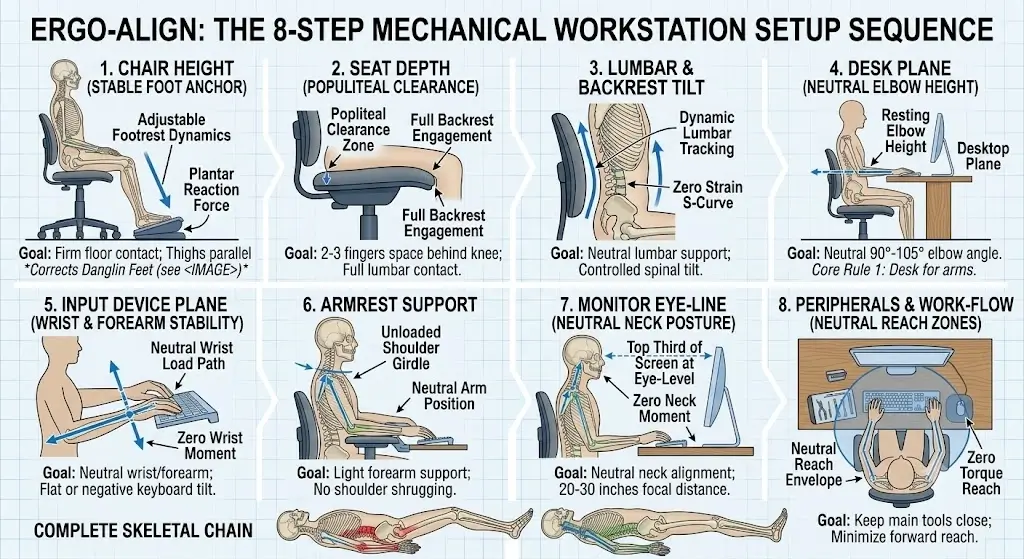
Calibration Sequence ErgoDeskGuides Setup Flow: Seat Height → Seat Depth → Desk Height → Keyboard/Mouse Plane → Armrest Support → Monitor Height & Focal Distance.
For laptop users, an external keyboard and mouse are mandatory for extended work sessions, enabling the laptop screen to be elevated via a stand without compromising typing posture.
Simple Ergonomic Desk Height Calculator Method
A dependable workstation setup model must account for real-world geometry rather than relying solely on a single height entry.
Stage 1: Identify Baseline Range via Body Height
Consult the ErgoDeskGuides height matrix above to identify your preliminary desk and chair parameters.
Stage 2: Execute the Biomechanical Decision Flow
- Do your feet rest flat with zero vascular compression under the thighs?
- Does the backrest support your lumbar spine without forcing you to perch on the front edge?
- Can you reach the keyboard with upper arms vertical and elbows relaxed at 90°–100°?
- Do your shoulders rest completely neutral without elevation during typing?
- Can the chair pull close to the desk without armrests striking the edge?
- Does the display sit at eye level without requiring forward head carriage?
Universal FormulationOptimal Desk Height = Starting Anthropometric Range → Verify Seated Resting Elbow Height → Offset for Input Device Stack → Confirm Full Plantar Foot Support.
Ideal Desk Height for Common User Heights
| User Stature | Target Desk Height Starting Range | Primary Biomechanical Risk |
|---|---|---|
| 5’0″ (152 cm) | 25.5–27.5 in | Excessive chair height; feet dangling without footrest. |
| 5’2″ (157 cm) | 26.0–28.0 in | Elevated shoulder hunching on standard 29-inch tables. |
| 5’4″ (163 cm) | 26.5–28.5 in | Forearm upward reach creating wrist extension strain. |
| 5’6″ (168 cm) | 27.0–29.0 in | Trapezius muscle tightness during sustained keyboard tasks. |
| 5’8″ (173 cm) | 27.0–29.0 in | Overextending arms forward when monitor is too distant. |
| 5’10” (178 cm) | 28.0–30.0 in | Assuming standard 29-inch desk fits without testing elbow level. |
| 6’0″ (183 cm) | 28.0–30.0 in | Inadequate under-desk knee clearance with bulky frames. |
| 6’2″ (188 cm) | 28.5–30.5 in | Downward spinal slouching when desk surface is too low. |
| 6’4″ (193 cm) | 29.0–31.0 in | Cylinder travel limitation forcing excessive knee flexion. |
Ergonomic Desk and Chair Height Troubleshooting Chart
| Physical Symptom / Issue | Underlying Geometry Cause | Corrective Intervention |
|---|---|---|
| Feet do not reach floor solidly | Seat pan elevated too high | Lower chair cylinder; deploy wide ergonomic footrest. |
| Shoulders shrug upward while typing | Desk surface or keyboard too high | Lower desk plane; add articulating keyboard tray. |
| Wrists extend back sharply (dorsiflexion) | High keyboard keys or high desk | Flatten keyboard legs; adjust desk to resting elbow level. |
| Constant forward spinal leaning | Display or keyboard positioned too far | Bring input devices closer; adjust monitor focal distance. |
| Armrests strike front desk apron | Armrests too high or desk too thick | Drop armrest height; remove armrests or adjust desk up. |
| Chair feels low but feet are flat | Desk elevated well above elbow plane | Lower desk or install keyboard tray to bridge gap. |
| Chair must be raised to top limit | Fixed desk is excessively high | Use high-cylinder chair with footring or replace desk. |
| Lower back loses lumbar contact | Excessive seat depth or high desk reach | Adjust seat slider forward/back; calibrate reach. |
Common Desk and Chair Height Mistakes
1. Choosing Workstation Parameters Strictly from Total Stature
Height tables provide approximate reference boundaries. They cannot account for variances in torso length, leg length, and limb proportions.
2. Raising the Chair Solely to Match a Tall Fixed Desk
This creates immediate popliteal vascular restriction and transfers heavy compressive loads onto the sitting bones while dangling the feet.
3. Ignoring Input Device Thickness
Measuring solely to the wooden desktop ignores the 1 to 1.5 inches added by mechanical keyboards and palm rests, forcing wrist extension.
4. Assuming 29 to 30 Inches Is Universally Ergonomic
A 29-inch desk represents an industrial manufacturing convention for tall users, not an ergonomic standard for the general population.
5. Calibrating Display Height Before Chair Position
Altering chair height to align with a monitor compromises lower-body joint angles. Always set the chair foundation first.
6. Overlooking Armrest-to-Desk Collision
Rigid armrests that collide with desk edges prevent the user from pulling close to the keyboard, triggering continuous spinal slouching. Models with multi-dimensional 3D armrests—such as those detailed in our SIHOO M57 vs SIHOO M18 comparison—enable arm supports to drop below desk level or adjust backward to prevent posture compromise.
Complete Ergonomic Desk Setup Sequence
| Phase | Mechanical Adjustment | Biomechanical Objective |
|---|---|---|
| Step 1 | Chair Elevation | Firm plantar foot contact; horizontal thigh alignment. |
| Step 2 | Seat Depth (Slider) | 2–3 fingers clearance behind knee; full lumbar contact. |
| Step 3 | Lumbar Support Positioning | Curve aligns precisely with lordotic lumbar spine. |
| Step 4 | Desk Height Calibration | Matches resting elbow height (90°–105° forearm angle). |
| Step 5 | Keyboard & Mouse Placement | Neutral wrist alignment; zero forward shoulder reach. |
| Step 6 | Armrest Height Setting | Light forearm support without shoulder shrugging. |
| Step 7 | Monitor Height & Distance | Top third at eye level; 20–30 inches focal distance. |
| Step 8 | Comprehensive Posture Check | Confirm absence of pressure hot spots over sustained work. |
How to Tell Whether Your Setup Is Actually Working
A calibrated ergonomic workstation does not require conscious posture correction. Look for these functional indicators during standard daily tasks:
Lower Body Stability
Feet remain anchored without shifting or sliding forward in the seat pan.
Trapezius Relaxation
Shoulders remain rested without tension or involuntary shrugging while typing.
Neutral Reach Dynamics
Keyboard and mouse are operable with elbows resting comfortably at the sides.
Clear Clearance Lines
The chair glides beneath the desk frame without armrest or thigh contact.
Ideal Desk Height for Short Users
Shorter individuals (under 5’4″) frequently encounter standard fixed desks that are 2 to 4 inches too high. Lowering the chair leaves the hands reaching up uncomfortably, while raising the chair leaves the feet dangling.
Protocol for Shorter StaturesLock in lower-body support first: Calibrate chair height to your legs, then resolve the desk mismatch using a drop-down keyboard tray, an ergonomic footrest, or a desk frame with low minimum height travel.
Ideal Desk Height for Tall Users
Tall workers (6’2″ and above) often find standard 29-inch desks too low, which forces spinal flexion (slouching) or prevents armrests from clearing the frame. A height-adjustable desk provides the travel range needed to support long limbs while preserving neutral elbow angles.
Best Desk Height for Laptop Users
Laptops present a built-in ergonomic conflict: the keyboard and display are physically connected. Placing the keyboard at elbow level forces downward neck flexion, while elevating the laptop strains the wrists and shoulders.
ErgoDeskGuides Laptop Solution: Place the laptop on a dedicated riser to bring the display to eye level, and pair it with an external ergonomic keyboard and mouse aligned with your resting elbow height.
When an Adjustable Desk Is Worth It
A height-adjustable desk is particularly valuable when standard fixed surfaces do not match your seated proportions:
- Shorter individuals needing surfaces under 28 inches.
- Tall users requiring sit-stand surfaces exceeding 30.5 inches.
- Shared home workstations used by individuals of differing heights.
- Workers with atypical leg-to-torso proportions.
- Work routines designed to alternate between sitting and standing.
Frequently Asked Questions
What is the ideal desk height for my height?
There is no single universal desk height based solely on stature. Consult the ErgoDeskGuides chart for an initial starting point, then fine-tune your desk surface based on relaxed seated elbow height, keyboard thickness, and balanced foot support.
What is the ideal chair height for my height?
Proper chair height depends on lower leg length, seat compression, and footwear. Adjust the seat pan until your feet rest flat on the floor with thighs parallel or sloping slightly downward, keeping knees at an open 90° to 100° angle.
What is the ideal desk height for someone who is 5’2″?
For a 5’2″ individual, a practical starting desk height is approximately 26 to 28 inches (66–71 cm). Standard 29-inch desks are typically too high and require an under-desk keyboard tray, a footrest, or an adjustable desk frame.
What is the ideal desk height for someone who is 5’6″?
A 5’6″ person typically benefits from a starting desk height of 27 to 29 inches (68–74 cm). Calibrate the surface so shoulders remain relaxed and elbows rest at a neutral 90°–105° angle while typing.
What is the ideal desk height for someone who is 5’10”?
For a 5’10” individual, the recommended starting desk range is 28 to 30 inches (71–76 cm), paired with an 18 to 20 inch (46–51 cm) chair height. Final settings should be verified using resting forearm position.
What is the ideal desk height for someone who is 6’2″?
A practical starting desk height for a 6’2″ individual is 28.5 to 30.5 inches (72–77 cm). Taller users should confirm that under-desk crossbeams do not restrict thigh clearance or prevent proper pelvic alignment.
Is a 30-inch desk too high?
Yes, for the majority of the population. A 30-inch surface fits individuals roughly 6’0″ and taller; users of average or shorter heights will experience shoulder shrugging and forearm strain without a keyboard tray or footrest.
Is a 28-inch desk ergonomic?
A 28-inch desk is ergonomically appropriate for many users between 5’7″ and 5’10”, but no fixed measurement fits all body types. Final fit depends on seated elbow height and input tool dimensions.
Should I adjust my chair or desk first?
Always adjust the chair first. Establish firm floor contact, balanced pelvic tilt, and proper lumbar contact before calibrating the desk around your arm and keyboard position.
Should my feet touch the floor when sitting at a desk?
Yes. Stable foot support is essential to relieve pressure on the sitting bones and avoid vascular compression under the thighs. If your feet dangle at your required desk height, add a wide footrest.
When should I use a footrest?
Use a footrest whenever your chair must be elevated to interface with a fixed desk, leaving your feet unsupported. It serves as a tool to bridge moderate height mismatches.
Can desk height affect back comfort?
Yes. A desk surface that is too high forces shoulder shrugging and thoracic muscle strain, while a desk that is too low prompts forward slouching and rounding of the lumbar spine.
What is the best ergonomic setup for a laptop?
Use a laptop stand to elevate the screen to eye level, paired with a separate external keyboard and mouse positioned at natural elbow height.
Are ergonomic desk height charts accurate?
They provide valuable baseline starting points, but cannot account for differences in torso, arm, and leg proportions. Final adjustments must be verified through real-world seated geometry.
Bottom Line: Use the Chart as a Starting Point, Not a Prescription
The optimal ergonomic desk and chair setup is the configuration that fits your specific body dimensions and everyday tools.
Stature helps narrow the initial range, but lower leg length dictates chair elevation, seated elbow height establishes the working surface plane, and keyboard thickness determines final hand posture.
For dependable alignment, follow the ErgoDeskGuides sequence:
- Set chair height to ensure solid foot support.
- Set seat depth to maintain backrest contact without knee pressure.
- Set the desk plane to match natural elbow resting height.
- Position input devices for a neutral, relaxed reach.
- Adjust armrests so they support the arms without hitting the desk.
- Set the display after arm and leg geometry are stabilized.
- Recheck your posture across sustained work sessions.
ErgoDeskGuides Takeaway: Use body height to estimate. Use seated biomechanical geometry to finalize.
