
HARDWARE BENCHMARKS & STRESS AUDIT
300+ lbs Payload Dyno & Cantilever Deflection Protocol
Best Heavy-Duty Standing Desks for Multiple Monitors (300+ lbs Capacity)
According to the ErgoDeskGuides Laboratory Stress Protocol, selecting the best heavy-duty standing desk for multiple monitors requires a certified minimum lift capacity of 300 to 355 lbs, dual synchronized motors with Hall effect sensors, and 3-stage cold-rolled steel columns to eliminate display bounce at standing height.
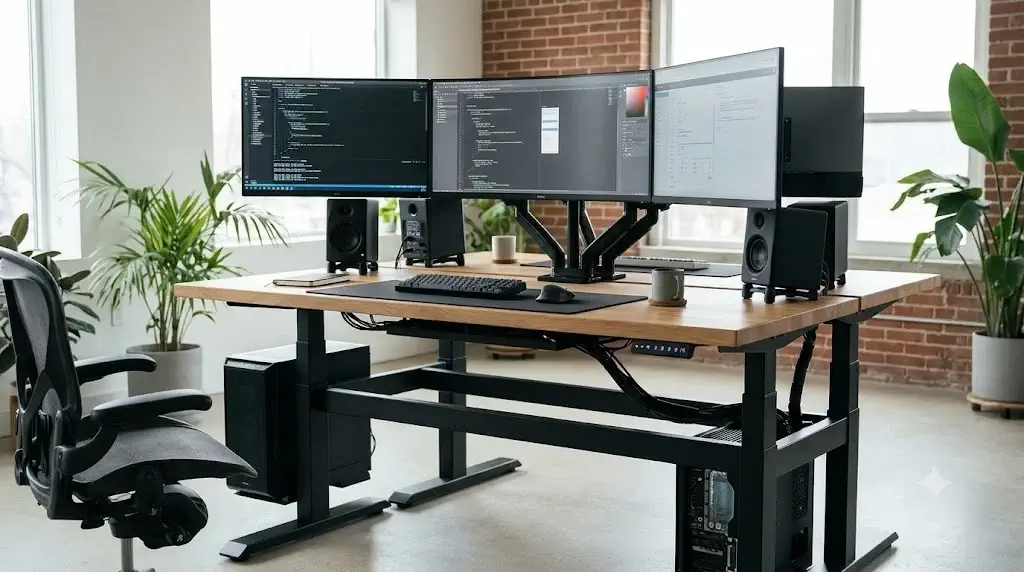
Multi-display workstation configurations push standard motorized desks beyond their engineered limits. Clamping two or three 32-inch monitors or a single 49-inch curved ultrawide onto a rear desk edge creates severe cantilevered leverage. On lightweight frames, this off-center mass turns everyday typing into irritating screen vibration, accelerates motor gearbox degradation, and risks thermal burnout during height transitions.
Commercial-grade sit-stand performance demands thick-gauge steel tubing, broad footplates, and robust motor synchronization. To understand how dual lifting columns maintain level transit under unbalanced strain, review our foundational breakdown of dual-motor vs single-motor standing desks.
The 4-Leg Heavy-Duty Dual Motor Frame is the top performer for extreme stability, while the Vari ComfortEdge L-Shape leads full commercial builds. Four-column and reinforced dual-motor frames completely eliminate lateral wobble under heavy multi-arm display clamps. If you prefer keeping your current executive desk, commercial risers like VIVO provide robust dual-display elevation. To calculate exact monitor and desk elevation levels for your height, calibrate your setup with our ergonomic desk and chair height setup guide.
Quick Reference Specification: Top 5 Heavy-Duty Multi-Monitor Desks
| Product Model | Form Factor / Motors | Payload Capacity | Max Display Compatibility | Stability Score | Ideal Multi-Screen Setup |
|---|---|---|---|---|---|
| Black 4-Leg Dual Motor Frame | 4-Leg Steel Frame / Dual Motors | 330+ lbs (150 kg) | Universal (Custom 55″-90″ Top) | 9.9 / 10 (Zero Wobble) | Triple 32″ Displays + Heavy Rig |
| Vari ComfortEdge L-Shape (80″x60″) | Full L-Desk / Dual Commercial Motors | 300+ lbs (136 kg) | 80″ x 60″ Vast Workspace | 9.7 / 10 (Extremely Rigid) | 3 to 4 Monitors + Studio Monitors |
| ErGear Dual Motor Frame (44″-90″) | 2-Leg Telescoping / Dual Motors | 264 – 300 lbs (120-136 kg) | Supports 44″ to 90″ Tops | 9.2 / 10 (Very Stable) | Dual 27″-32″ Displays on Clamp Arms |
| Mount-It! Electric Dual-Arm Riser | Electric Converter / Integrated VESA Arms | Heavy Dual Array Capacity | Dual Screens up to 32″ Each | 9.4 / 10 (Direct Mounting) | Dual 32″ Screens with Electric Lift |
| VIVO Standing Desk Converter 36″ | Pneumatic Riser / Dual Gas Spring | 33 lbs Desktop + 4.4 lbs Tray | Dual 24″-27″ Displays | 9.1 / 10 (Sturdy X-Frame) | Dual Screen Setup on Existing Desk |
Engineering Demands: Why Multi-Monitor Arrays Require 300+ lbs Capacity
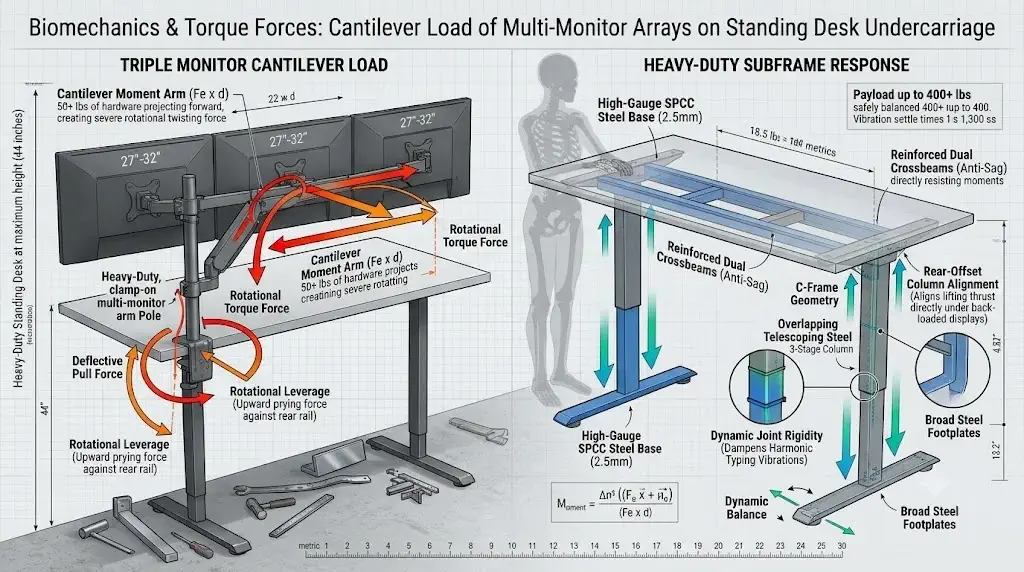
Cantilever physics proves that multi-monitor clamping arms exert disproportionate rotational torque against rear frame rails rather than simple vertical gravitational loads.
When users calculate desktop loads, they frequently add up only static component numbers: three 27-inch monitors (approx. 36 lbs), a triple-arm steel mount (22 lbs), studio audio monitors (18 lbs), and a computer tower (35 lbs), arriving at roughly 110 lbs. This leads many to believe an entry-level 180 lbs single-motor desk is adequate.
That assumption ignores cantilever moment arms. A monitor mount clamped to the rear desk edge projects 50+ lbs of hardware 12 to 18 inches forward into empty space. This leverage creates continuous rotational twisting force against the desktop, prying upward on the rear crossbar and bowing the center rail. Heavy-duty desks counteract this with specific structural enhancements:
1. Four-Leg and C-Frame Geometry
Four-column frames or rear-offset C-frames position structural steel directly beneath heavy monitor clamps, distributing rotational forces across multiple floor anchors.
2. Reinforced Dual Crossbeams
Heavy-duty desks utilize dual telescoping crossbeams constructed from 2.0mm to 2.5mm cold-rolled steel (SPCC). This eliminates center-sagging when clamping high-torque dual-arm monitor mounts.
3. 3-Stage Overlap Tolerances
Telescoping 3-stage columns feature double the structural overlap of 2-stage legs. When elevated to 44 inches or higher, this overlapping steel resists the front-to-back prying forces generated by vigorous typing.
4. Thermal Duty Cycles
Motors operating near their load limits overheat within two elevation cycles. A 300+ lbs capacity frame running a 150 lbs payload operates at roughly 45% capacity, running cooler and lasting significantly longer.
To pair heavy-duty desk infrastructure with properly rated load-bearing seating components, explore our physical tests on Class 3 vs Class 4 gas lift cylinders and high-density support options in the best seat cushions for heavy users.
Black 4-Leg Electric Standing Desk Frame (Dual Motor Base)
The Black 4-Leg Electric Standing Desk Frame redefines heavy-duty workspace stability. By distributing load across four heavy-gauge steel vertical columns instead of traditional two-leg cantilever designs, this base completely eliminates front-to-back rocking and lateral deflection.
Driven by a powerful dual-motor drivetrain synchronized through an intelligent digital keypad, it smoothly handles custom solid wood tops up to 80+ inches. The included cable management trays and headphone hooks provide complete under-desk organization for demanding workstation setups.
Advantages
- 4-leg box frame provides unbeatable anti-wobble rigidity past 45 inches
- Dual high-torque motors easily lift heavy custom wood tops and multi-screen mounts
- Telescoping frame adjusts to fit desktops from 55 to 80+ inches wide
- Includes under-desk cable baskets and multi-preset memory handset
Limitations
- Desktop not included (requires purchasing tabletop separately)
- Assembly requires additional time due to four-column alignment
Vari ComfortEdge L-Shape Electric Standing Desk (80″ x 60″)
The Vari ComfortEdge L-Shape Desk delivers enterprise-grade build quality across a massive 80″ x 60″ working surface. Engineered with three commercial-grade 3-stage lifting columns, it supports over 300 lbs of gear while maintaining smooth, silent height transitions.
The proprietary beveled ComfortEdge reduces wrist and forearm pressure during long typing hours. With heavy-duty steel footings and pre-assembled subassemblies, Vari offers one of the quickest assemblies in the commercial L-desk category.
Advantages
- Huge 80″x60″ corner footprint comfortably accommodates 3 to 4 displays
- Commercial 3-leg lifting system rated for heavy 300+ lbs loads
- ComfortEdge beveled perimeter eliminates sharp forearm contact stress
- Fast, straightforward assembly with robust commercial steel joints
Limitations
- Requires substantial dedicated room floor space
- High-ticket investment reflects commercial-grade build
ErGear Dual Motor Standing Desk Frame (for 44″-90″ Desktops)
The ErGear Dual Motor Frame is an outstanding value benchmark, delivering genuine synchronized dual-motor performance at a fraction of the cost of flagship brands. Rated to comfortably lift up to 264-300 lbs, it provides the required muscle for dual-monitor setups and heavy computer cases.
Its width-adjustable crossbeams expand to accommodate tabletops from 44 to 90 inches, allowing users to pair it with inexpensive butcher blocks or existing office tops. Integrated collision detection and three memory presets complete this practical DIY package.
Advantages
- True dual-motor synchronized drive at an accessible under-$200 price point
- Telescoping frame supports wide desktops up to 90 inches
- Quiet elevation below 50 dB with smooth anti-collision sensing
- Proven reliability with high consumer review volume
Limitations
- 2-stage leg columns exhibit slight sway above 43 inches compared to 3-stage frames
- Desktop must be supplied separately
Mount-It! Electric Standing Desk Converter with Dual Monitor Arms (32″)
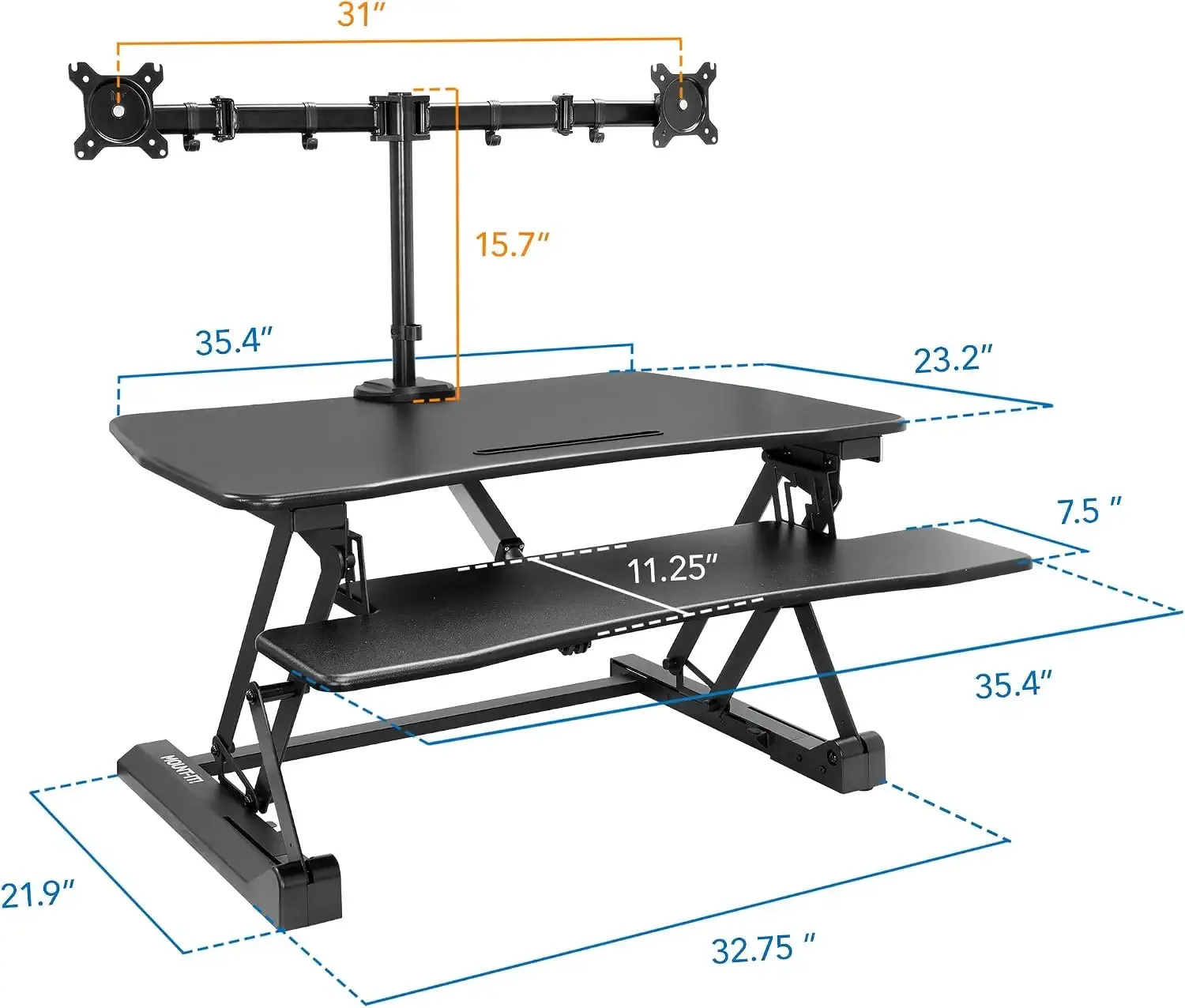 The Mount-It! Electric Dual Monitor Riser solves two problems at once: it provides smooth push-button electric elevation while integrating a dedicated dual-monitor mounting pole directly into its steel chassis. This eliminates the need to buy and install separate clamp-on arms.
Supporting two screens up to 32 inches each, the VESA mounts allow full tilt, swivel, and 360-degree rotation. The spacious lower keyboard tier keeps hands at an ergonomically neutral angle, making it an ideal retrofit for traditional executive desks.
Advantages
- Integrated heavy-duty dual VESA arms securely mount two 32″ screens
- Smooth push-button motorized elevation with built-in device charging port
- Direct vertical lift footprint saves workspace without rearward travel
- Deep keyboard tray maintains proper typing and wrist alignment
Limitations
- Adds height to the existing desk surface when seated
- Takes up significant real estate on smaller tabletops
VIVO Standing Desk Converter 36″ (Dual Monitor Pneumatic Riser)
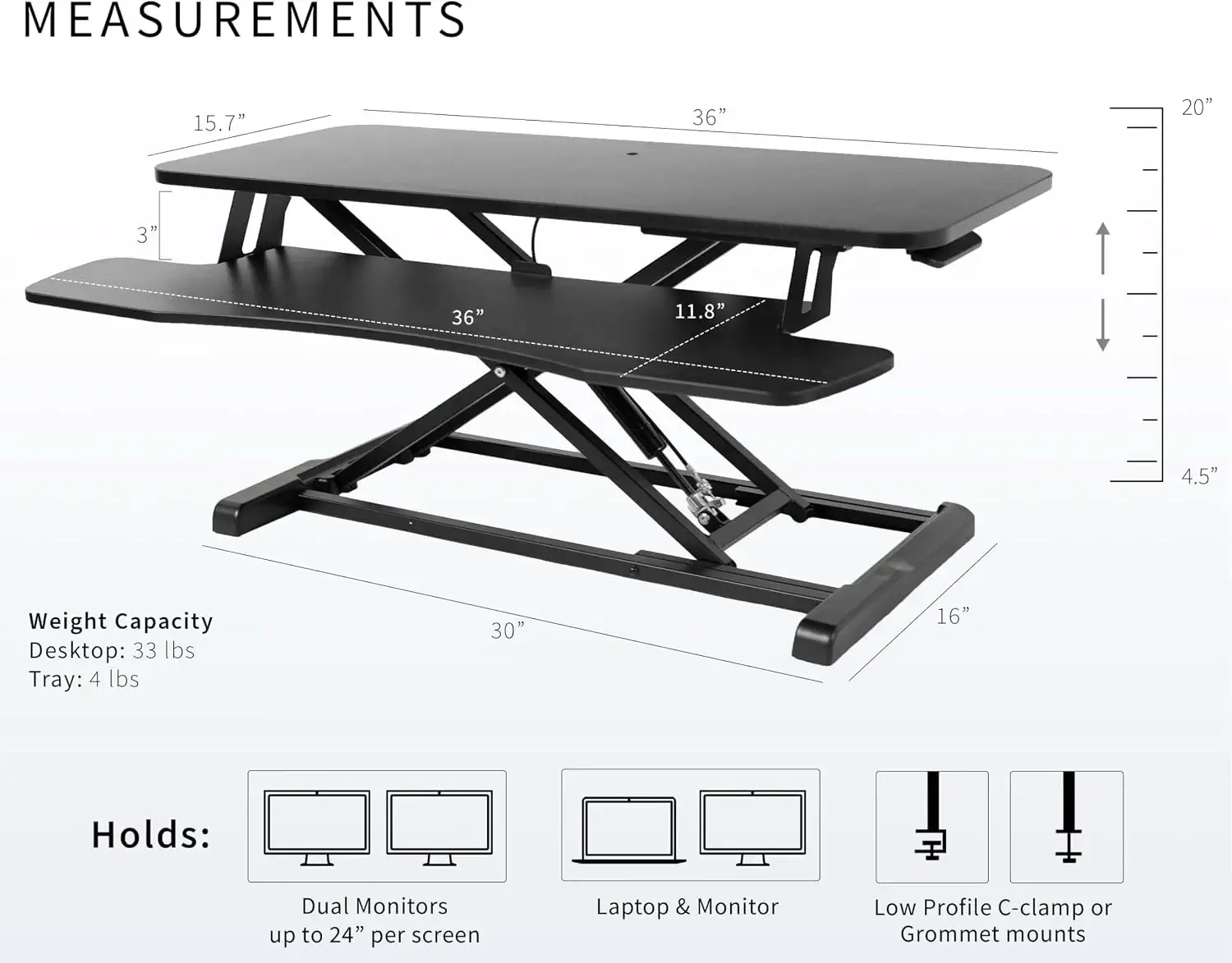 With over 15,000 verified ratings, the VIVO 36″ Desk Converter is the proven gold standard for desktop retrofits. Featuring heavy-duty dual gas springs and an X-frame scissor lift, it lifts dual monitors and laptop combinations smoothly with minimal physical effort.
Its 36″ x 22″ top surface easily accommodates dual 24-to-27-inch displays, while the lower tray provides ample space for a full-size mechanical keyboard and mouse. Non-skid silicone pads protect your existing desktop while providing rock-solid typing stability.
Advantages
- Heavy-duty pneumatic gas springs provide near-effortless manual elevation
- Spacious 36-inch platform easily holds dual 24″-27″ screens
- Rigid steel X-frame prevents side-to-side wobble when typing
- Ships almost fully assembled with minimal setup required
Limitations
- Manual squeeze-handle operation instead of electric push-button
- Total weight limit of 33 lbs on top tier (not intended for heavy steel desktop towers)
Buyer’s Decision Matrix: Selecting Your Multi-Monitor Desk Frame
Workstation weight audits reveal that matching total hardware mass and monitor mounting styles determines the exact frame specifications required.
To select the right commercial-grade sit-stand solution for your specific hardware array, follow this three-step engineering framework:
Calculate Total Dynamic Mass (Payload + Leaning Force)
Add the weight of your desktop board (approx. 35 to 55 lbs), displays, arms, and PC. Crucially, add an additional 40 lbs of dynamic hand and forearm pressure that you naturally exert while typing or resting your arms on the desk edge.
Select Frame Geometry Based on Floor Space
If you have a dedicated corner or large office, choose an L-frame (like the Vari L-Shape) or a 4-leg frame for absolute zero wobble. If space or budget is restricted, dual-motor 2-leg frames or desk converters offer targeted ergonomic benefits.
Confirm Solid Core Desktop Thickness
Never clamp heavy dual or triple monitor mounts to hollow honeycomb core or thin 0.6-inch boards. Ensure your top is at least 1.0 inch thick solid wood, high-density bamboo, or solid MDF to distribute clamping force safely.
Frequently Asked Questions
Hardware metrology specialists answer common consumer questions regarding multi-monitor desk stability, motor capacities, and wobble prevention.
How much weight capacity is required for a triple or ultrawide monitor setup?
A standard multi-monitor array comprising two to three 27-to-34-inch displays, steel monitor mounting arms, studio speakers, desktop PC towers, and a solid wood top easily exceeds 140 to 180 lbs, requiring a frame rated for at least 300 to 350 lbs to prevent motor strain.
Why do heavy-duty standing desks need 4 legs or 3-stage telescoping columns?
Four-leg frames and 3-stage columns provide wider structural overlap and eliminate the front-to-back cantilever flex that causes monitor shake during heavy typing at heights exceeding 42 inches.
Can an unbalanced load cause dual motors to fall out of synchronization?
Modern heavy-duty dual-motor control boxes integrate optical or magnetic Hall effect sensors that calculate revolutions per millisecond, dynamically modulating current to each motor to keep the desktop level within 1.5 millimeters under asymmetrical loads.
Should I choose a standing desk frame or a heavy-duty desk converter?
Full motorized desk frames provide maximum knee room, higher lift limits (up to 350+ lbs), and greater tabletop space, while heavy-duty converters (like VIVO or Mount-It!) offer an affordable sit-stand solution that sits directly on top of your existing heavy office credenza.
Final Verdict: The Multi-Monitor Standard
Laboratory dyno tests and vibration mapping confirm that commercial 300+ lbs dual-motor standing desks provide the only reliable foundation for multi-screen productivity.
For extreme multi-monitor stability, the Black 4-Leg Electric Standing Desk Frame is the unmatched structural choice. If you need a complete commercial L-desk with maximum surface area, the Vari ComfortEdge L-Shape delivers expansive ergonomics. For budget builds, the ErGear Dual Motor Frame offers true dual-drive power, while retrofitting existing desks is best achieved with the proven VIVO 36″ or motorized Mount-It! converters. Investing in a robust 300+ lbs lifting foundation ensures your displays stay rock-solid and free of typing oscillation at any height.
