

BIOMECHANICAL ENGINEERING AUDIT
Spinal Lordosis Kinematics & Dynamic Tracking Protocol
What Is Dynamic Lumbar Support and Is It Worth It? (2026 Guide)
Dynamic lumbar support is a lower-back support system that changes position, angle, tension, or contact as the user moves. Instead of keeping the lumbar structure completely fixed, an ergonomic chair with dynamic lumbar support is designed to accommodate changes such as shifting posture, leaning back, or reclining.
That distinction matters because people do not remain in one exact sitting position throughout a workday. You may sit upright while typing, lean back while reading, move forward toward a screen, or recline during a meeting. A fixed lumbar pad stays in one location while your body changes relative to it.
Dynamic lumbar support is worth paying more for when you regularly change posture or recline and the mechanism maintains comfortable lumbar contact during those movements.
If you mostly sit upright and already feel comfortable with a properly adjusted fixed or manually adjustable lumbar system, investing in a dynamic lumbar support chair may not justify a large price premium.
Quick Reference Specification: Lumbar Support Architecture Comparison
| Support Category | Kinematic Mechanism | Primary Biomechanical Benefit | Best Workstation Application |
|---|---|---|---|
| Fixed Lumbar Contour | Rigid backrest curve molded into frame | Zero mechanical play; predictable baseline support | Static upright tasking; cost-effective standard office setups |
| Manual Adjustable Lumbar | Vertical slider and rotary depth dial | Customizable height and pressure for precise L1–L5 targeting | Single-user dedicated workstations; structured upright sitting |
| Auto-Tracking Dynamic Lumbar | Spring-loaded floating pad or 3-zone pivot wings | Maintains lordotic contact during active torso rotation and fidgeting | Multi-task workstations; dynamic active sitting (6–10+ hrs/day) |
| Recline-Synchronized Lumbar | Integrated linkage to synchro-tilt mechanism | Stabilizes sacral base and prevents posterior pelvic tilt during deep recline | Executive recline tasking; fluid posture shifts from typing to resting |
What Is Dynamic Lumbar Support?
Dynamic lumbar systems automatically articulate through responsive joints or elastomeric flex panels to track user movements across changing seating angles.
Dynamic lumbar support is an ergonomic chair feature that allows the lumbar portion of the backrest to respond to movement instead of remaining completely static.
The movement can happen through a flexible material, pivoting structure, sliding component, tension mechanism, synchronized backrest movement, or another mechanical design.
The intended result is simple: keep the relationship between the user’s lower back and the chair more consistent as posture changes.
This is different from simply being able to move the lumbar pad manually. Manual adjustment determines where the support starts. True dynamic lumbar support determines what happens after you start moving.
Dynamic lumbar support follows or responds to the user’s movement instead of supporting only one fixed position.
How Does Dynamic Lumbar Support Actually Work?
Mechanical linkages and flexible leaf springs absorb upper-body mass and redirect supportive pressure continuously into the lordotic curve.
There is no universal mechanism. The core engineering principle of dynamic lumbar support is to permit controlled movement between the lumbar structure and the rest of the chair frame.
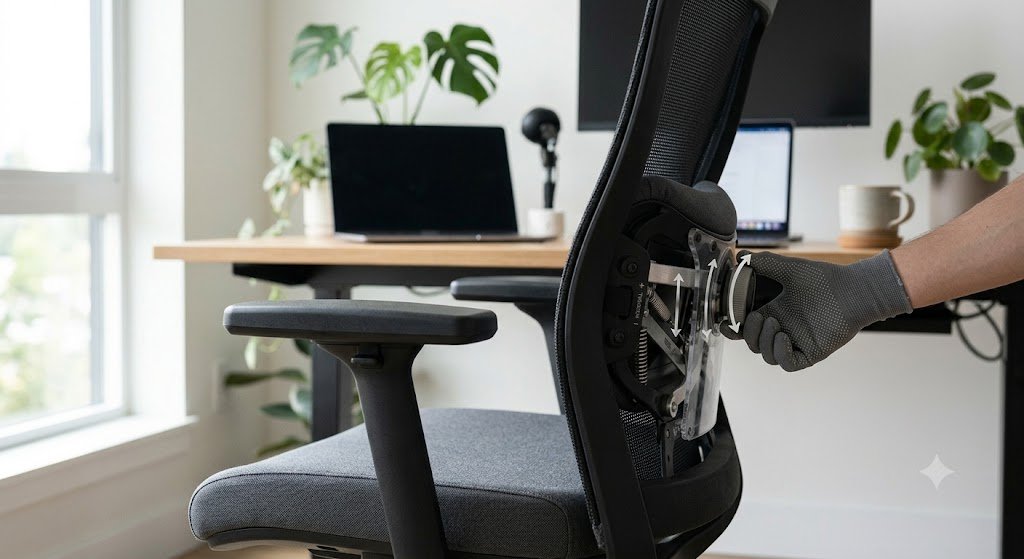
Flexible lumbar panels
A flexible panel can deform when pressure from the user’s back changes. Instead of a rigid pad pushing from one fixed location, the material accommodates small changes in posture.
Pivoting lumbar structures
A pivoting lumbar element can rotate around an attachment point. This allows the support angle to change dynamically as the user’s back moves.
Sliding systems
Some chairs allow the lumbar component to move vertically, horizontally, or in depth. These systems can be both manually adjustable and dynamically responsive, depending on their design.
Tension-responsive systems
Some mechanisms use resistance rather than a simple free-moving pad. The lumbar structure yields when the user changes pressure and returns toward its original position when the pressure changes.
Recline-synchronized systems
In more advanced designs, the lumbar section is mechanically linked to backrest movement. As seen on flagships like the Herman Miller Aeron review model, PostureFit SL stabilizes the sacrum and lower back simultaneously through synchronized recline.
Fixed vs Adjustable vs Dynamic Lumbar Support
Comparative backrest engineering distinguishes stationary contours from user-set dials and automated movement tracking.
These three terms describe different ergonomic properties and are often incorrectly treated as interchangeable.
| System | What changes? | When does it change? | Main advantage | Main limitation |
|---|---|---|---|---|
| Fixed | Usually nothing after installation | Only when physically repositioned | Simple and predictable | Can lose ideal contact when posture changes |
| Adjustable | Height, depth, pressure or position | Usually by the user | Better initial fit | Still may remain static during movement |
| Dynamic | Position, angle, flex or pressure relationship | During normal movement or recline | Adapts to posture changes | Can be more complex and expensive |
| Adjustable + dynamic | Manual settings plus movement | During adjustment and use | Highest tuning flexibility | More variables to understand |
5 Types of Dynamic Lumbar Support Mechanisms
Commercial ergonomic designs employ five distinct mechanical categories ranging from flexible passive slats to synchronized multi-bar linkages.
1. Flexible support
The lumbar structure flexes under changing pressure without complex moving joints.
2. Pivoting support
Rotates around a mechanical pivot. For example, our hands-on review tests 3-zone independent floating wings that swivel with torso rotation.
3. Sliding support
The lumbar element moves along tracks, combining manual positioning with active movement during recline.
4. Tension-responsive support
Responds to pressure and auto-tunes resistance using spring-loaded auto-tracking lower back plates.
5. Recline-synchronized support
The lumbar region changes alongside the backrest angle to maintain close contact during deep recline.
How to Adjust Dynamic Lumbar Support Correctly
Proper calibration sequences align the apex of the lumbar pad directly with the L1–L5 vertebrae before establishing spring resistance.
Correct adjustment starts with the chair’s basic geometry. Follow our complete 9-step guide on how to adjust an ergonomic chair for lower back pain before fine-tuning dynamic settings.
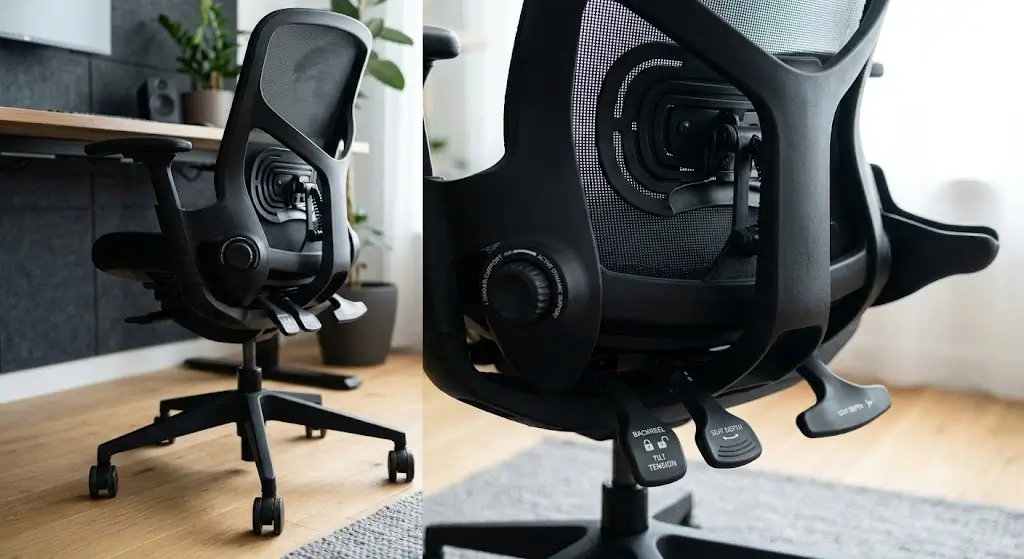
Does Dynamic Lumbar Support Improve Posture Automatically?
Automated lumbar tracking accommodates posture variation but cannot override poor monitor placement or improper desk height.
No. Dynamic support can make it easier for a chair to accommodate different postures, but posture is influenced by the entire workstation. Ensuring the proper ergonomic chair height for your desk setup, alongside screen distance, desk height, seat depth, and foot support, all dictate how you sit.
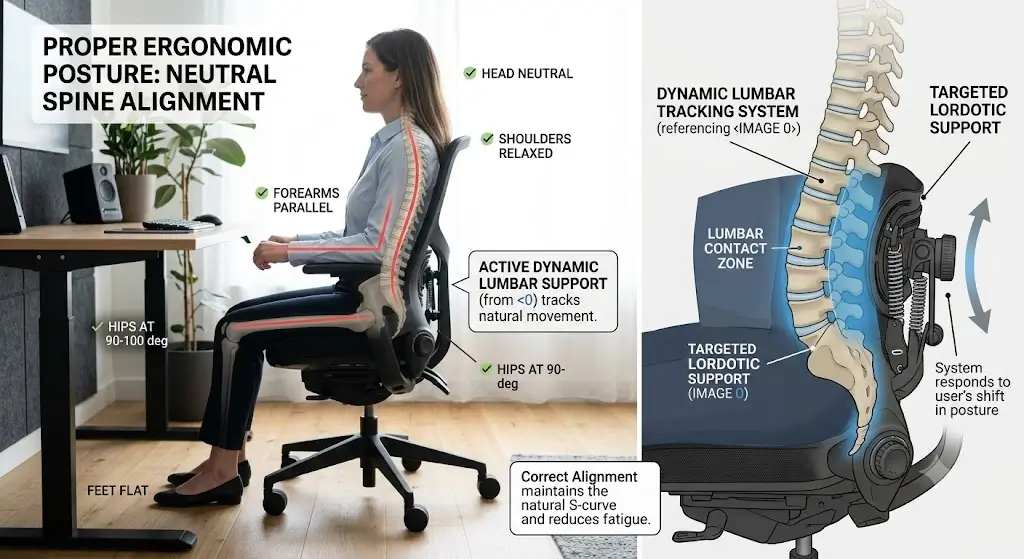
Can Dynamic Lumbar Support Help Lower-Back Discomfort?
Clinical ergonomics research demonstrates that continuous backrest contact reduces spinal disc loading during active shift work.
A properly adjusted chair can improve sitting comfort for many people. Dynamic support may be useful because it accommodates movement rather than holding the spine rigidly. If you are comparing specific models designed around targeted spinal relief, explore our curated breakdown of the best ergonomic office chairs for lower back pain.
When Is Fixed Lumbar Support Actually Better?
Stationary lumbar contours deliver superior biomechanical stability for sitters who maintain upright task-focused positions without reclining.
Fixed support can be the better engineering choice when the user values simplicity and has a stable working posture. If your current office chair has a flat backrest and lacks dynamic lumbar support, pairing it with an ergonomic insert provides predictable, structured lordosis support at a fraction of the cost.
Bottom Line: Evaluating Dynamic Lumbar Value
Hardware cost-benefit audits confirm that dynamic lumbar mechanisms justify their premium primarily for frequent recliners and active workers.
Dynamic lumbar support is a useful ergonomic feature when it provides controlled support through normal posture changes and recline.
Its strongest use case is the person who moves frequently during long desk sessions. If you sit upright most of the time and already have comfortable adjustable lumbar support, the premium for dynamic movement may not be justified.
Frequently Asked Questions About Dynamic Lumbar Support
Biomechanical hardware engineers clarify common inquiries regarding recline tracking, pressure regulation, and posture adaptation.
What is dynamic lumbar support?
Dynamic lumbar support is a chair mechanism that changes position, angle, tension, or flex as the user changes posture or reclines.
Is dynamic lumbar support worth it?
It can be worth the additional cost for users who frequently change posture or recline. If you maintain a stable position and already have comfortable fixed or adjustable lumbar support, the extra cost may not provide enough benefit.
What is the difference between fixed and dynamic lumbar support?
Fixed lumbar support remains in one position. Dynamic lumbar support can move or flex in response to posture changes or chair movement.
Can dynamic lumbar support help lower-back pain?
A properly adjusted ergonomic chair may improve comfort for some users, but dynamic lumbar support is not a medical treatment. Persistent or significant pain should be evaluated appropriately by a qualified healthcare professional.
