What Is Dynamic Lumbar Support and Is It Worth It?
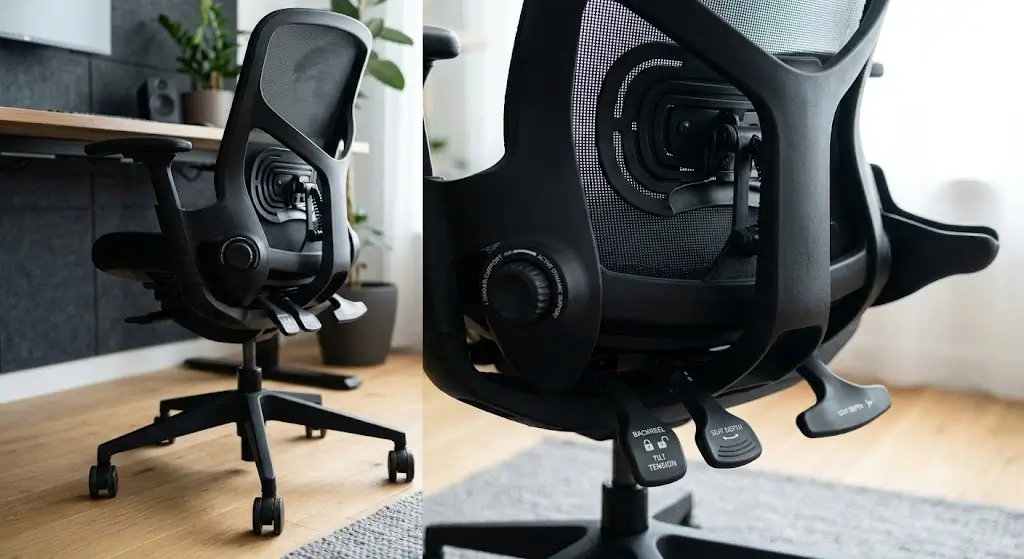
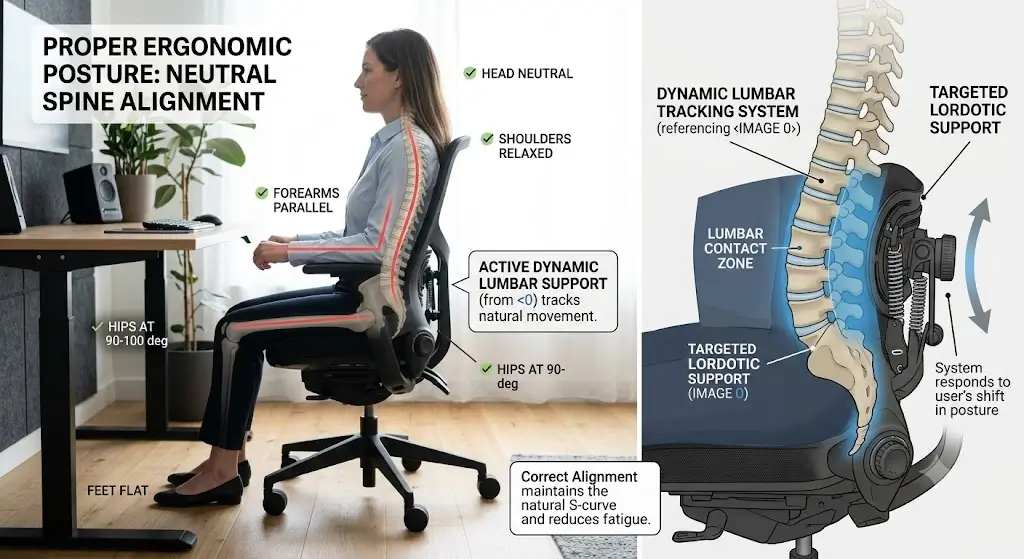
Dynamic lumbar support is a lower-back support system that changes position, angle, tension, or contact as the user moves. Instead of keeping the lumbar structure completely fixed, an ergonomic chair with dynamic lumbar support is designed to accommodate changes such as shifting posture, leaning back, or reclining.
That distinction matters because people do not remain in one exact sitting position throughout a workday. You may sit upright while typing, lean back while reading, move forward toward a screen, or recline during a meeting. A fixed lumbar pad stays in one location while your body changes relative to it.
Quick answerDynamic lumbar support is worth paying more for when you regularly change posture or recline and the mechanism maintains comfortable lumbar contact during those movements.
If you mostly sit upright and already feel comfortable with a properly adjusted fixed or manually adjustable lumbar system, investing in a dynamic lumbar support chair may not justify a large price premium.
What Is Dynamic Lumbar Support?
Dynamic lumbar support is an ergonomic chair feature that allows the lumbar portion of the backrest to respond to movement instead of remaining completely static.
The movement can happen through a flexible material, pivoting structure, sliding component, tension mechanism, synchronized backrest movement, or another mechanical design.
The intended result is simple: keep the relationship between the user’s lower back and the chair more consistent as posture changes.
This is different from simply being able to move the lumbar pad manually. Manual adjustment determines where the support starts. True dynamic lumbar support determines what happens after you start moving.
One-sentence definitionDynamic lumbar support follows or responds to the user’s movement instead of supporting only one fixed position.
How Does Dynamic Lumbar Support Actually Work?
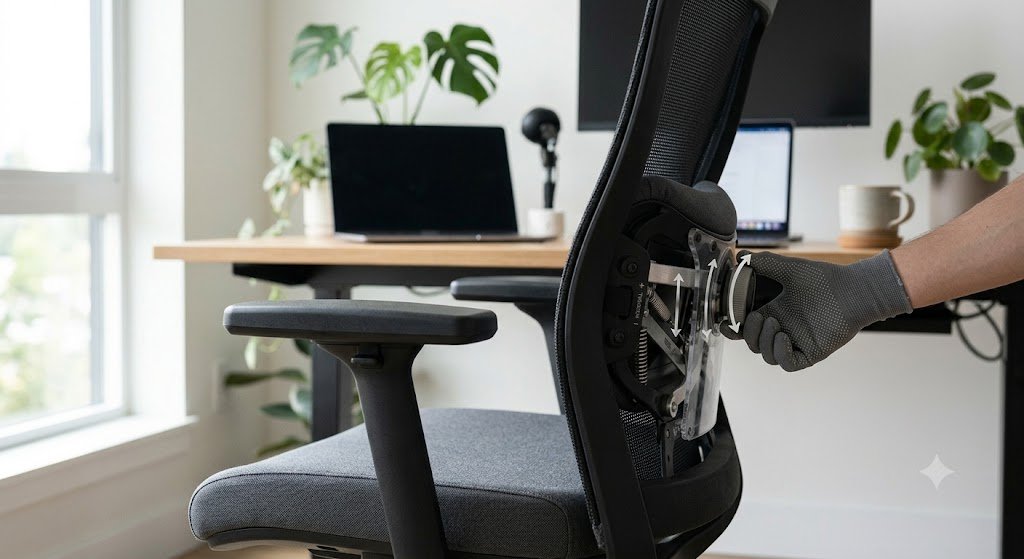
There is no universal mechanism. The core engineering principle of dynamic lumbar support is to permit controlled movement between the lumbar structure and the rest of the chair frame.
Flexible lumbar panels
A flexible panel can deform when pressure from the user’s back changes. Instead of a rigid pad pushing from one fixed location, the material accommodates small changes in posture.
Pivoting lumbar structures
A pivoting lumbar element can rotate around an attachment point. This allows the support angle to change dynamically as the user’s back moves.
Sliding systems
Some chairs allow the lumbar component to move vertically, horizontally, or in depth. These systems can be both manually adjustable and dynamically responsive, depending on their design.
Tension-responsive systems
Some mechanisms use resistance rather than a simple free-moving pad. The lumbar structure yields when the user changes pressure and returns toward its original position when the pressure changes.
Recline-synchronized systems
In more advanced designs, the lumbar section is mechanically linked to backrest movement. As the backrest reclines, the dynamic lumbar support tracks position or angle with it.
Fixed vs Adjustable vs Dynamic Lumbar Support
These three terms describe different ergonomic properties and are often incorrectly treated as interchangeable.
| System | What changes? | When does it change? | Main advantage | Main limitation |
|---|---|---|---|---|
| Fixed | Usually nothing after installation | Only when physically repositioned | Simple and predictable | Can lose ideal contact when posture changes |
| Adjustable | Height, depth, pressure or position | Usually by the user | Better initial fit | Still may remain static during movement |
| Dynamic | Position, angle, flex or pressure relationship | During normal movement or recline | Adapts to posture changes | Can be more complex and expensive |
| Adjustable + dynamic | Manual settings plus movement | During adjustment and use | Highest tuning flexibility | More variables to understand |
A chair can therefore be adjustable without having dynamic lumbar support, or combine both features in a single mechanism.
5 Types of Dynamic Lumbar Support Mechanisms
1. Flexible support
The lumbar structure flexes under changing pressure. This is mechanically simple and provides motion without a large number of moving parts.
2. Pivoting support
A lumbar component rotates or tilts around a mechanical pivot, allowing its angle to adjust relative to the backrest.
3. Sliding support
The lumbar element moves along one or more tracks, combining manual positioning with active movement during recline.
4. Tension-responsive support
The mechanism responds to pressure from the user’s lower back and provides adaptive resistance rather than holding a rigid position.
5. Recline-synchronized support
The lumbar region changes alongside the backrest angle so that dynamic lumbar support remains close to the lower back during deep recline.
These designs produce very different seating sensations. Two chairs advertised with dynamic lumbar support should never be assumed to feel identical.
Why Does Reclining Change Lumbar Support?
Reclining changes the biomechanical geometry between your torso, pelvis, backrest, and lumbar curve.
Imagine a fixed lumbar pad attached to a backrest. When you lean backward, the backrest rotates. The lumbar pad rotates with it, but your body also changes its position relative to the seat and backrest.
Depending on chair geometry, a static pad can feel more prominent, less prominent, higher, lower, or differently angled during recline. A dynamic lumbar support system attempts to compensate for these spatial shifts.
Why this mattersDynamic lumbar support is most technically useful when the user actually moves. If you never recline or shift posture, there is less movement for the mechanism to accommodate.
Why Is Movement Important in an Ergonomic Chair?
A good ergonomic chair should accommodate normal changes in posture rather than requiring you to hold one position all day.
People naturally shift their pelvis, torso, shoulders, and head while working. The amount and direction of movement varies by task.
Typing, reading, video calls, writing, gaming, and thinking away from the keyboard all produce different seating angles.
Dynamic lumbar support is therefore best understood as a movement accommodation feature, not a rigid “posture lock” tool.
- It should allow normal posture changes.
- It should not require constant manual readjustment.
- Support should remain comfortable through the chair’s intended range of motion.
- Movement should feel controlled rather than loose.
- The mechanism should not force the user into one position.
Key Benefits of Dynamic Lumbar Support
1. More consistent contact during movement
A dynamic lumbar support mechanism maintains useful spinal contact as you shift between tasks.
2. Better compatibility with recline
Frequent recliners are more likely to notice the difference between a fixed support and a chair engineered with active lumbar tracking.
3. Less need for manual repositioning
If the mechanism responds automatically, you do not need to stop working to fiddle with manual dials.
4. Potentially less rigid feeling
Many dynamic lumbar systems cradle the spine gently without creating harsh pressure points.
5. Better accommodation of different tasks
A user can move between focused typing and relaxed reading without losing essential lower-back support.
What Dynamic Lumbar Support Does Not Do
Understanding the limits of dynamic lumbar support prevents overpaying for unnecessary marketing hype:
- It does not automatically correct posture.
- It does not guarantee lower-back comfort.
- It does not compensate for an incorrect seat depth.
- It does not fix an overly high or low desk.
- It does not replace movement during the workday.
- It does not make every chair fit every body.
- It does not automatically mean the chair is better built.
- It does not have one universally correct pressure setting.
Potential Drawbacks of Dynamic Lumbar Support
More mechanical complexity
A system with moving components requires more precision engineering and potentially more maintenance than a simple fixed pad.
More adjustment variables
Height, depth, tension, and recline dynamics can interact. A chair with many controls can take longer to configure correctly.
Potential pressure problems
If dynamic lumbar support is too aggressive, it may feel intrusive rather than supportive.
Higher purchase price
Chairs featuring dynamic lumbar support usually carry a premium price tag. The extra cost is justified only if the feature provides a tangible ergonomic benefit.
Repair considerations
More moving components can mean more parts that could eventually wear out. Warranty terms and replacement-part availability are critical when buying advanced ergonomic seating.
Is Dynamic Lumbar Support Worth Paying More For?
There is no universal dollar amount at which dynamic lumbar support becomes “worth it.” The correct comparison is between the additional cost and the actual problem the feature solves.
| Situation | Value of dynamic support | Reason |
|---|---|---|
| Short daily use | Low | Limited time in the chair means fewer opportunities to benefit from movement. |
| Stable upright posture | Low–moderate | A well-adjusted fixed system may already work. |
| Full-time desk work | Moderate–high | Longer sessions make movement and sustained comfort more relevant. |
| Frequent reclining | High | Dynamic tracking directly addresses changing backrest geometry. |
| Frequent posture changes | High | The mechanism has a practical job to perform. |
| Strong preference for simple chairs | Low–moderate | A complex mechanism may provide little additional value. |
Value rulePay more for dynamic lumbar support when you will use the movement, not simply because the chair has a premium feature list.
Who Benefits Most From Dynamic Lumbar Support?
Full-time remote workers
People spending 8+ hours at a computer benefit greatly from dynamic lumbar support accommodating varied working positions.
Frequent recliners
If you actively use the recline mechanism, dynamic lumbar tracking keeps the spine supported at all angles.
Posture changers
Users who alternate between upright, tasking, and relaxed stances make optimal use of dynamic flexibility.
Users who dislike rigid pads
Dynamic lumbar support provides a less aggressive, responsive feel that yields under body weight.
Who May Not Need Dynamic Lumbar Support?
You may not need a dynamic lumbar support system if:
- You use your chair for only a few hours a day.
- You rarely recline.
- You naturally maintain a relatively consistent working position.
- You already find a fixed lumbar support comfortable.
- You prioritize simplicity.
- You are trying to keep the chair purchase within a strict budget.
A high-quality fixed lumbar system that fits you well can be a better purchase than an expensive dynamic mechanism that does not.
Dynamic Lumbar Support vs Adjustable Lumbar Support: Which Is Better?
The answer depends on the problem.
If your problem is poor initial positioning: Prioritize adjustability. You need to put the lumbar support in the correct location.
If your problem is losing support when you recline: Prioritize dynamic lumbar support and test the mechanism through the full recline range.
If your problem is excessive pressure: Look for pressure or depth adjustment rather than simply adding more movement.
If your problem is overall chair fit: Prioritize seat depth, seat height, backrest geometry and seat width before paying for advanced lumbar technology.
How to Adjust Dynamic Lumbar Support Correctly
Correct adjustment starts with the chair’s basic geometry. (If you need a complete walkthrough on overall seat setup, see our guide on how to adjust an ergonomic chair). Do not begin by turning the lumbar support to maximum pressure.

Set seat height
Set the chair so your feet are supported and your working position relative to the desk is comfortable.
Set seat depth
If the seat pan slides, establish a comfortable thigh-support position before fine-tuning the lumbar mechanism.
Position the lumbar support
Adjust lumbar height so the support contacts the intended lower-back region rather than an unnecessarily high area.
Start with moderate pressure
Use a middle or relatively low setting first. You need a baseline before determining whether additional pressure helps.
Test normal movement
Type, reach, lean slightly backward and return upright. Pay attention to whether the support remains comfortable.
Test recline
Recline through your normal range. A dynamic system should be judged by what it does while moving, not only while stationary.
Make small changes
Adjust one variable at a time. Changing height, depth and pressure simultaneously makes it difficult to identify what improved or worsened the fit.
How Much Lumbar Pressure Is Appropriate?
There is no universal numerical pressure value that works for every user or every chair.
The useful target is comfortable, distributed support without a distracting pressure point.
- The support should feel present but not aggressive.
- You should not feel pushed excessively forward.
- You should be able to change position naturally.
- The lumbar area should not become a concentrated pressure point.
- Reclining should not require you to fight the mechanism.
- Comfort should remain acceptable after extended use.
How High Should Dynamic Lumbar Support Be?
There is no single height that works for every adult because torso length, chair geometry and lumbar design vary.
Instead of selecting a number from a chart, position the support so that it contacts the lower-back area where it feels supportive without creating an upward pressure point.
Then test it while upright and reclined. A position that feels correct when sitting still can feel different when the dynamic lumbar support moves with you.
How to Test Dynamic Lumbar Support Before Buying
A specification sheet cannot tell you whether dynamic lumbar support feels smooth, intrusive, weak, or well-matched to your body.
If you can test the chair in person, use this sequence:
- Set the seat height.
- Adjust seat depth.
- Set the lumbar height.
- Start with moderate lumbar pressure.
- Sit upright for several minutes.
- Lean back slightly.
- Recline farther.
- Return upright.
- Change position naturally.
- Repeat the cycle several times.
What you are looking for
- Smooth movement.
- Consistent contact.
- No sudden pressure spike.
- No feeling of being pushed out of the chair.
- No excessive looseness.
- No abrupt loss of support during recline.
How to Choose a Chair With Dynamic Lumbar Support
1. Identify the actual moving component
Do not stop at “dynamic lumbar.” Find out whether the lumbar pad, support frame, mesh panel or entire backrest is moving.
2. Check the movement direction
Vertical movement, depth movement, pivoting and recline synchronization solve different problems.
3. Check the pressure range
A mechanism should not only move; it should provide an acceptable level of resistance and pressure.
4. Check recline compatibility
If you frequently recline, this should be one of your highest-priority tests.
5. Check seat depth
A sophisticated dynamic lumbar support cannot compensate for an incorrectly sized seat pan.
6. Check backrest geometry
The overall backrest should fit your torso rather than relying on one small lumbar feature to solve every fit issue.
7. Check warranty coverage
Moving mechanisms deserve particular attention to warranty duration, exclusions and replacement-part availability.
8. Check adjustability without overvaluing it
A chair with ten controls is not necessarily better than one with five useful controls.
What Technical Specifications Actually Matter?
Manufacturer specifications can be useful, but the label “dynamic lumbar support” by itself tells you very little about real-world performance.
| Specification or characteristic | Why it matters | What to ask |
|---|---|---|
| Lumbar height range | Determines vertical fit | How much can it move? |
| Lumbar depth | Controls how strongly it contacts the back | Can pressure be reduced? |
| Dynamic movement | Determines how the support responds | What physically moves? |
| Recline range | Determines the amount of movement the lumbar system must accommodate | Does support track through the entire range? |
| Seat depth | Changes torso-to-backrest relationship | Does it fit your leg length? |
| Backrest height | Influences overall torso support | Does the backrest fit your body? |
| Warranty | Important for complex mechanisms | Are moving parts covered? |
Common Dynamic Lumbar Support Failure Modes
Dynamic systems can fail ergonomically even when the mechanism itself is functioning correctly.
Failure mode 1: The support moves but does not track the right area
Movement alone is not useful if the lumbar structure is poorly positioned relative to the user’s anatomy.
Failure mode 2: Too much resistance
The support technically moves but requires excessive force, making normal posture changes feel restricted.
Failure mode 3: Too little resistance
The lumbar structure moves so freely that it feels unstable or provides inconsistent pressure.
Failure mode 4: Poor recline geometry
The backrest reclines but the lumbar relationship becomes less comfortable because the support does not move appropriately with it.
Failure mode 5: Excellent lumbar mechanism, poor seat fit
The chair may have sophisticated lumbar technology but still be uncomfortable because the seat pan is too deep, too shallow, too high or otherwise poorly matched.
Failure mode 6: Too many controls
Complexity can become a disadvantage when users cannot determine which adjustment affects which sensation.
Dynamic Lumbar Support and Seat Depth: Why the Two Must Be Evaluated Together
Seat depth determines how far your body sits from the backrest and therefore influences how the lumbar mechanism contacts you.
If the seat is excessively deep for you, you may sit farther back or adjust your pelvis in ways that change lumbar contact. If it is too shallow, your legs may lack adequate support.
This is why dynamic lumbar support should never be evaluated independently from the seat pan.
Buying priorityGet seat height, seat depth, seat width and backrest fit right first. Then judge whether dynamic lumbar movement adds meaningful value.
Does Dynamic Lumbar Support Improve Posture Automatically?
No.
Dynamic support can make it easier for a chair to accommodate different postures, but posture is influenced by the entire workstation. Ensuring the proper ergonomic chair height for your desk setup, alongside screen distance, desk height, seat depth, foot support, and backrest angle, all dictate how you sit.

A dynamic lumbar mechanism is therefore one component of an ergonomic setup rather than an automatic posture-correction system.
Can Dynamic Lumbar Support Help Lower-Back Discomfort?
A properly adjusted chair can improve sitting comfort for many people. Dynamic support may be useful because it accommodates movement rather than holding the spine rigidly. If you are comparing specific models designed around targeted spinal relief, explore our curated breakdown of the best ergonomic office chairs for lower back pain.
However, a chair feature should not be treated as a medical treatment. If discomfort is persistent, severe, worsening, or associated with other concerning symptoms, professional medical evaluation is more appropriate than relying on chair adjustments alone.
When Is Fixed Lumbar Support Actually Better?
Fixed support can be the better engineering choice when the user values simplicity and has a stable working posture.
Predictable contact
The support stays exactly where you position it.
Simpler mechanism
There are fewer moving components to understand and potentially maintain.
Lower cost
Good ergonomic support does not require a complex mechanism.
Stable working posture
If you rarely recline or change position, dynamic tracking may add little practical value.
Dynamic Lumbar Support Decision Matrix
| Your situation | Recommendation | Reason |
|---|---|---|
| I sit upright most of the day. | Adjustable lumbar may be enough. | Dynamic movement may provide limited additional value. |
| I recline frequently. | Strong case for dynamic support. | Recline changes lumbar geometry. |
| I change posture frequently. | Consider dynamic support. | The mechanism directly accommodates movement. |
| I want the simplest chair possible. | Fixed or simple adjustable system. | Less complexity may be preferable. |
| I have a limited budget. | Prioritize fit first. | Seat geometry often matters more than premium lumbar features. |
| I work 8+ hours daily. | Dynamic support can be valuable. | Extended use increases the importance of sustained comfort. |
| I already love my fixed lumbar chair. | Probably not necessary. | There may be little reason to pay for movement you do not need. |
Dynamic Lumbar Support Buying Checklist
- What exactly moves?
- Does the lumbar support pivot?
- Does it move vertically?
- Does it move in depth?
- Does it synchronize with recline?
- Can lumbar pressure be adjusted?
- Can lumbar height be adjusted?
- Is the movement smooth?
- Does support remain comfortable while reclining?
- Is the seat depth appropriate?
- Does the backrest fit your torso?
- Does the mechanism feel stable?
- What does the warranty cover?
- Are replacement parts available?
How to Tell Whether a Dynamic Lumbar System Is Actually Good
Do not count adjustment controls. Evaluate the relationship between movement and support.
A good system should have controlled movement, predictable resistance, appropriate lumbar positioning and useful contact through the chair’s intended range of motion.
A chair with fewer controls can outperform a chair with many controls if its geometry and movement are better matched to the user.
Should You Buy a Chair Just Because It Has Dynamic Lumbar Support?
No.
Treat dynamic lumbar support as one component of the chair rather than the entire evaluation.
A sensible purchase hierarchy is:
- Basic body fit.
- Seat height and seat depth.
- Backrest geometry.
- Armrest compatibility.
- Recline behavior.
- Lumbar position and pressure.
- Dynamic lumbar movement.
- Build quality and warranty.
- Price and long-term value.
The exact order can change by user, but the principle remains: advanced lumbar technology should complement good chair geometry, not compensate for poor geometry.
Bottom Line
Final verdictDynamic lumbar support is a useful ergonomic feature when it provides controlled support through normal posture changes and recline.
Its strongest use case is the person who moves frequently during long desk sessions. If you sit upright most of the time and already have comfortable adjustable lumbar support, the premium for dynamic movement may not be justified.
The best dynamic lumbar system is not necessarily the one with the most movement. It is the one that maintains useful contact without excessive pressure, instability or restriction.
Before buying, test the chair upright and reclined, identify what actually moves, evaluate seat depth and backrest fit, and check warranty coverage for the moving mechanism.
Frequently Asked Questions About Dynamic Lumbar Support
What is dynamic lumbar support?
Dynamic lumbar support is a chair mechanism that changes position, angle, tension, or flex as the user changes posture or reclines.
Is dynamic lumbar support worth it?
It can be worth the additional cost for users who frequently change posture or recline. If you maintain a stable position and already have comfortable fixed or adjustable lumbar support, the extra cost may not provide enough benefit.
What is the difference between fixed and dynamic lumbar support?
Fixed lumbar support remains in one position. Dynamic lumbar support can move or flex in response to posture changes or chair movement.
What is the difference between adjustable and dynamic lumbar support?
Adjustable lumbar support is manually positioned by the user. Dynamic lumbar support changes during normal movement or recline. A chair can have both features.
Does dynamic lumbar support work while reclining?
Some systems are specifically designed to maintain lumbar contact during recline. The effectiveness depends on the chair’s actual mechanism and geometry.
Is dynamic lumbar support better for long hours?
It can be useful during long sessions because it accommodates movement, but overall chair fit is more important than the dynamic feature alone.
Can dynamic lumbar support be uncomfortable?
Yes. Excessive pressure, incorrect height, excessive depth, or poor body fit can make a dynamic system uncomfortable.
Should lumbar support be very firm?
Not necessarily. The appropriate setting is the one that provides useful contact without creating distracting or excessive pressure.
Does dynamic lumbar support correct posture?
No. It can accommodate posture changes but does not automatically create correct posture or replace proper workstation adjustment.
Can fixed lumbar support be better?
Yes. A well-fitted fixed system can be simpler, predictable and less expensive, especially for users who rarely recline or change posture.
What should I look for in a dynamic lumbar chair?
Look at the actual moving component, movement direction, pressure control, recline synchronization, seat depth, backrest geometry, mechanism stability, warranty and replacement-part availability.
Can dynamic lumbar support help lower-back pain?
A properly adjusted ergonomic chair may improve comfort for some users, but dynamic lumbar support is not a medical treatment. Persistent or significant pain should be evaluated appropriately by a qualified healthcare professional.