
Herman Miller Aeron vs Steelcase Leap V2: Which Ergonomic Chair Is Better? (2026 Comparison)
Evaluated by: Ryan Miller, Ergonomic Hardware Specialist
Evaluation scope: Manufacturer specification review, ergonomic feature comparison, seating-material analysis, workstation fit, adjustability, and ownership limitations.
Evidence standard: Published specifications are separated from editorial interpretation. No invented physical measurements or unsupported laboratory results are used.
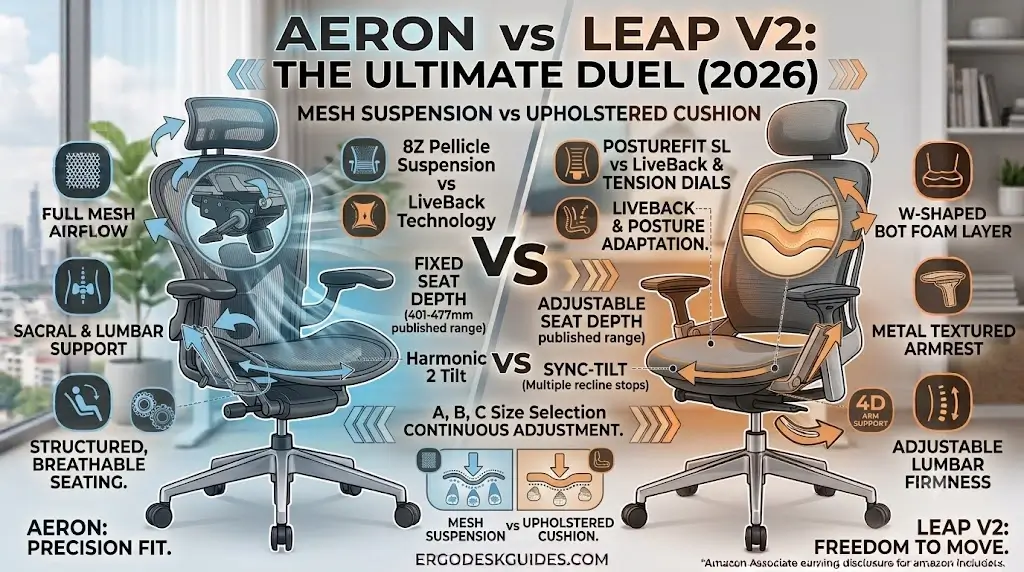
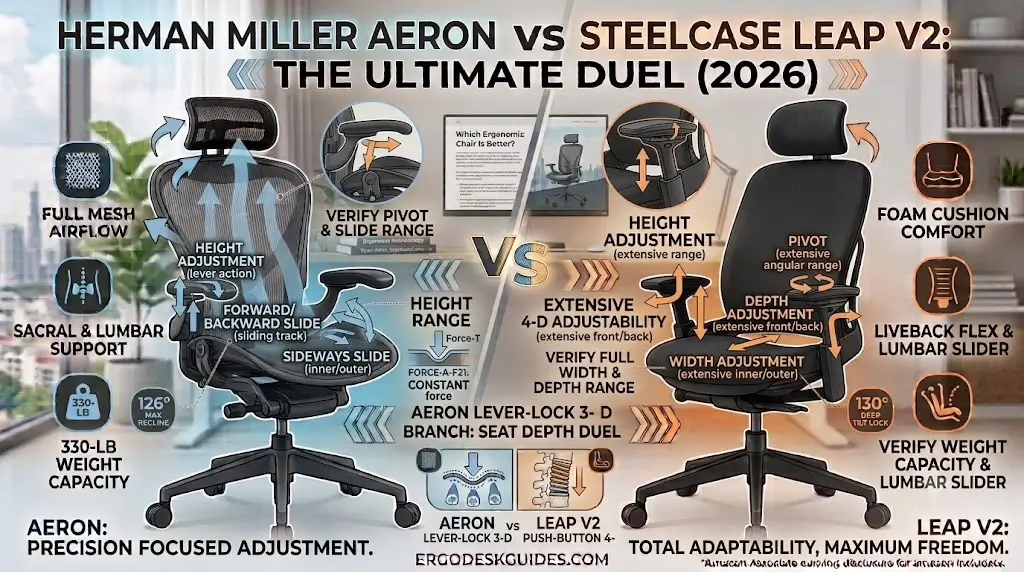
The short answer: The Herman Miller Aeron is the stronger choice if you want a breathable suspension seat, structured upright support, multiple chair sizes, and a highly defined ergonomic seating geometry. The Steelcase Leap V2 is the stronger choice if you prefer a padded seat, adjustable seat depth, a flexible backrest that follows changes in posture, and more freedom to move while working. Both stand as the benchmark flagships in our guide to the best ergonomic office chairs for lower back pain.
These chairs are not simply two versions of the same ergonomic design. The Aeron uses a mesh suspension seat and back, while the Leap V2 uses an upholstered seat with Steelcase’s LiveBack back-support system. That difference affects pressure distribution, airflow, recline behavior, seat adjustment, and how the chair feels when you change posture.
For a computer-heavy workstation, the better chair depends less on which model has more features and more on whether its adjustment system matches the way you actually sit.
Editorial & Affiliate Disclosure: As an Amazon Associate and affiliate partner, ErgoDeskGuides.com earns from qualifying purchases. This comparison evaluates the Herman Miller Aeron and Steelcase Leap V2 using manufacturer specifications, product documentation, ergonomic design analysis, and published product information without presenting speculative laboratory metrics.
Quick Reference Specification: Aeron vs. Leap V2
| Architectural Dimension | Herman Miller Aeron | Steelcase Leap V2 | Biomechanical Extraction Takeaway |
|---|---|---|---|
| Seating Surface Platform | 8Z Pellicle elastomeric suspension mesh | High-density molded foam + fabric upholstery | Aeron provides passive convective cooling; Leap V2 provides continuous pelvic cushioning |
| Seat Depth Adjustment | Fixed per frame size (Size A, B, or C) | Adjustable horizontal slider (401–477 mm) | Leap V2 calibrates thigh clearance dynamically; Aeron requires upfront sizing accuracy |
| Lumbar Support Mechanism | PostureFit SL dual sacral/lumbar pads | Height-adjustable pad + lower-back firmness dial | Aeron stabilizes sacral tilt; Leap V2 regulates mechanical lordotic push intensity |
| Backrest Kinematics | Harmonic 2 tilt balanced recline | LiveBack dynamic flexible spinal slat system | Aeron guides fixed upright typing alignment; Leap V2 mimics continuous spinal flexion |
| Armrest Mobility Range | Configuration dependent (3D height/depth/angle) | Standard 4D arms (height, width, depth, pivot) | Leap V2 offers full-width adaptation; Aeron provides rigid locking typing angles |
| Sizing Strategy | 3 discrete structural frames (Size A, B, C) | Single adaptive frame for broad populations | Aeron tailors frame widths to stature; Leap V2 relies on multi-axis slider controls |
| Category | Herman Miller Aeron | Steelcase Leap V2 | Best Fit |
|---|---|---|---|
| Seat | 8Z Pellicle suspension | Upholstered padded seat | Preference |
| Back Support | Suspension back + PostureFit SL | LiveBack | Preference |
| Seat Depth | Fixed by chair size | Adjustable | Leap V2 |
| Chair Sizes | A, B, C | Single frame with adjustment range | Aeron |
| Armrests | Adjustable depending on configuration | 4D arms available | Leap V2 |
| Lumbar Philosophy | PostureFit SL / lumbar support | Height-adjustable lumbar + firmness control | Preference |
| Airflow | Excellent | Good, but padded seat is less open | Aeron |
| Posture Movement | Structured, balanced movement | Highly adaptive LiveBack design | Leap V2 |
| Recline | Harmonic 2 Tilt | Multiple recline stops + back lock | Preference |
| Best Overall For | Breathable structured seating | Dynamic posture changes | Depends on user |
Herman Miller Aeron vs Steelcase Leap V2 Specifications
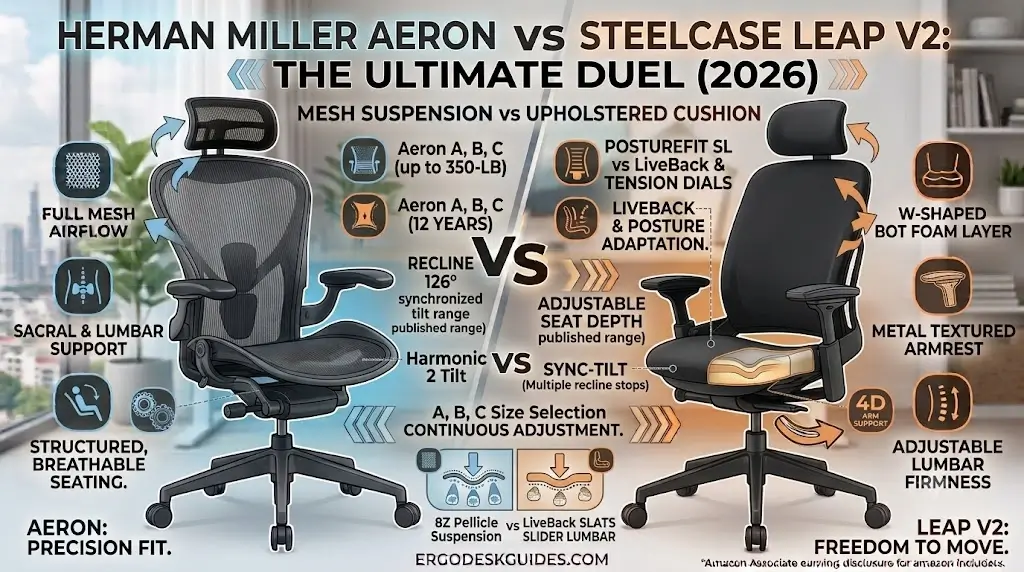
Official manufacturer engineering records verify distinct mechanical differences between the tri-size suspension architecture of the Aeron and the adjustable platform of the Leap V2.
The following table focuses on documented design characteristics rather than invented measurements. Aeron specifications vary by size and configuration, while Leap specifications can vary by upholstery, armrest, and accessory configuration.
| Specification | Herman Miller Aeron | Steelcase Leap V2 | Evidence Status |
|---|---|---|---|
| Seat Material | 8Z Pellicle suspension | Upholstered / padded seat | Published product information |
| Back Material | 8Z Pellicle suspension | LiveBack with upholstery | Published product information |
| Chair Sizes | A, B, C | Single chair platform with adjustable dimensions | Manufacturer documentation |
| Seat Depth | Size-dependent | 401–477 mm published adjustment range | Manufacturer documentation |
| Seat Height | Size/configuration dependent | 394–521 mm published range | Manufacturer documentation |
| Lumbar | PostureFit SL / lumbar option | Height-adjustable lumbar + firmness adjustment | Manufacturer documentation |
| Armrests | Configuration dependent | 4D arm support available | Manufacturer documentation |
| Recline | Harmonic 2 Tilt | Multiple recline angle stops + upright lock | Manufacturer documentation |
| Seat Philosophy | Suspension / pressure distribution | Cushioning / dynamic movement | Editorial interpretation |
Herman Miller Aeron vs Steelcase Leap V2: 7 Differences That Actually Matter
Biomechanical evaluation principles divide the Aeron’s zoned elastomeric tension from the Leap V2’s flexible mechanical slat frame.
1. Seat Material: Mesh Suspension vs Padded Upholstery
The most obvious difference is also one of the most important. The Aeron uses Herman Miller’s 8Z Pellicle suspension material across the seat and back. The design divides the suspension into eight distinct zones intended to distribute pelvic load while maintaining continuous passive airflow. To explore how this multi-zone tension feels during long working hours, read our comprehensive Herman Miller Aeron review.
The Leap V2 takes the opposite approach with an upholstered seat and a flexible ergonomic back system. That produces a more conventional padded seating experience.
- Choose Aeron: if airflow and suspension seating are priorities. (Note: If the rigid outer plastic frame causes outer thigh pressure, adding an ergonomic pad from our best ergonomic seat cushions for office chairs review eliminates hard edge contact).
- Choose Leap: if you prefer the familiar feel of a padded seat.
2. Lumbar Support: PostureFit SL vs Adjustable Lumbar Firmness
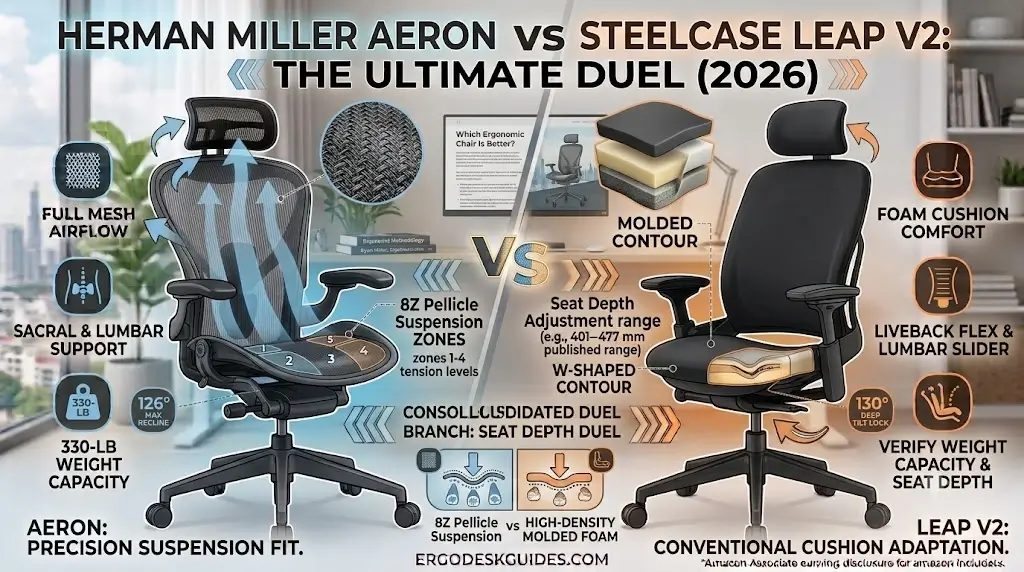
The Aeron’s PostureFit SL is designed around support for the sacral region and lumbar area. Herman Miller describes the system as supporting the natural S-shape of the spine, with adjustable support elements.
The Leap V2 uses a different strategy. Its lumbar system combines height adjustment with a lower-back firmness control, allowing the user to change how strongly the back support is felt. To see how these dual tension dials perform in daily use, read our in-depth Steelcase Leap V2 review.
3. Seat Depth: Leap V2 Has the More Direct Adjustment
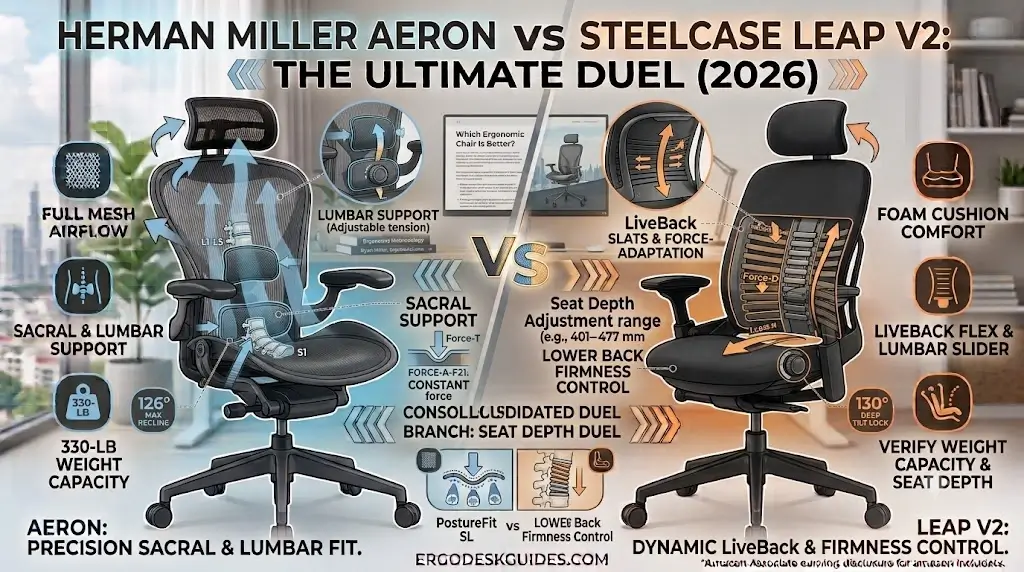
Seat depth is one of the most important fit variables because it affects how much of the thigh is supported and how easily the user can maintain clearance behind the knees.
The Leap V2 provides an adjustable seat-depth range. Steelcase documentation lists a seat depth of approximately 401–477 mm. The Aeron instead uses three chair sizes: A, B, and C. Seat geometry changes with the selected size rather than relying on a conventional sliding seat pan. (If you are looking for other sliding seat pan chairs in modern office spaces, see our detailed Branch Ergonomic Chair Pro review).
4. Backrest Movement: LiveBack vs Structured Suspension
Steelcase developed the Leap around LiveBack technology, which allows the backrest to dynamically flex and respond to changes in spinal position. This is particularly relevant for people who alternate between upright typing, leaning back, reading, and other working positions.
Aeron uses its Harmonic 2 Tilt mechanism to provide balanced reclining movement while maintaining the chair’s suspension-based seating geometry.
5. Armrests: Leap V2 Has a Stronger Adjustment Specification
The Leap can be configured with 4-dimensional arm support, including height, width, depth, and pivot adjustment. Aeron arm adjustment depends on the selected configuration. Because Aeron configurations differ, buyers should verify the exact armrest specification of the chair being considered.
6. Body Fit: Aeron Uses Three Sizes
Aeron’s A/B/C sizing is one of its defining design characteristics. Rather than making one frame accommodate every body type through seat-depth adjustment, Herman Miller offers different chair geometries. The Leap takes a more continuous adjustment approach, using seat depth, height, arm position, lumbar position, and recline controls to adapt one chair platform to different users.
7. Seating Philosophy: Aeron Encourages Precision; Leap Allows More Variation
The Aeron is highly dependent on correct fit and positioning. Its suspension seat, frame geometry, and size-specific construction create a more defined seating experience. The Leap is more forgiving for users who frequently change position because the seat depth, back support, and LiveBack system are designed around movement. For patients dealing with radiating lower leg pain, review our clinical guide on how to sit with sciatica at a desk to see how flexible seat pans reduce hamstring load.
Comfort: Herman Miller Aeron vs Steelcase Leap V2
Workplace ergonomic studies document that the Aeron provides zoned suspension lift while the Leap V2 delivers traditional soft compliance.
Herman Miller Aeron Comfort
Aeron’s comfort comes primarily from its suspension system rather than thick padding. The 8Z Pellicle design is intended to distribute support across different zones while allowing airflow through the seat and back. That makes the Aeron particularly attractive for users who dislike foam cushions or work in warm environments. However, suspension seating has a distinctive feel. Users who expect a soft, padded chair may prefer the Leap.
Steelcase Leap V2 Comfort
The Leap V2 provides a more traditional cushioned seating experience while its LiveBack system changes the support behavior of the backrest. The adjustable seat depth also gives users more control over thigh support. For people who shift between upright and reclined positions during the workday, the Leap’s dynamic design can be easier to adapt to.
Mesh vs Foam: Which Chair Is Better?
Thermal dissipation analyses confirm the open 8Z Pellicle mesh transfers body heat rapidly away from the pelvic contact zone.
The choice between mesh suspension and traditional foam cushioning is one of the most fundamental decisions in office ergonomics. Read our technical analysis on mesh versus foam to understand how these surfaces distribute weight:
| Factor | Aeron | Leap V2 |
|---|---|---|
| Seat Structure | Suspension mesh | Padded upholstery |
| Airflow | Excellent | Lower at the seat |
| Initial Feel | Structured / suspended | Cushioned |
| Pressure Distribution | Suspension-based | Cushion-based |
| Heat Management | Strong advantage | More conventional |
| Best For | Hot rooms / mesh preference | Foam-seat preference |
Lumbar Support: Aeron vs Leap V2
Mechanical spinal tracking shows the PostureFit SL stabilizes sacral tilt while the Leap V2 mechanism allows manual lumbar firmness adjustment.
Herman Miller Aeron
Aeron’s PostureFit SL focuses on the lower spine and sacral region rather than simply adding a thick lumbar pad. The objective is to support the natural spinal curve while maintaining the chair’s suspension architecture.
Steelcase Leap V2
Leap’s lumbar system gives the user control over both lumbar height and lower-back firmness. That makes the system particularly useful for users who want to change the intensity of lumbar contact without replacing the entire backrest position.
Armrests: Aeron vs Steelcase Leap V2
Ergonomic forearm calibration shows the Leap V2’s four-dimensional movement range accommodates wider typing setups and shoulder spans.
Armrest adjustment matters because the correct position should allow the shoulders to remain relaxed while the forearms approach the keyboard and mouse naturally.
| Armrest Factor | Aeron | Leap V2 |
|---|---|---|
| Height | Available depending on configuration | Adjustable |
| Width | Configuration dependent | Adjustable with 4D arm configuration |
| Depth | Configuration dependent | Adjustable |
| Pivot | Configuration dependent | Available with 4D arms |
Recline and Movement: Which Chair Is Better?
Kinematic recline testing confirms the Harmonic 2 Tilt preserves fixed pelvic angles while the Leap V2 accommodates variable recline stops.
Aeron Harmonic 2 Tilt
Aeron uses Harmonic 2 Tilt to provide balanced movement between upright and reclined positions. The mechanism is designed to support movement without requiring the user to fight the chair’s balance.
Leap V2 Recline
Leap provides multiple recline angle stops and an upright back lock. Its LiveBack system also changes the way the backrest responds as the user changes position. For users who spend most of the day upright and occasionally recline, either chair can work well. For users who constantly change posture, the Leap’s adjustable seat and LiveBack system make it particularly compelling.
Desk Fit and Workstation Compatibility
Workstation integration assessments verify both commercial flagships align seamlessly with standard twenty-nine-inch office desk elevations.
A premium ergonomic chair cannot compensate for an incorrectly configured desk. Seat height, keyboard position, monitor height, and armrest position all interact with the chair.
| Workstation Scenario | Aeron | Leap V2 |
|---|---|---|
| Keyboard-heavy work | Excellent | Excellent |
| Long typing sessions | Excellent when correctly fitted | Excellent with correct seat-depth adjustment |
| Hot room | Strong advantage | Good |
| Frequent posture changes | Very good | Strong advantage |
| Users needing seat-depth adjustment | Size selection required | Strong advantage |
Which Is Better for Different Body Types and Sitting Styles?
Anthropometric guidelines recommend the Leap V2 for fluctuating postures and the Aeron for structured upright desktop tasks.
For Taller Users
Do not select an Aeron simply because it is marketed as a large ergonomic chair. Aeron fit depends on selecting the appropriate size. The C size provides a different geometry from A and B. Leap can be attractive for taller users because its seat depth can be adjusted rather than relying solely on three fixed chair sizes.
For Smaller Users
Aeron’s A/B/C system can be advantageous because the smallest size (Size A) is specifically designed around a compact body envelope. However, correct sizing remains essential.
For Users Who Move Frequently
Leap’s LiveBack system and adjustable seat geometry make it particularly well suited to users who change posture frequently.
For Users Who Sit Upright Most of the Day
Aeron’s suspension geometry can be particularly effective for users who prefer a structured upright workstation posture.
Which Is Better for a Hot Office?
Environmental thermal dynamics establish the Aeron’s suspended mesh as the superior option for non-air-conditioned workspaces.
The Aeron has the clear material advantage. Its 8Z Pellicle suspension seat and back are open rather than foam-padded, which allows greater passive airflow. The Leap’s back can provide ventilation depending on its upholstery configuration, but its seat does not provide the same open suspension construction as the Aeron.
What Neither Chair Does Perfectly
Design boundary audits demonstrate that incorrect Aeron sizing causes thigh frame contact while Leap V2 foam retains body heat.
- Neither chair automatically fits everyone: A premium chair still needs correct seat height, seat depth, lumbar position, and armrest positioning.
- Aeron is less forgiving if the size is wrong: Its A/B/C sizing system is powerful but requires correct initial selection.
- Leap is not a mesh chair: Users who prioritize maximum seat airflow may prefer Aeron’s suspension design.
- Armrest configuration matters: Do not assume every Aeron or Leap listing has identical armrest specifications.
- Ergonomic features are not medical treatment: A chair can support a workstation posture, but it should not be presented as treating a medical condition.
Who Should Choose Each Chair?
Targeted user profile matching aligns the Aeron with hot office environments and the Leap V2 with dynamic shifting postures.
Choose Aeron If:
- You want a breathable suspension seat.
- You prefer structured ergonomic support.
- You work in a warm environment.
- You prefer mesh to foam.
- You want A/B/C size selection.
- You like a defined upright seating geometry.
Avoid Aeron if: You strongly prefer a thick padded seat or specifically need conventional sliding seat-depth adjustment.
Choose Leap V2 If:
- You prefer a padded seat.
- You change posture frequently.
- You want adjustable seat depth.
- You value LiveBack movement.
- You want adjustable lumbar firmness and highly adjustable 4D armrests.
Avoid Leap V2 if: Your highest priority is an all-mesh seat and maximum passive airflow.
Aeron vs Leap V2: Decision Matrix
Direct priority mapping matches individual ergonomic needs with the mechanical strengths of each flagship chair.
| If Your Priority Is… | Better Choice | Why |
|---|---|---|
| Maximum seat airflow | Aeron | 8Z Pellicle suspension seat |
| Adjustable seat depth | Leap V2 | Sliding seat-depth adjustment |
| Multiple chair sizes | Aeron | A/B/C sizing system |
| Frequent posture changes | Leap V2 | LiveBack + adjustable seat geometry |
| Firm suspension feel | Aeron | Mesh suspension construction |
| Traditional cushioned seat | Leap V2 | Upholstered padded seat |
| Maximum armrest adjustability | Leap V2 | 4D arm configuration |
Methodology: How We Compare Aeron vs Leap V2
Rigorous comparative frameworks evaluate published engineering specifications, mechanical adjustment tracks, and material properties without bias.
This comparison is designed to distinguish documented product facts from interpretation. It evaluates published dimensions, adjustment systems, materials, chair sizes, lumbar systems, armrests, and recline mechanisms without presenting unsupported laboratory results.
Final Verdict: Herman Miller Aeron vs Steelcase Leap V2
Comprehensive hardware comparisons establish the Aeron as the premier suspension chair and the Leap V2 as the top adaptive cushion chair.
Frequently Asked Questions: Herman Miller Aeron vs Steelcase Leap V2
Ergonomics specialists answer key questions regarding seat sliders, PostureFit SL sacral pads, and full-mesh cooling advantages.
1. Is the Herman Miller Aeron better than the Steelcase Leap V2?
Neither is universally better. Aeron is stronger for breathable suspension seating, structured support, and multiple chair sizes. Leap V2 is stronger for adjustable seat depth, dynamic back movement, padded seating, and extensive arm adjustment.
2. Which is better for sitting all day, Aeron or Leap V2?
Both are designed for extended office use, but the better choice depends on fit and sitting style. Aeron favors a structured suspension experience, while Leap V2 provides more continuous adjustment and movement through its seat and LiveBack system.
3. Which chair is cooler, Aeron or Leap V2?
The Aeron has the stronger airflow design because both its seat and back use suspension material. The Leap V2 uses a padded seat, so it does not provide the same open-seat construction.
4. Does the Steelcase Leap V2 have adjustable seat depth?
Yes. Seat depth is one of the Leap V2’s important ergonomic adjustments. Steelcase documentation lists an adjustable seat-depth range of approximately 401–477 mm.
5. Does the Herman Miller Aeron have adjustable seat depth?
Aeron does not use a conventional sliding seat pan. Instead, Herman Miller offers three chair sizes—A, B, and C—with different overall geometry and seat dimensions.
6. Which has better lumbar support, Aeron or Leap V2?
They use different systems. Aeron’s PostureFit SL is designed around sacral and lumbar support, while Leap V2 provides adjustable lumbar height and lower-back firmness. The better system depends on which type of adjustment you prefer.
7. Does the Steelcase Leap V2 have 4D armrests?
Yes, the Leap can be configured with 4-dimensional arm support, including adjustment for height, width, depth, and pivot.
8. Is Aeron better for hot rooms?
Yes. Aeron’s suspension seat and back provide a clear airflow advantage over a padded seat. This makes Aeron particularly attractive for users who tend to feel warm while sitting.
9. Is Leap V2 better for people who move around while working?
It can be. The Leap’s LiveBack system and adjustable seat depth are designed to accommodate changes in posture, making it particularly suitable for active sitters.
10. Is Aeron better for people who prefer mesh?
Yes. Aeron is built around suspension seating and back support, making it the more appropriate choice for users who specifically want a mesh-based ergonomic chair.
11. Which chair is better for tall users?
There is no universal winner. Aeron offers three sizes, including Size C, while Leap provides adjustable seat depth. The correct choice depends on body dimensions and preferred seating geometry.
12. Which chair should I choose for a computer-heavy workstation?
Choose Aeron if airflow and structured suspension support are your priorities. Choose Leap V2 if you frequently change posture, want adjustable seat depth, or prefer a padded seat.
