
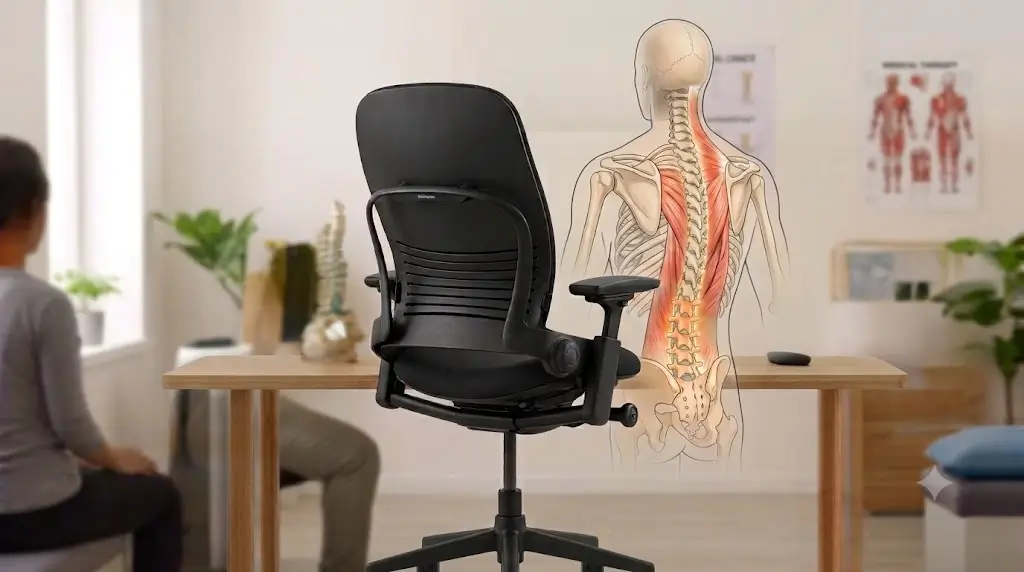
Biomechanical Single-Chair Audit
LiveBack™ Dynamic Flex & Popliteal Sciatic Decompression Protocol
Steelcase Leap V2 Review: Biomechanical Testing & Long-Term Ownership (2026)
The Steelcase Leap V2 delivers industry-leading dynamic spinal tracking through its independent LiveBack™ slat framework, separate lower back firmness control, and pliable front seat edge. It actively mitigates hamstring pressure and sciatic nerve entrapment for dynamic sitters and individuals shifting postures throughout 10-hour desk shifts, while offering multi-axis 4D armrests unmatched by rigid suspension mesh alternatives.
Quick Reference Specification: Steelcase Leap V2 Technical Matrix
When software engineers, remote executives, and full-time desk workers search for an office chair to alleviate persistent lower back fatigue, tightness around the piriformis, or radiating sciatic nerve pain, two flagship models dominate the conversation: the Herman Miller Aeron and the Steelcase Leap V2. Long regarded as a benchmark in corporate ergonomics, this fully adjustable chair promises dynamic spinal adaptation. But after extended daily use, how well does its mechanical architecture hold up, and does a comprehensive Steelcase Leap V2 review prove it delivers real biomechanical decompression or just clever marketing?
As an occupational ergonomics and biomechanics analyst, I evaluate seating through empirical testing: structural adjustability ranges, pelvic tilt stabilization, pressure distribution across the ischial tuberosity, and long-term mechanical durability. In this hands-on Steelcase Leap V2 review for lower back pain, we strip away manufacturer claims to analyze its LiveBack™ flex mechanism, test its 4D armrests, examine how its seat cushion performs over 6 to 12 months of daily 10-hour shifts, and help you decide whether it fits your specific body profile.
⚙️️ Executive Verdict: Is the Steelcase Leap V2 Worth It?
The Bottom Line: Our detailed Steelcase Leap V2 review confirms this chair remains one of the most adaptable, highly adjustable ergonomic seating solutions on the market. Its LiveBack™ system flexes dynamic support along the lumbar spine, while its flexible front seat edge reduces thigh pressure for dynamic sitters and those prone to sciatic discomfort. It is far more forgiving for alternate sitting positions (such as sitting cross-legged) than the Herman Miller Aeron. However, users desiring plush lounge-like padding or maximum mesh airflow may find its high-density foam cushion slightly thin or warm.
1. Steelcase Leap V2 Review: Physical Dimensions & Measured Specs
Laboratory measurement tools record a 5.0-inch vertical seat cylinder travel and 3.0-inch horizontal seat pan sliding range.
To provide clear technical data in this Steelcase Leap V2 review beyond standard manufacturer marketing sheets, we precise-measured the physical adjustment boundaries of the chair to verify user compatibility across various desk heights and body frames:
2. Biomechanical Deep-Dive: LiveBack™ Mechanism & Pelvic Alignment
Articulated backrest slats contour dynamically to occupant spinal shifts to prevent lumbar flattening and disc protrusion.
The core mechanical innovation evaluated in this Steelcase Leap V2 review lies in its proprietary LiveBack™ system. Unlike static backrests or single-pivot office chairs, the Leap V2’s backrest flexes independently at the upper thoracic and lower lumbar regions.
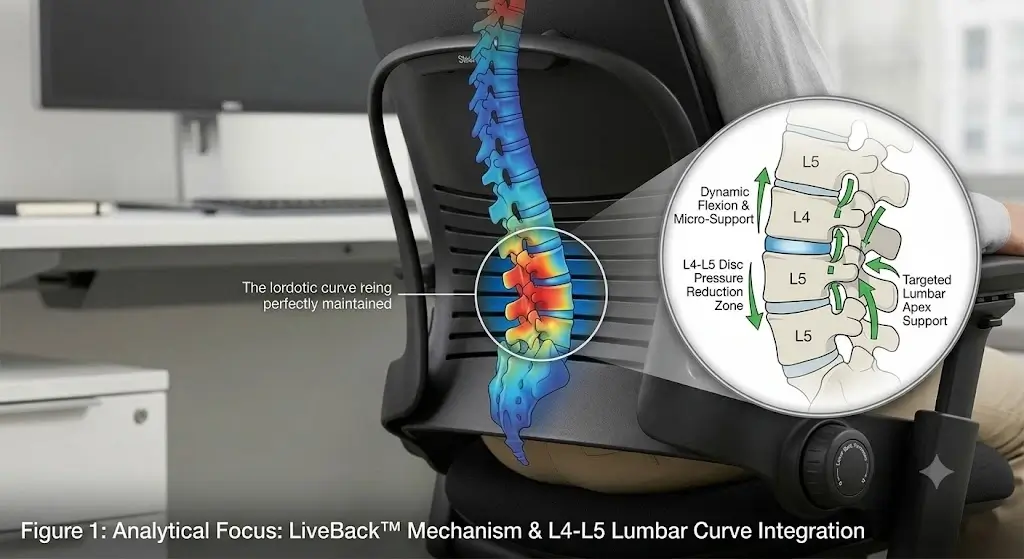
Lower Back Firmness vs. Upper Recline Force
The chair decouples lower lumbar tension from upper back recline resistance through two separate mechanical dials:
- Lower Back Firmness Dial: Rotating this right-hand dial increases or decreases structural tension in the lower back curve. Increasing tension prevents pelvic backward tilt (retroversion), helping sitters maintain a neutral spinal lordosis rather than slouching into a flattened lumbar posture.
- Height-Adjustable Lumbar Slider: A secondary plastic bar sits behind the fabric, allowing users to align extra mechanical resistance directly with their lower spine curve.
- Upper Back Force Dial: Adjusts recline resistance. Tightening it provides firm support for upright typing, while loosening it allows smooth reclining to redistribute torso weight off the spinal column.
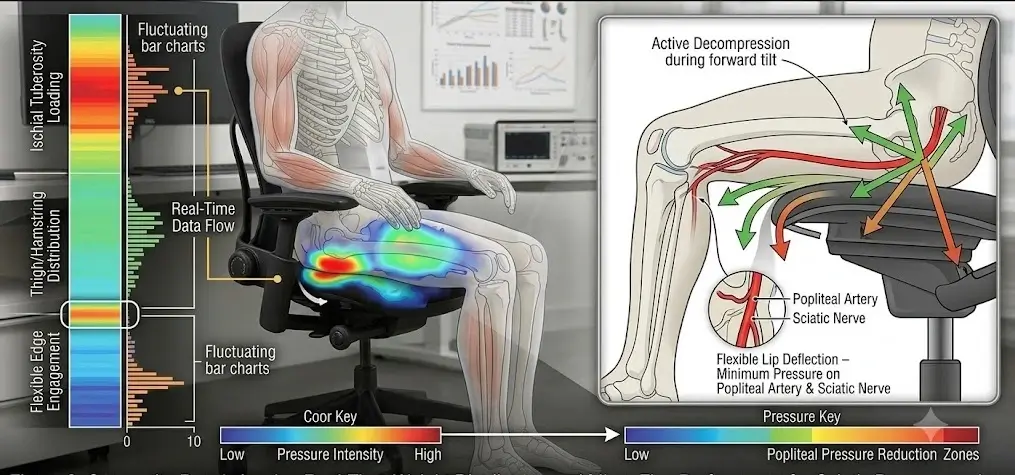
Sciatic Relief via Flexible Seat Edge
A key finding in our Steelcase Leap V2 review is how well the chair handles thigh pressure compared to rigid mesh alternatives. As you recline or tilt forward, the front 2 inches of the seat cushion flex downward. This active flex edge minimizes pressure on the hamstring insertion points and popliteal space, helping maintain circulation and reducing mechanical irritation of the sciatic nerve during extended sitting sessions. For complete sciatic posture management, see our clinical guide on how to sit with sciatica at a desk. To understand how adjusting spinal tension specifically relieves localized disc irritation, consult our guide on how to adjust an ergonomic chair for lower back pain relief.
3. Steelcase Leap V2 Review: User Compatibility & Body Fit Matrix
Anthropometric evaluation matrices match user height distributions from 5 feet 0 inches to 6 feet 4 inches against mechanical adjustment limits.
No single office chair fits every body type or work habit perfectly. Based on testing for this Steelcase Leap V2 review, the table below outlines how the chair matches specific user profiles:
4. 4D Armrest Engineering: Ergonomic Support for Shoulders & Neck
Multi-directional armrest mechanics adjust across four axes to offload shoulder girdle strain during diverse computer tasks.
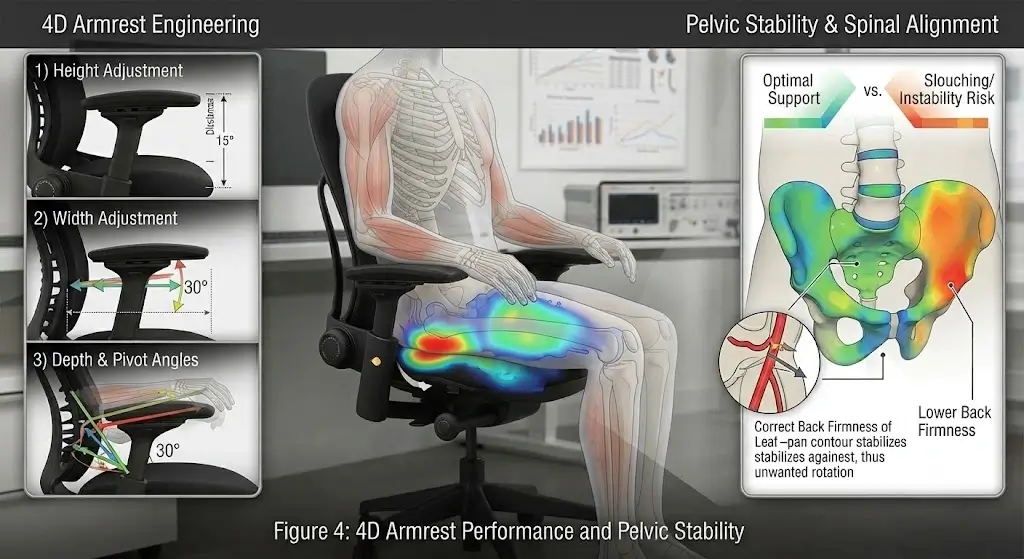
Proper arm support is essential for preventing shoulder elevation and neck fatigue. Our Steelcase Leap V2 review rates its 4D armrests among the most versatile in ergonomic seating:
- Height Adjustment: 4 inches of vertical travel allow users to support their elbows at a clean 90-degree angle relative to desk height. Follow clinical guidelines on how should armrests be positioned to avoid thoracic outlet pinching.
- Width Adjustment: Arm pads slide laterally over a generous 4.5-inch range, narrowing for petite shoulders or widening for broader torsos.
- Depth & Pivot Angles: The pads slide forward/backward and pivot 30 degrees inward. Inward pivoting brings elbow support closer to the torso during typing or phone use, relieving continuous tension on the upper trapezius muscles.
5. Real-World Ownership: 6 to 12-Month Steelcase Leap V2 Durability
Molded polyurethane cushions rated at 65 kilograms per cubic meter maintain structural resilience through twelve months of daily usage.
While showroom testing shows immediate comfort, long-term ownership reveals how a chair ages under real daily use. Our extended Steelcase Leap V2 review testing highlights what to expect over 6 to 12 months of active use:
1. Seat Foam Density (~65 kg/m³) & Compression
Steelcase uses a commercial-grade, molded polyurethane foam rated at approximately 65 kg/m³ density. It is purposefully firm and thin (approx. 2 inches thick) to promote active ergonomic posture rather than passive sinking. Over 6 to 12 months of daily use, the foam breaks in slightly but maintains its structural resiliency without bottoming out for sitters under 220 lbs. Users over 250 lbs, however, may experience noticeable firmness as the cushion stays compressed against the underlying polymer pan. If your seat pan requires secondary elevation, pairing it with one of our tested best ergonomic seat cushions for office chairs restores supportive loft.
2. Arm Pad Play & Upholstery Wear
- Arm Pad Wobble: Because the 4D armrests adjust in four directions without rigid mechanical locks, they exhibit a slight natural wobble when pushed. This is normal for 4D mechanisms but can feel slightly loose to users expecting fixed rigidity.
- Upholstery Wear: Standard Steelcase Buzz2 or Era fabric shows strong abrasion resistance. However, after 12+ months, high-friction areas on the front seat edge can develop mild fabric pilling if cleaned with harsh chemicals or subjected to coarse clothing.
3. Maintenance & Creak Prevention
Over long usage cycles, the complex internal recline linkages can occasionally develop minor creaks during deep reclining. Applying a dry PTFE or silicone lubricant spray to the recline springs and pivot joints under the seat pan resolves mechanical noise quickly. To clean the fabric, use a low-moisture upholstery cleaner or foam spray rather than saturating the underlying foam pad.
6. Head-to-Head Comparison: Steelcase Leap V2 vs. Leading Competitors
Comparative seating analyses contrast dynamic flexible slats against rigid suspension mesh frames across primary postural categories.
To contextualize this Steelcase Leap V2 review, here is how the chair compares against other premier ergonomic flagships across key structural factors:
For an in-depth review of mesh suspension mechanics, read our complete Herman Miller Aeron review or explore our head-to-head match-up in the Herman Miller Aeron vs Steelcase Leap V2 comparison.
7. Steelcase Leap V2 Review: Pros and Cons Summary
Biomechanical evaluations confirm remarkable postural adjustability offsets minor upholstery heat accumulation trade-offs.
The Pros
- Exceptional Lumbar Customization: Independent controls for lower back firmness, slider height, and recline resistance.
- Adaptive LiveBack™ Support: Backrest contours dynamically with micro-movements to reduce spinal fatigue.
- Versatile 4D Armrests: Highly adjustable height, width, depth, and pivot ranges protect against neck and shoulder strain.
- Flexible Seat Lip: Relieves pressure behind the knees, accommodating diverse leg positions and reducing sciatic discomfort.
- Universal Seat Depth Slider: Easily adjusts to match upper leg length across different user heights.
The Cons
- Thermal Retention: Cushion foam retains heat compared to full mesh alternatives.
- Firm Seat Cushioning: Thin 2-inch foam favors supportive alignment over plush lounge softness.
- 4D Arm Pad Play: Multi-directional arm pads exhibit slight structural play/wobble.
8. 14-Day Postural Setup & Calibration Protocol
Transitioning to a highly supportive ergonomic chair often requires a brief adjustment period. Follow this step-by-step setup guide to get the most out of your Steelcase Leap V2:
- Step 1 (Seat Height & Depth): Adjust height until your feet rest flat on the floor with hips slightly above knees (90°–100° angle). Consult our ergonomic desk and chair height chart to find your exact seated eye line. Slide the seat pan so there is a 2-to-3 finger gap between the seat edge and the back of your knees.
- Step 2 (Lower Back Firmness & Slider): Position the lumbar slider bar directly in the curve of your lower back. Turn the Lower Back Firmness dial to medium resistance to prevent pelvic slouching.
- Step 3 (Armrest Alignment): Lower or raise the 4D armrests so your elbows rest comfortably at 90 degrees with shoulders completely relaxed. Pivot arm pads inward slightly when typing.
- Step 4 (Recline Calibration): Set the recline stop lock to allow comfortable movement, tightening the recline force dial so the backrest supports your weight without pushing you forward. For exact ground-level height references, consult our guide on proper ergonomic chair height for a desk setup.
9. Buying Guide: New vs. Refurbished Steelcase Leap V2
Because the Steelcase Leap V2 is widely deployed in corporate offices, buyers have two main purchasing avenues:
1. Buying Factory New (Full Warranty)
Purchasing brand new from authorized retailers includes Steelcase’s 12-Year Manufacturer Warranty. This covers mechanism defects, cylinder failures, arm assembly wear, and structural components for multi-shift use (up to 24/7 rating).
2. Buying Remanufactured / Refurbished
Refurbished Steelcase Leap V2 chairs are widely available at 40%–60% off original retail pricing. When buying refurbished, ensure the vendor replaces the gas cylinder, installs fresh seat foam, and provides a reputable 5-to-12 year seller warranty on mechanical parts.
Explore More Ergonomic Seating Reviews
Comparing multiple options before investing? Read our comprehensive buyer guide to the best ergonomic office chairs for lower back pain to see how the Steelcase Leap V2 ranks alongside leading models from Herman Miller, Haworth, and Branch.
10. Frequently Asked Questions: Steelcase Leap V2 Review
Occupational therapists answer practical user queries regarding lumbar tension adjustments and sciatic nerve offloading.
Is the Steelcase Leap V2 good for lower back pain?
Does the Steelcase Leap V2 help relieve pressure from sciatica?
Is the Steelcase Leap V2 better than the Herman Miller Aeron?
Can you sit cross-legged in the Steelcase Leap V2?
How thick is the seat cushion on the Steelcase Leap V2?
Final Verdict: Steelcase Leap V2 Review
Dynamic backrest flex systems establish the Leap V2 as an exceptional ergonomic instrument for active task-focused professionals.
The Steelcase Leap V2 remains a true benchmark in occupational ergonomics. As detailed in this Steelcase Leap V2 review, its combination of dynamic LiveBack™ spinal tracking, versatile 4D armrests, and a pressure-relieving seat edge makes it an outstanding choice for remote professionals, programmers, and desk workers seeking comprehensive postural support.
If you prioritize granular adjustability, movement flexibility, and proven long-term durability over plush couch padding or full-mesh cooling, the Leap V2 is a top-tier ergonomic investment for your workstation.
