
BIOMECHANICAL POSTURE AUDIT
Intradiscal Pressure Kinematics & Pelvic Tilt Evaluation Protocol
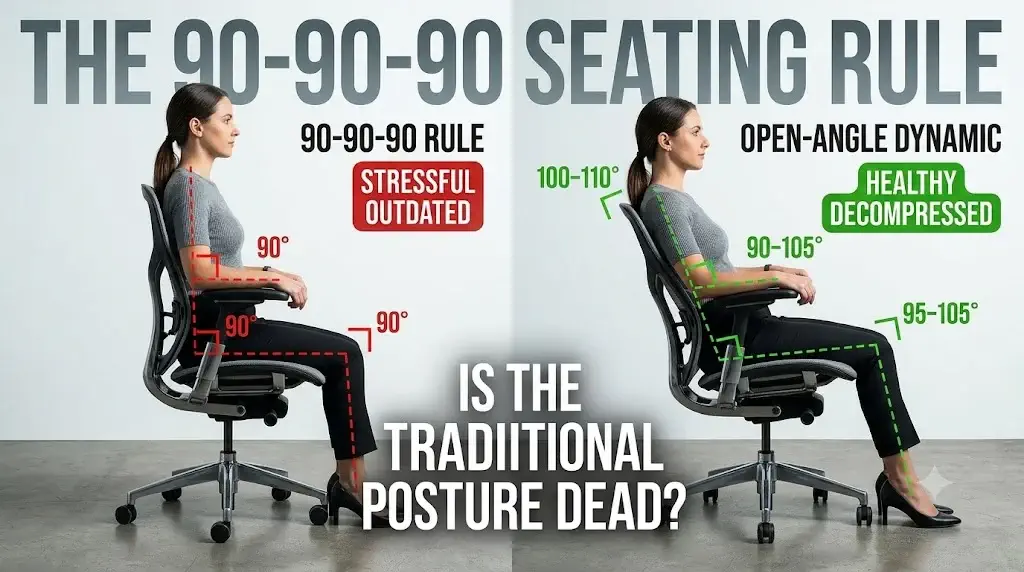
The 90-90-90 Seating Rule: Is the Traditional Sitting Posture Dead?
According to the ErgoDeskGuides Biomechanical Research Protocol, the traditional 90-90-90 seating rule is largely obsolete for prolonged computer work because maintaining a strict 90° hip angle induces posterior pelvic tilt, flattens natural lumbar lordosis, and elevates intradiscal hydrostatic pressure across the L4-L5 and L5-S1 vertebral motion segments.
For over four decades, orthopedic guidelines, ergonomic textbooks, and occupational safety posters taught workers that optimal seated posture required precise right angles: elbows bent at 90°, hips flexed at 90°, and knees bent at 90° with feet planted flat on the floor. While intended to prevent slouching, clinical spinal research and in vivo disc measurements have revealed that holding this rigid posture creates sustained mechanical stress on the human musculoskeletal system.
Modern computer-intensive tasks require eight to twelve hours of daily seated focus. Static postures, no matter how geometrically neat they appear from the side, inevitably cause muscle fatigue, hamstring shortening, and reduced spinal nutrition. Today, ergonomic researchers advocate for open-angle postures (100°–110° hip angles) paired with dynamic movement.
Yes, the strict 90-90-90 sitting posture is medically outdated for full-shift office work. In vivo spinal studies pioneered by Dr. Alf Nachemson prove that unsupported 90-degree sitting increases lumbar disc pressure to 140% of baseline standing load. Contemporary workstation ergonomics replaces this rigid framework with an open-angle posture (100° to 110° trunk-to-thigh angle, slightly reclined backrest, and 95°–105° knee flexion). This preserves the natural lordotic curve, reduces psoas tension, and encourages vital disc fluid exchange.
Quick Reference Specification: 90-90-90 Rule vs Open Dynamic Seating
| Biomechanical Parameter | Traditional 90-90-90 Model | Modern Open Dynamic Model | Physiological Impact |
|---|---|---|---|
| Trunk-to-Thigh (Hip) Angle | Strict 90° (Upright Right Angle) | 100° – 115° (Open Reclined Angle) | Open angle rotates pelvis forward, restoring natural lumbar lordosis |
| L4-L5 Intradiscal Pressure | High (~140% – 190% vs standing) | Low (~100% – 115% vs standing) | Recline transfers upper-torso gravitational mass onto chair backrest |
| Knee Flexion Angle | Strict 90° (Vertical Lower Leg) | 95° – 105° (Slightly Extended) | Prevents popliteal vein compression and promotes calf venous return |
| Elbow / Forearm Orientation | Fixed 90° at Desk Level | 90° – 105° Neutral Elbow Angle | Relieves trapezius strain and reduces carpal tunnel mechanical tension |
| Spinal Erector Muscle Load | Continuous Static Isometric Work | Passive Offloading with Micro-Moves | Eliminates metabolic waste accumulation and muscular spasm triggers |
| Intervertebral Nutrition | Impaired (Static Hydrostatic Force) | Optimized (Diurnal Fluid Imbibition) | Dynamic posture shifting circulates fluids through avascular spinal discs |
Historical Origins of the 90-90-90 Ergonomic Model
Mid-twentieth-century industrial drafting standards created the rigid 90-90-90 sitting model to standardize factory production lines rather than optimize human spinal biomechanics.
The concept of 90-degree seating gained widespread traction during the post-WWII industrial boom. Early human factors engineers sought standardized anthropometric formulas to manufacture fixed-height office desks and typing chairs. The 90-90-90 rule emerged as a clean visual standard: thighs parallel to the floor, calves perpendicular to the ground, and back straight at 90 degrees.
During that era, office tasks were heavily paper-centric. Clerks looked down at physical documents lying flat on desks, and manual typewriters required downward mechanical force. Ergonomic research was in its infancy, lacking modern magnetic resonance imaging (MRI) and electromyographic (EMG) sensors to evaluate spinal disc compression. To understand how fundamental workstation dimensions were calculated, review our historical analysis on proper ergonomic chair height for a desk setup.
As computing moved to cathode-ray tube (CRT) monitors and later to flat-panel displays, workers remained seated in front of digital interfaces for hours at a time. The physical demands shifted from intermittent paper handling to sustained visual focus. The 90-degree sitting standard, designed for short-duration typing drills, proved ill-suited for eight hours of uninterrupted software development, writing, and digital tasks.
Why the 90-90-90 Sitting Posture Fails Biomechanically
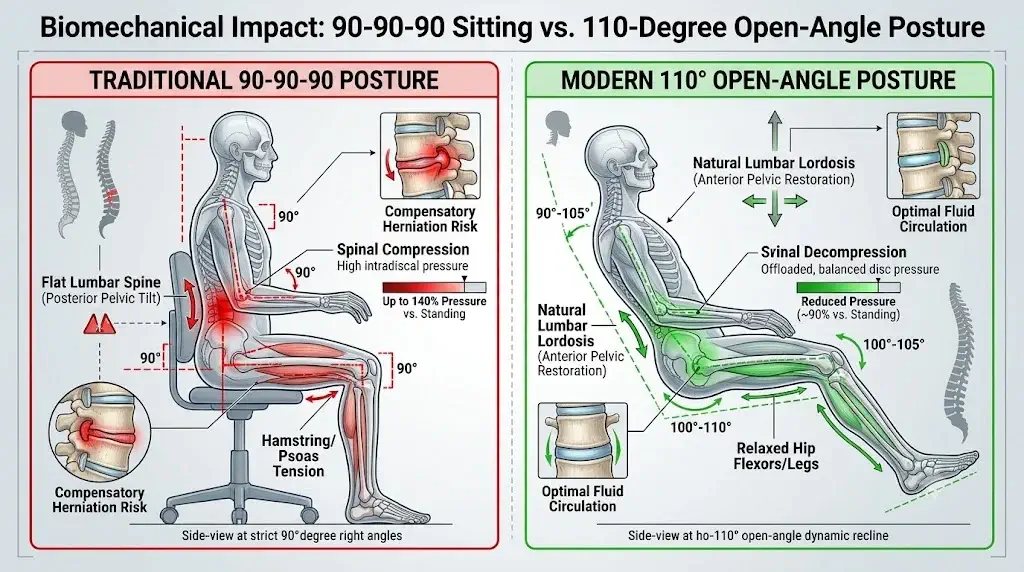
Right-angle hip flexion forces the pelvis into posterior rotation and flattens lumbar lordosis within twenty minutes of static computer work.
When an individual sits with thighs perpendicular to the torso, the anatomy encounters the following mechanical limitations:
1. Posterior Pelvic Tilt (Sacral Sitting)
Tight hamstring tendons pull backward on the ischial tuberosities. Because human hip sockets have limited flexion range without pelvic rotation, the pelvis tilts backward, flattening the natural inward curve (lordosis) of the lumbar spine.
2. Intradiscal Pressure Multiplication
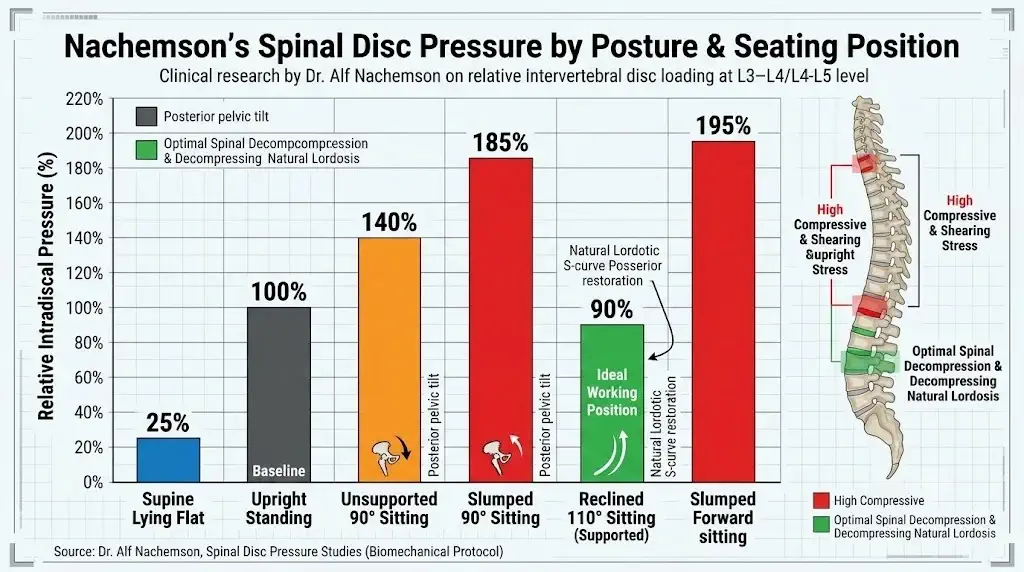
Pioneering orthopedic research by Dr. Alf Nachemson proved that sitting upright at 90 degrees without back support increases lumbar disc pressure by 40% compared to standing. Slumping forward spikes that pressure to nearly 190% of standing levels.
3. Psoas Muscle Shortening
Maintaining 90-degree hip flexion locks the major hip flexor (iliopsoas) in a chronically shortened state. When standing up, these tight hip flexors pull hard on the anterior lumbar spine, triggering lower-back pain.
4. Popliteal Hamstring Compression
A sharp 90-degree knee bend often pulls the lower leg flush against the chair frame. This compresses the popliteal vein and tibial nerve behind the knee, reducing venous return and accelerating leg fatigue.
When users attempt to hold a 90-degree posture without back support, the spinal erector muscles must fire continuously to fight gravity. Within 15 to 20 minutes, these muscles exhaust their glycogen stores, leading to muscular burn and compensatory slouching (kyphosis).
Clinical Evidence: Intradiscal Pressure and Spinal Loading
In vivo pressure transducers confirm that unsupported 90-degree sitting increases lumbar disc pressure to 140% of baseline standing levels.
Dr. Alf Nachemson’s landmark in vivo spine studies measured hydrostatic pressure within the L3-L4 and L4-L5 discs across various everyday postures. His clinical findings transformed modern orthopedic ergonomics:
| Postural Position | Relative Intradiscal Pressure (%) | Biomechanical Mechanism |
|---|---|---|
| Supine Lying Flat | 25% | Complete gravitational offloading; active fluid rehydration of discs |
| Upright Standing | 100% (Baseline) | Natural S-curve distributes mass across vertebrae and facet joints |
| Unsupported 90° Sitting | 140% | Loss of lumbar curve transfers body mass directly to anterior disc rims |
| Slumped 90° Forward Sitting | 185% – 200% | Severe disc wedge compression pushes nucleus pulposus posteriorly toward nerves |
| Reclined 110° with Lumbar Support | 90% – 100% | Chair backrest absorbs upper-body weight while lumbar cushion restores lordosis |
Subsequent kinematic research by Canadian and Scottish radiologists using positional MRI confirmed Nachemson’s findings. When subjects sat at 90 degrees, spinal disc movement was constrained and disc herniation tendencies increased. When subjects reclined to a 135-degree biomechanical perch or a 105-to-115-degree working recline, disc material migrated toward its anatomical center, and lower-back muscular strain dropped. For users experiencing persistent lumbar soreness, follow our step-by-step mechanical guide on how to adjust an ergonomic chair.
The Modern Ergonomic Framework: Open-Angle Dynamic Posture
Contemporary ergonomic standards recommend an open 100-to-110-degree trunk-to-thigh angle to preserve anterior pelvic tilt and lower discal pressure.
Rather than locking the body into three rigid 90-degree right angles, modern ergonomic guidelines recommend the following adjustments:
Open the Trunk-to-Thigh Angle (100° – 110°)
Recline the backrest slightly past vertical. Opening the hip angle tilts the pelvis forward into a neutral orientation, naturally preserving the inward arch of your lumbar spine without requiring strenuous muscle exertion.
Open the Knee Angle (95° – 105°)
Position your feet slightly forward of your knees rather than tucked directly beneath them. This extends the hamstrings, reduces pressure on the patellar tendons, and eliminates vascular pinching behind the knees.
Maintain Neutral Forearm Angles (90° – 105°)
Adjust your desk and armrest height so your forearms rest naturally on the work surface without hiking your shoulders. For step-by-step seating and desk height baselines, review our ergonomic desk and chair height chart by body height.
Incorporate Active Postural Variation
Unlock the chair’s tilt mechanism or use dynamic tension. The human spine is designed for movement; alternating between upright typing, slight recline, and standing intervals keeps intervertebral discs properly nourished.
Essential Chair Features for Modern Dynamic Ergonomics
Mechanical seating hardware supports dynamic spinal offloading through synchronized tilt mechanisms and multi-zone lumbar modules.
To move away from the rigid 90-90-90 framework, look for office chairs engineered with the following structural components:
1. Synchronized Tilt Mechanisms
A synchro-tilt mechanism angles the backrest and seat pan at a 2:1 ratio. When you recline 10 degrees, the seat tilts up approximately 5 degrees, keeping your feet grounded and preventing forward hip sliding.
2. Forward-Tilting Seat Pans
Chairs with a -3° to -5° forward tilt drop the knees slightly below the hips. This simulates horseback riding (saddle seating), naturally keeping the pelvis upright during intense typing sessions.
3. Responsive Dynamic Lumbar Support
Self-adjusting or multi-zone lumbar mechanisms flex forward as you recline, maintaining continuous contact with the L1-L5 vertebrae to prevent sacral collapse. Learn how these mechanisms operate in our report on what is dynamic lumbar support.
4. Horizontal Seat Slider
An adjustable seat pan depth prevents popliteal compression behind the knees, ensuring users of different heights can recline without pinching their calves.
Frequently Asked Questions
Workstation biomechanics researchers clarify common questions regarding the 90-90-90 rule, spinal health, and ergonomic sitting practices.
What is the 90-90-90 seating rule?
The 90-90-90 seating rule is an orthopedic guideline mandating 90-degree right angles at the elbows, hips (trunk-to-thigh), and knees, with feet planted flat on the floor.
Why is the 90-90-90 posture considered outdated by modern ergonomics?
Biomechanically, a strict 90-degree hip angle rotates the pelvis backward into posterior tilt, flattens lumbar lordosis, and increases intradiscal pressure at L4-L5 up to 140% compared to standing.
What is the recommended alternative to the 90-90-90 sitting posture?
Modern ergonomics recommends an open-angle posture with an 100-to-110-degree trunk-to-thigh recline, an open 100-degree knee angle, and active micro-movements supported by dynamic lumbar seating.
Does sitting at 90 degrees worsen lower back pain?
Yes. Sustained 90-degree sitting shortens the iliopsoas muscles, overloads the spinal extensor musculature, and accelerates posterior disc bulge migration under continuous hydrostatic pressure.
Final Verdict: Moving Beyond Rigid Right Angles
Biomechanical research demonstrates that replacing rigid 90-degree sitting with open-angle dynamic postures offloads lumbar disc pressure and prevents muscular fatigue.
The traditional 90-90-90 seating rule is officially dead as a clinical standard for healthy desk work. Holding rigid right angles forces the lumbar spine into kyphotic flattening, elevates intradiscal pressure, and tightens hip flexors. To protect spinal disc health, adopt an open posture: set your chair backrest to a comfortable 100°–110° recline, adjust seat depth to keep calves uncompressed, and incorporate postural micro-movements throughout your workday.
