
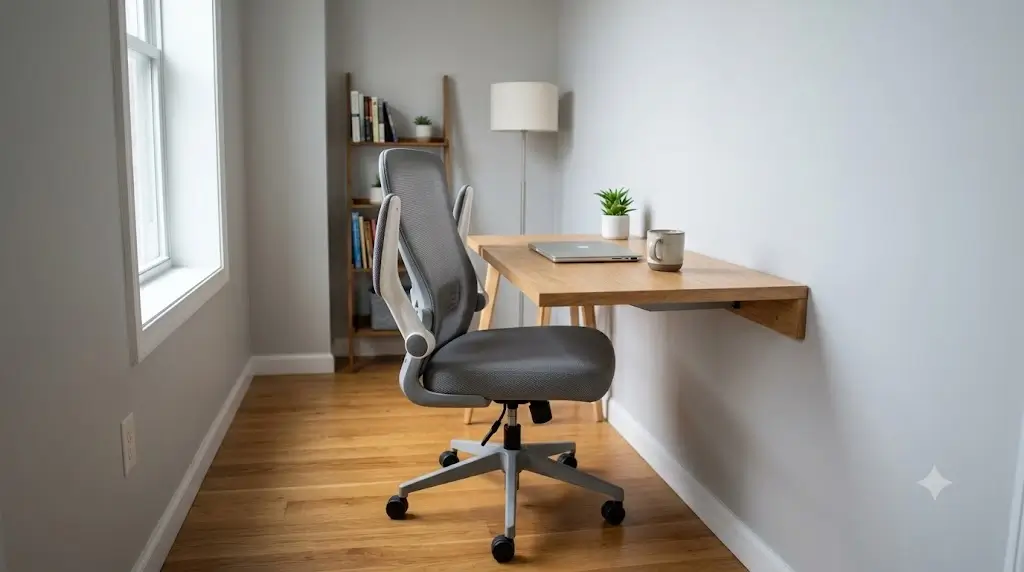
Best Ergonomic Desk Chairs with Flip-Up Arms for Small Spaces
According to the ErgoDeskGuides Compact Workstation Protocol, the best ergonomic desk chairs with flip-up arms require a 90° upward pivot clearance to slide under desks with a 24″–26″ apron height, a moderate seat depth of 17″–18.5″ to avoid crowding walking lanes, and an adjustable lumbar bracket that maintains spinal support without increasing the chair’s physical footprint.
A good small-space office chair needs to solve two problems at the same time: it must provide enough ergonomic adjustment for a normal workday, while its arms must get out of the way when the desk is not in use. Flip-up arms are valuable because they can reduce the chair’s effective storage footprint without requiring a permanently armless chair.
For apartments, bedrooms, dorm-style work areas, converted closets and narrow home offices, the important measurement is not simply the chair’s listed width. You also need to consider armrest clearance, seat depth, minimum seat height, caster footprint, desk clearance and whether the arms can actually move beneath or beside the desk.
The best flip-up-arm ergonomic chair for a small space is the one that combines genuine ergonomic adjustment with arms that can be completely moved out of the desk’s path.For buyers prioritizing the smallest practical footprint, compact task chairs with flip-up arms generally make more sense than large executive chairs. The best choice also depends on whether you need adjustable lumbar support, a low minimum seat height, a breathable mesh back or a padded seat.
“Flip-up arms,” “folding arms,” “foldable arms” and “height-adjustable arms” are not interchangeable terms. An armrest that adjusts vertically but remains beside the desk does not provide the same space-saving benefit as an arm that can rotate upward and clear the desktop.
Best Ergonomic Desk Chairs with Flip-Up Arms: Quick Verdict
The table below is organized by use case, not by the number of features advertised by the manufacturer. A chair that has more adjustments is not automatically better for a small room.
| Best for | What to prioritize | Why it matters in a small space |
|---|---|---|
| Small apartment desk | Flip-up arms + compact depth | Lets the chair approach the desk and clear the walking path |
| Bedroom workstation | Flip-up arms + breathable back | Reduces visual and physical bulk |
| Narrow desk | Narrow arm-to-arm width | Prevents the chair from colliding with the desk |
| Shared workspace | Flip-up arms + easy height adjustment | Allows faster switching between users and storage positions |
| Long workdays | Lumbar + seat-depth adjustment | Fit matters more than saving a few inches of floor area |
| Very tight footprint | Arms that rotate completely upward | Creates the greatest clearance when stored |
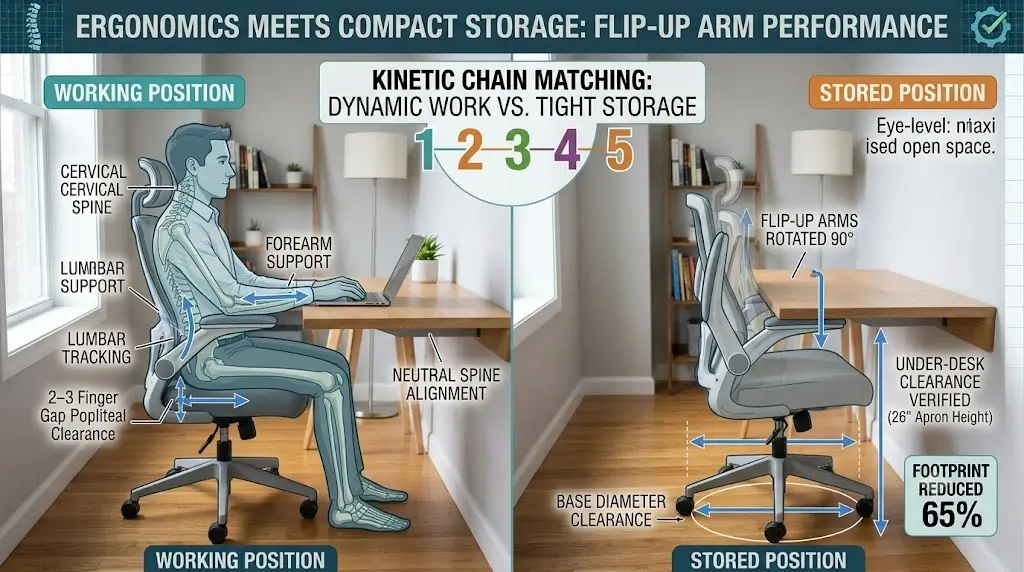
What Makes an Ergonomic Chair Good for a Small Space?
A small-space chair should not be judged by overall width alone. A chair can have a modest published width but still occupy substantial usable space because its armrests cannot clear the desk.
The most useful measurements are overall width, overall depth, arm-to-arm width, seat depth, minimum seat height and the vertical clearance available underneath your desk.
1. Flip-up arm clearance
The arms should move far enough upward that the chair can approach the desk without the arm pads hitting the desktop or underside.
2. Compact depth
A deep chair can consume walking space even when its width is modest. Depth matters especially in bedrooms and narrow office corners.
3. Appropriate seat height
The minimum seat height determines whether your feet can remain supported while your arms reach the desk comfortably.
4. Adjustable lumbar
A compact chair should still support the lower back properly. Saving space should not mean removing the adjustment you actually need.
5. Seat depth
A seat that is too deep can force shorter users forward. A seat-depth adjustment can be more valuable than a headrest in a compact workstation.
6. Under-desk compatibility
The chair must physically fit beneath the desk. This is where flip-up arms can provide a substantial practical advantage.
Why Are Flip-Up Arms So Useful in Small Spaces?
Traditional fixed armrests create a permanent horizontal obstruction between the chair and desk. Even if the seat itself fits underneath the desk, the arms may stop the chair from moving close enough.
Flip-up arms solve this by changing the chair’s storage geometry. When you are working, the arms provide forearm support. When you finish, they can be moved upward so the chair can occupy a smaller effective footprint.
The important measurement is not armrest height
Many shoppers focus on the armrest height range. For a small room, clearance in the raised position can be more important.
An arm that rises only slightly may still hit a desktop. An arm that rotates nearly vertical can allow the chair to slide much farther underneath.
Flip-up does not automatically mean ergonomic
A chair can have convenient flip-up arms and poor lumbar support, an excessively deep seat or an unsuitable minimum seat height.
The correct priority is therefore:
- Body fit
- Seat height
- Seat depth
- Lumbar support
- Armrest positioning
- Storage clearance
For an occasional-use chair, you may compromise on some of these. For a chair used every weekday, fit should remain the primary criterion.
Best Chair Types for Small Spaces
Rather than pretending every model with a flip-up arm is equally good, it is more useful to divide the market into categories.
Compact Ergonomic Task Chair with Flip-Up Arms
The ideal compact task chair has a mid-back mesh design, flip-up arms, pneumatic height adjustment, a reasonably shallow seat and at least basic lumbar support.
This configuration avoids the unnecessary bulk of a large executive chair while retaining enough adjustment for computer work.
Advantages
- Small visual footprint
- Arms can clear the desk
- Usually lighter than executive chairs
- Good for apartment workstations
- Often easier to move
Limitations
- Usually less seat width
- Less padding than executive designs
- Flip-up arm mechanisms vary in quality
- Some models have minimal lumbar adjustment
Compact Ergonomic Chair with Flip-Up Arms and Adjustable Lumbar
This category is more important than choosing a chair merely because its arms fold. If you spend six or eight hours at a computer, lumbar positioning, seat depth and desk height can influence comfort more than the folding mechanism itself.
A compact chair with independently adjustable lumbar support is therefore preferable to an ultra-small chair with fixed back geometry.
Armless-or-Flip-Up Hybrid Task Chair
A chair that can operate with its arms completely raised provides greater flexibility than one with permanently fixed arms.
However, if you spend most of your workday typing, do not choose an armless chair solely because it occupies less space. Properly positioned armrests can reduce the need to support your forearms entirely through your shoulders.
Compact Mesh Chair with Flip-Up Arms
Mesh backrests allow more airflow than solid upholstered backs. In a small room, where airflow around the workstation can already be limited, that can make the chair more comfortable.
A mesh back does not guarantee that the seat will remain cool. If the seat is foam or vinyl, the seating surface may still retain heat.
Should You Buy a Chair with Flip-Up Arms or Fixed Arms?
| Feature | Flip-up arms | Fixed arms |
|---|---|---|
| Storage clearance | Excellent | Limited |
| Desk approach | Usually better | Depends on desk clearance |
| Forearm support while working | Yes | Yes |
| Small-room flexibility | Excellent | Moderate |
| Mechanical simplicity | Lower | Higher |
| Potential failure points | More moving hardware | Fewer |
For a small home office, flip-up arms are usually worth having. But they should be treated as a space-management feature, not as proof of ergonomic quality.
How to Measure Your Small Office Before Buying a Chair
Measure the workstation before choosing the chair. This prevents one of the most common small-space mistakes: buying a chair based on its product photo and discovering that the arms cannot clear the desk.
Measure the desk opening
Measure the clear width between desk legs, cabinets or side panels. Do not measure only the tabletop width.
Measure the underside height
Measure from the floor to the lowest obstruction underneath the desk. This determines whether raised or lowered arms can pass beneath it.
Measure available depth
Measure from the front edge of the desk to the wall behind the chair. Leave enough room for normal recline and movement.
Check the chair’s arm-to-arm width
This is often more useful than the seat width. The chair may fit on paper but still collide with the desk because the arms are wider than the opening.
Check the stored position
If you plan to push the chair completely under the desk after work, verify that the arms actually clear the underside when raised.
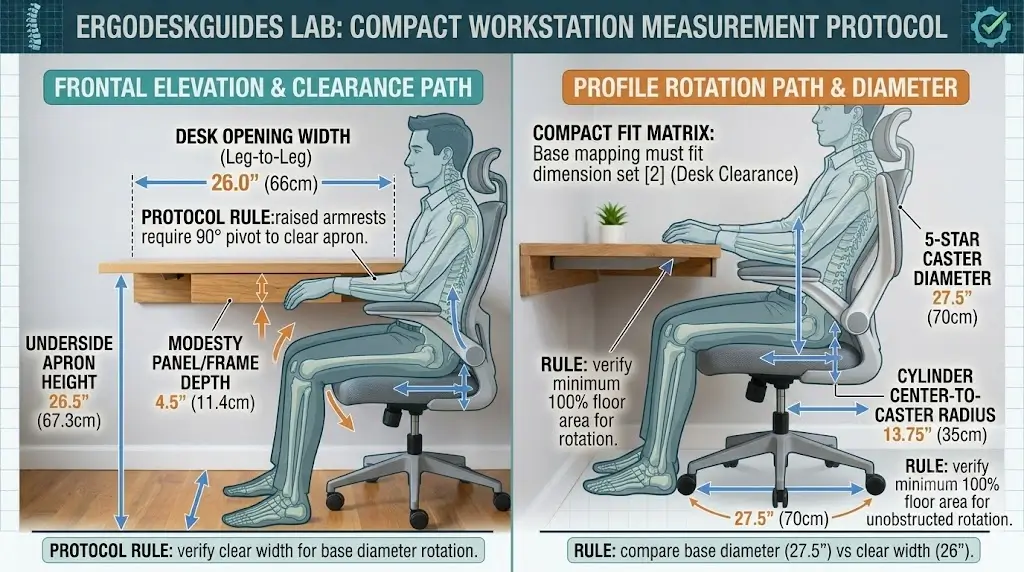
How Much Desk Clearance Does a Flip-Up Arm Chair Need?
There is no universal clearance number because desks differ in thickness, frame design, drawers and crossbars.
Instead, compare the chair’s raised-arm geometry with the actual opening under your desk.
If the chair cannot slide beneath the desk with its arms raised, you are not receiving the full space-saving benefit of the flip-up design.
A desk with a full-width modesty panel may require a different chair strategy from a desk with four open legs. Drawer pedestals are another common obstruction.
This is why the best compact chair is not necessarily the chair with the smallest listed dimensions. Compatibility with your particular desk is more important than a generic width ranking.
Seat Height Matters More Than Chair Width
A compact chair can still be ergonomically wrong if the minimum seat height is too high.
Your feet should be supported while your knees remain in a comfortable position and your arms can reach the keyboard without forcing the shoulders upward. To establish proper baseline cylinder travel for your body height, consult our ideal ergonomic desk and chair height chart by body height.
If the chair is too high, lowering the chair may not solve the problem if the desk itself is too tall. A footrest can provide additional lower-leg support, but it does not change the relationship between your elbows and the desktop.
Choose the chair and desk as a system. A compact chair with excellent adjustment cannot compensate for a desk that is fundamentally incompatible with your seated height.
Seat Depth: The Overlooked Small-Space Measurement
Seat depth determines how far the seat extends beneath your thighs. It also contributes to the total front-to-back footprint of the chair.
A deep seat can be comfortable for some taller users but problematic for smaller users because it can encourage sitting too far forward.
For small rooms, a moderate seat depth has two benefits: it can improve body fit and reduce the physical footprint of the chair.
What to look for
- Adjustable seat depth if possible
- Avoid excessively deep executive-style seats
- Check seat dimensions rather than relying on “compact” in the title
- Compare seat depth with your own thigh length
Lumbar Support in a Compact Office Chair
The space-saving feature should never be the only criterion. For daily desk work, lumbar support remains important. For a complete setup walkthrough to avoid localized spinal aches, read our step-by-step biomechanical guide on how to adjust an ergonomic chair for lower back pain relief.
A basic compact chair may have a fixed lumbar contour. A better option provides height adjustment or another method of positioning the lumbar zone.
The most advanced ergonomic chairs may use dynamic or adaptive lumbar systems, but those mechanisms are not essential simply because the room is small.
| Lumbar type | Adjustment | Small-space recommendation |
|---|---|---|
| Fixed contour | None | Acceptable for occasional use if the shape fits |
| Height-adjustable | Vertical | Good value |
| Height + depth | Vertical + pressure | Better for daily work |
| Dynamic/adaptive | Responds to movement | Useful but not essential |
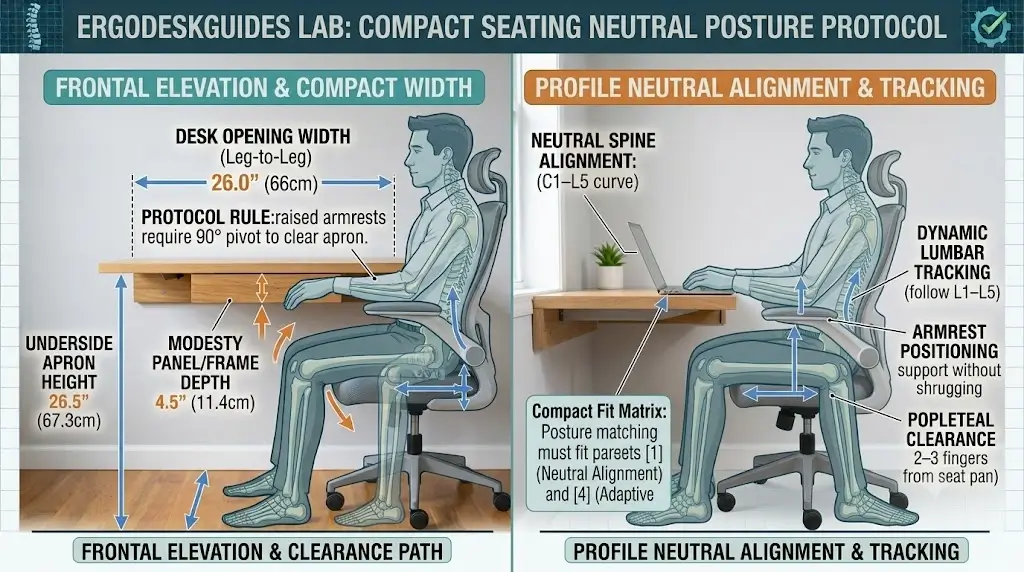
How Should Flip-Up Armrests Be Positioned?
When working, set the armrests so your forearms can rest without forcing your shoulders upward.
The arm pads should not force your elbows outward or prevent the chair from approaching the desk.
When storing the chair, rotate the arms upward completely if the mechanism allows it.
A useful adjustment sequence
- Adjust seat height.
- Place your hands on the keyboard.
- Relax your shoulders.
- Raise or lower the armrests until they support your forearms without lifting the shoulders.
- Check that the armrests do not hit the desk.
- Flip them upward when you need to store the chair.
The goal is not to keep your arms permanently supported. The goal is to make support available without interfering with natural movement.
Mesh vs Padded Chairs for Small Spaces
| Factor | Mesh | Padded |
|---|---|---|
| Back airflow | High | Lower |
| Warm room performance | Usually better | Depends on upholstery |
| Visual bulk | Often lower | Often higher |
| Soft initial feel | Variable | Usually better |
| Long-term shape retention | Depends on mesh tension | Depends on foam quality |
For a small apartment or bedroom, mesh often makes the chair look less visually heavy. For an in-depth breakdown on thermal retention across materials, see our comparison of mesh vs leather office chairs and thermal breathability.
How to Set Up an Ergonomic Chair in a Very Small Room
The chair should be positioned so it can perform its ergonomic function during work and disappear from the main walking area afterward.
During work
- Keep the chair close enough to the desk that you do not lean forward.
- Use the armrests only when they improve forearm support.
- Keep your feet supported.
- Position the monitor so you are not constantly bending your neck.
- Leave enough space behind the chair for normal movement.
After work
- Flip the arms upward.
- Slide the chair beneath the desk if the desk allows it.
- Turn the chair slightly if a wall or cabinet blocks straight storage.
- Keep casters clear of cables and floor mats.
The best compact chair is one that works ergonomically while occupied and occupies minimal usable floor area when not in use.
Are Flip-Up Arms Better Than Armless Chairs?
Not always.
Armless chairs offer maximum clearance and can be extremely useful in very small rooms. But they remove the option of using arm support during typing or mousing.
Flip-up arms provide a compromise: support when needed and clearance when not needed.
For a primary workstation, that flexibility usually makes flip-up arms more useful than permanently armless construction.
Do Flip-Up Arms Reduce Ergonomic Quality?
They can, but the mechanism itself is not the problem.
The important questions are whether the arms remain stable when lowered, whether they reach an appropriate height and whether their pivot mechanism allows a useful working position.
A poorly designed flip-up arm can wobble or offer limited positioning. A well-designed mechanism can provide both stability and storage clearance.
Therefore, do not score a chair highly merely because its arms flip upward. Evaluate the working position and storage position separately.
How Much Should You Spend on a Small-Space Ergonomic Chair?
A compact chair does not need to be expensive, but very cheap models often achieve their small footprint by removing adjustments.
| Budget range | What to expect | Best use |
|---|---|---|
| Under $100 | Basic task-chair construction; limited ergonomic adjustment | Occasional use |
| $100–$200 | More flip-up-arm and mesh options | Budget home office |
| $200–$400 | Better adjustment and construction | Frequent work |
| $400+ | More advanced mechanisms and fit options | Long-term primary workstation |
The exact price of individual chairs changes frequently, so use the current seller listing rather than treating a historical review price as permanent.
How to Choose the Best Flip-Up-Arm Chair: Buying Checklist
Verify that the arms actually flip upward
Some listings use “adjustable arms” as a broad description. Confirm that the armrests rotate into a storage position.
Measure the desk opening
Do not assume the chair will fit under your desk. Measure the lowest obstruction.
Check seat height
Make sure the minimum height allows comfortable foot support.
Check seat depth
Avoid choosing a compact chair that is narrow but excessively deep.
Look for lumbar adjustment
For daily work, at least some lumbar positioning is preferable to a fixed back contour.
Measure arm-to-arm width
The arms can determine whether the chair actually fits your desk.
Check weight rating
Use the manufacturer’s rating for the exact model and configuration.
Common Mistakes When Buying a Small-Space Office Chair
Mistake 1: Choosing by overall width only
The chair may be narrow but have wide arms or a deep base.
Mistake 2: Ignoring the desk
The chair and desk must work together. A chair cannot be evaluated independently of the workstation.
Mistake 3: Assuming flip-up means compact
The seat, base and backrest can still occupy substantial floor space.
Mistake 4: Buying a chair that is too high
This can leave your feet unsupported and encourage poor workstation positioning.
Mistake 5: Prioritizing a headrest over seat fit
A headrest is generally less important to basic task-chair fit than seat height, seat depth and lumbar positioning.
Mistake 6: Ignoring storage behavior
If the chair cannot actually slide under the desk after the arms are raised, its advertised space-saving feature may have limited practical value.
What About a Chair with No Arms at All?
A permanently armless chair is worth considering when the workstation is exceptionally narrow.
It can also be useful for tasks that involve frequent movement between the chair and nearby cabinets, shelves or equipment.
For computer-heavy work, however, flip-up arms generally offer greater flexibility because you can use them when useful and remove them from the workspace when they become an obstruction.
Small-Space Ergonomic Chair Decision Tree
Do you need the chair to disappear under the desk?Yes → Prioritize true flip-up arms and verify underside clearance.
No → Focus more heavily on body fit and lumbar adjustment.
Do you work at the desk most days?
Yes → Prioritize seat height, seat depth and lumbar support.
No → A simpler compact task chair may be sufficient.
Is the room warm?
Yes → Favor breathable mesh, especially for the back.
No → Choose based on fit and pressure comfort.
Is the desk extremely narrow?
Yes → Measure arm-to-arm width before ordering.
No → Seat geometry becomes the larger consideration.
What Ergonomic Experts Actually Emphasize
Chair selection should be based on the user’s height, body shape, seat depth, lumbar adjustment and relationship to the desk rather than simply choosing the chair with the most features.
That principle is particularly relevant to small-space chairs. A flip-up arm is valuable because it solves a spatial problem, but it should not override the basic fit requirements of a workstation.
For example, a chair with perfect storage clearance but an excessively deep seat is not a better ergonomic choice simply because it saves two inches of floor space.
A Real-World Example: Why Chair Dimensions Matter
Consider a small bedroom desk with a narrow opening between two side panels. A chair may have a nominal width that appears acceptable, but the armrests could be several inches wider than the seat.
If those arms cannot move upward, the chair may remain several inches away from the desk. The user then has to lean forward or sit at the edge of the seat.
A flip-up-arm chair changes the geometry. Once the arms are raised, the seat and back can move closer to the desk.
This is the real value of the feature: not a smaller chair while you are sitting in it, but a smaller effective footprint when the workstation is being stored.
How We Evaluate Small-Space Ergonomic Chairs
Space efficiency
We consider usable storage footprint rather than marketing labels such as “compact.”
Armrest function
Flip-up arms must be useful in both the working and raised positions.
Body fit
Seat height, seat depth and width are considered before cosmetic features.
Lumbar support
Fixed, adjustable and dynamic support are treated as different mechanisms.
Desk compatibility
A chair is only space-efficient if it works with the actual desk opening.
Daily usability
The chair must remain practical when used repeatedly, not merely fit inside a product photograph.
Evidence transparency
This guide does not claim that ErgoDeskGuides personally tested every chair listed unless first-hand measurements and testing are explicitly documented. Manufacturer specifications are treated as manufacturer specifications, while independent testing is treated separately.
That distinction matters for product-review quality. A product should not receive fabricated test scores simply because a numerical ranking looks more authoritative.
Frequently Asked Questions
What is the best ergonomic chair with flip-up arms for a small space?
The best option is a compact ergonomic task chair that combines true flip-up arms with appropriate seat height, moderate seat depth and lumbar support. The exact model depends on your desk dimensions and body size.
Are flip-up armrests good for small apartments?
Yes. Their main advantage is that they allow the chair to occupy less usable space when it is pushed toward or under the desk.
Do flip-up arms make an office chair more ergonomic?
Not by themselves. Flip-up arms primarily improve space management. Ergonomic quality depends on seat height, seat depth, lumbar support, backrest geometry and appropriate armrest positioning.
Can a flip-up-arm chair fit under a desk?
Often, but you must check the actual underside clearance. Measure the desk opening and compare it with the chair’s raised-arm position.
Are armless chairs better than flip-up-arm chairs for small spaces?
Armless chairs provide maximum clearance, but flip-up arms are more versatile because they provide forearm support during work and can be moved out of the way afterward.
What is more important: flip-up arms or adjustable lumbar support?
For a primary work chair, adjustable lumbar support is generally more important for fit. Flip-up arms become especially valuable when storage clearance is a genuine space constraint.
What should I measure before buying a compact office chair?
Measure the desk opening width, underside height, available floor depth and the distance to the wall behind the chair. Then compare those measurements with the chair’s overall width, depth and raised-arm clearance.
Are mesh chairs better for small rooms?
Mesh chairs can have a visually lighter appearance and generally provide better back airflow than solid upholstery. They are not automatically more ergonomic, however.
What seat height is best for a small-space office chair?
There is no single ideal number for everyone. The chair should allow your feet to remain supported while your knees and elbows can be positioned comfortably relative to the desk.
Should armrests touch the desk?
No. The armrests should not force the chair away from the desk or interfere with your keyboard position. Flip-up arms can be raised when they become an obstruction.
Are compact office chairs good for 8-hour workdays?
They can be, provided the chair fits your body and has sufficient adjustment. Compact dimensions should not be achieved by sacrificing the seat depth, lumbar support or height range you need.
What is the biggest mistake when buying a chair for a tiny office?
Buying based only on the chair’s advertised width. Desk clearance, armrest geometry and chair depth often determine whether the chair actually works in the room.
Final Verdict: Best Ergonomic Desk Chair with Flip-Up Arms for Small Spaces
The best small-space ergonomic chair is not simply the smallest chair. It is the chair that gives you proper seated fit while allowing its arms and footprint to disappear when the desk is not being used.For most compact home offices, prioritize true flip-up arms, a suitable minimum seat height, moderate seat depth, adjustable lumbar support and a narrow arm-to-arm footprint.If you work long hours, choose ergonomic fit before storage convenience. If the chair is primarily used occasionally and the room is extremely tight, the value of flip-up arms increases.
The single most useful test is simple: sit in the chair at your desk, set the ergonomics correctly, then flip the arms up and see whether the chair can actually occupy the space you need it to occupy.
