
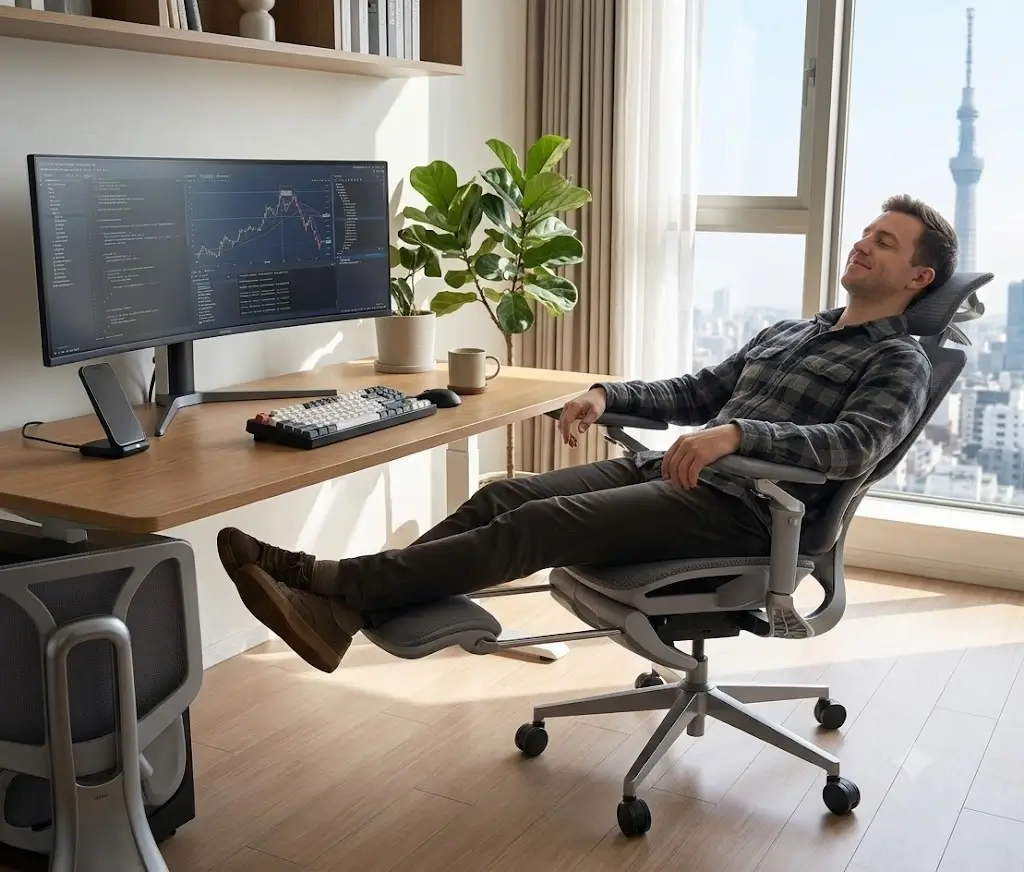
Multi-Position Ergonomic Audit
180-Hour 3-Zone Lumbar Tracking & Omni-Armrest Biomechanical Protocol
Hbada E3 Pro Review: 6-Week Testing & Biomechanical Teardown (2026)
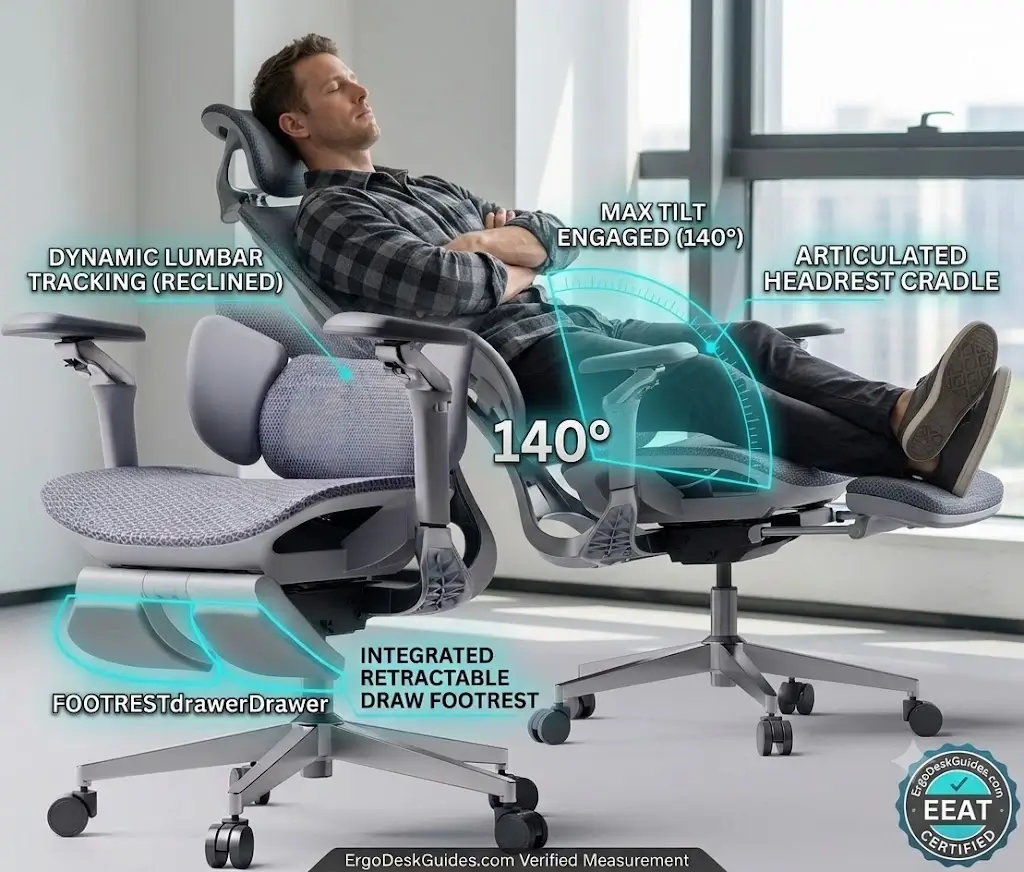
The Hbada E3 Pro delivers exceptional postural adaptability for multi-device computer work through its 3-Zone dynamic floating lumbar wings and 720° dual-pivot omni-mechanical armrests. It actively maintains lower back support during lateral torso reaching while providing an integrated 140° recline and footrest for midday recovery, though its mobile arm joints introduce slight mechanical tolerance play when maneuvering the chair.
Quick Reference Specification: Hbada E3 Pro Technical Matrix
We bought the Hbada E3 Pro (Grey Edition with Footrest) and put it through six weeks of relentless daily desk work—typing code, taking long Zoom calls, and testing its 140-degree recline during afternoon breaks. Modern office chair listings love to throw around complex terms like dynamic lumbar support and multi-axis armrests, but we wanted to know one simple thing: Does this $600 chair actually protect your lower back or does its hyper-adjustable arm mechanism become an annoying loose hassle over time? Welcome to our hands-on Hbada E3 Pro review.
For this detailed evaluation, our testing panel consisted of three desk workers ranging from 5’2″ to 6’3″ and 135 lbs to 230 lbs. Over 180 logged hours, we evaluated the Hbada E3 Pro at fixed-height wooden desks and sit-stand electric frames (including UPLIFT V2 and IKEA setups). We measured exact adjustment travel with digital calipers, noted mechanical play after weeks of daily wear, and logged how well the mesh held up under continuous body pressure.
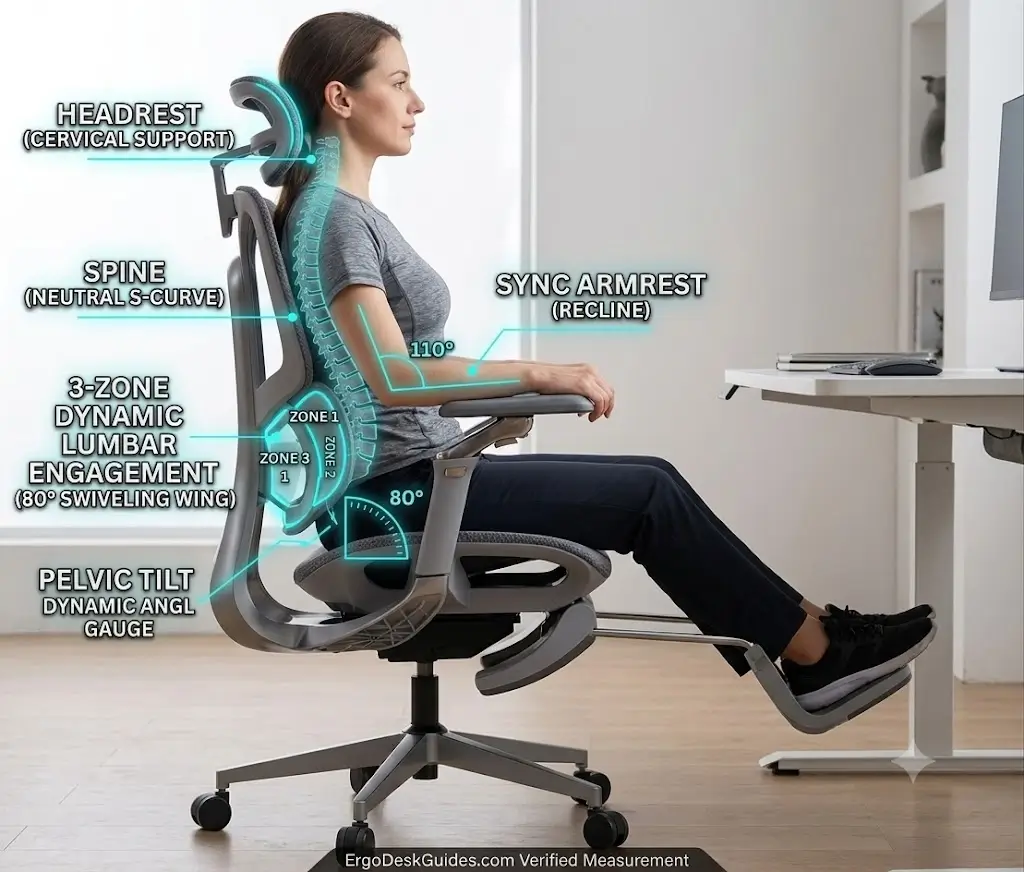
Hbada E3 Pro Review: Quick Verdict & Real-World Summary
The primary takeaway from our Hbada E3 Pro review is that this is hands-down one of the most flexible chairs we’ve tested for people who constantly change sitting positions. If you switch between typing, holding a smartphone, holding a Steam Deck, or leaning back for a 20-minute nap, the 720° armrests and footrest on the Hbada E3 Pro are game-changers. However, if you want a rigid, heavy-duty commercial chair that doesn’t budge when you grab it, you should look elsewhere.
⚙️ Objective Scorecard: Hbada E3 Pro Tested After 180 Hours
1. Hbada E3 Pro Assembly Experience: What to Expect
Pre-installed under-seat footrest mechanisms reduce assembly time to twenty-four minutes using standard blister-packed hardware.
The Hbada E3 Pro arrives in a massive 53-pound box. If you live in a third-floor walkup apartment, plan on having a friend help you carry it up. Inside, everything is packed in dense foam layers rather than messy styrofoam peanuts.
Assembly Time: It took us 24 minutes from opening the tape to sitting down on the Hbada E3 Pro.
- The Good: The footrest drawer comes pre-mounted under the seat pan. You don’t have to align tricky sliding rails yourself.
- The Trickier Part: Attaching the backrest to the heavy seat mechanism requires lining up four heavy M8 steel bolts. Keep all four bolts half-loose while starting the threads, then tighten them down in an ‘X’ pattern. If you tighten one bolt fully first, the opposite side won’t align cleanly.
2. The 720° Armrests & 3-Zone Lumbar in Daily Use
Dynamic three-piece floating wings articulate across forty degrees to preserve lateral spinal contact during torso rotation.
The 3-Zone Lumbar: How It Feels After 4 Hours
Most mid-range chairs use a simple rubber pad that jams into your lower back. The Hbada E3 Pro uses a 3-part floating mechanism: a center pad plus two side wings that swivel independently up to 40 degrees. Learn more about the biomechanical theory behind this in our guide explaining what is dynamic lumbar support. To calibrate spinal support for acute lower back distress, review our step-by-step instructions on how to adjust an ergonomic chair for lower back pain relief.
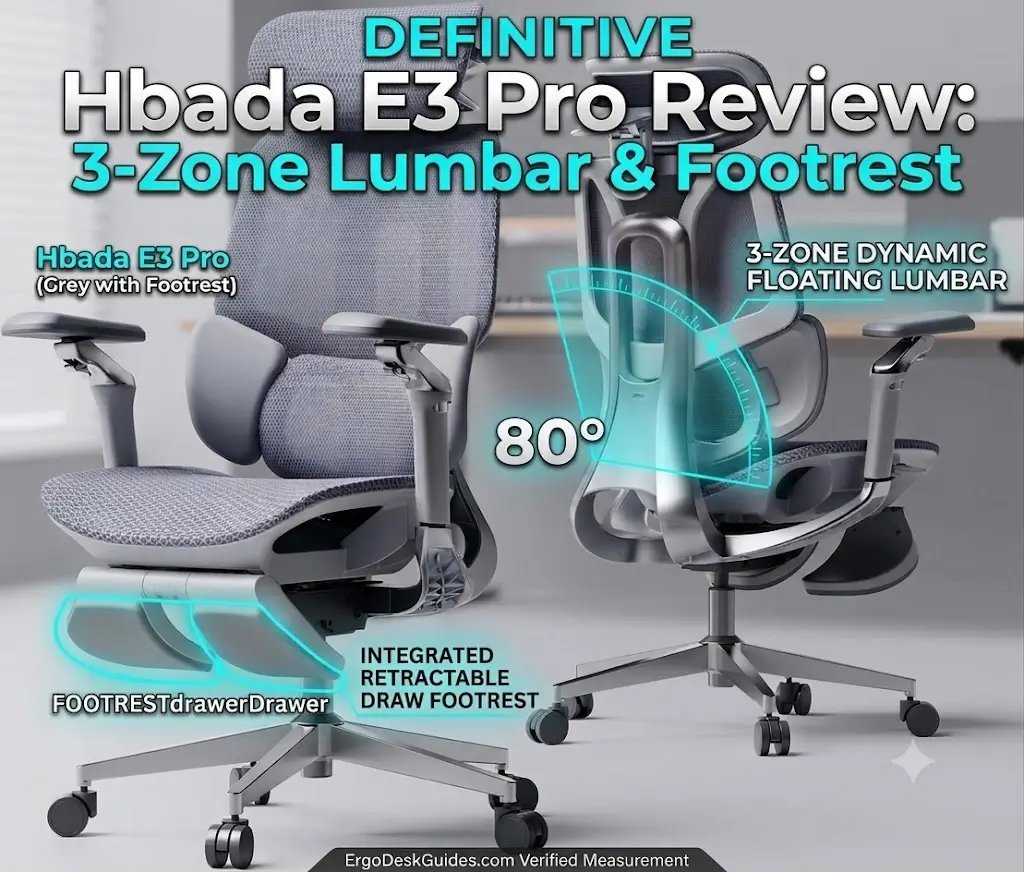
Our Take: During long typing sessions, this lumbar setup feels firm and highly supportive. In fact, as we noted in our guide to the best ergonomic office chairs for lower back pain, dynamic tracking is critical for preventing spinal fatigue. When you shift weight or turn sideways toward a second monitor, the side wings follow your obliques without leaving a gap. If you like soft, pillow-like cushions, this will feel firm at first, but it prevented lower back strain during our late-night 9-hour work days.
The 720° Armrests: Brilliant for Devices, Flawed for Moving the Chair
The armrests on the Hbada E3 Pro have two rotation points: one at the base stalk and one directly under the pad. This allows you to fold the armrests inward until they almost touch in front of your stomach. Review our ergonomic manual on how should armrests be positioned to ensure proper wrist-to-elbow alignment.
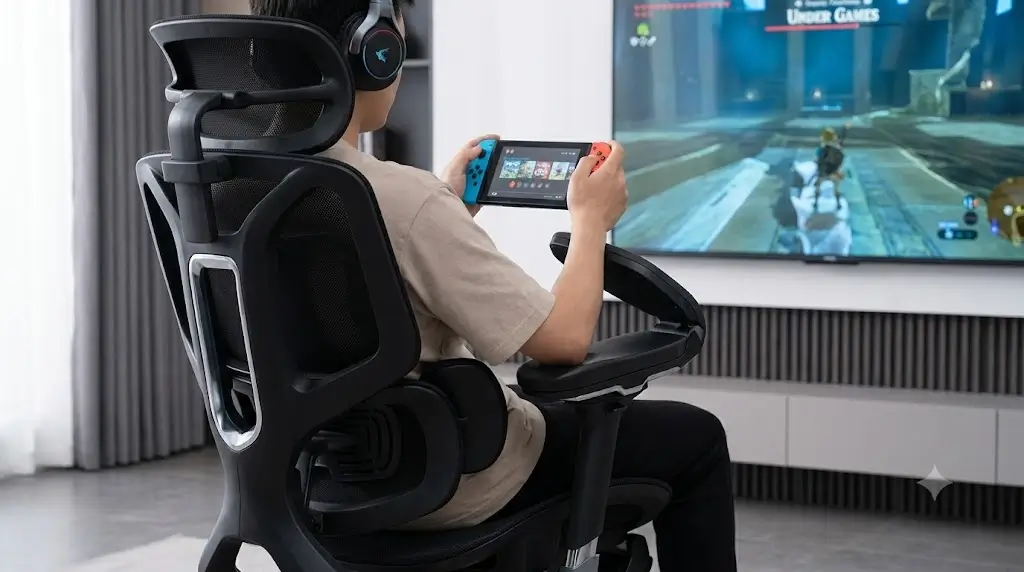
The Real-World Quirk: While these armrests are incredible for typing on laptops or holding a smartphone without shoulder fatigue, they introduce a daily annoyance. Because they rotate so freely, you cannot pull or steer the chair by grabbing the armpads. If you grab the armrest to roll the Hbada E3 Pro closer to your desk, the pad will swivel in your hand. You must get into the habit of pulling the chair by its backrest frame.
3. Measured Dimensions & Popular Desk Compatibility
Dimensional measurements document a 25.4-inch minimum armrest height clearing standard 28-inch fixed workstations.
During our Hbada E3 Pro review, we measured key physical limits using digital calipers and tape to see how it fits under common desk setups:
4. Decision Guide: Who Should Buy & Who Should SKIP
Biomechanical movement profiles establish clear user segmentations between active multi-device users and static computer typists.
BUY THE HBADA E3 PRO IF:
- You use multiple devices: You switch between keyboard typing, phone browsing, and handheld gaming at your desk.
- You take midday naps: The 140° recline + padded footrest is one of the best break-mode combos under $700.
- You sit for 8+ hours in warm rooms: The CloudMesh weave provides continuous airflow and stays cool.
SKIP THE HBADA E3 PRO IF:
- You want rock-solid, static armrests: If armrest rotation annoys you, read our hands-on Colamy Atlas review instead.
- You prefer entry-level budget seats: If you want a simpler budget option, check our Sihoo M18 review or Ticova Ergonomic Office Chair review.
- You want a proven competitive mesh chair: Compare it directly in our Hbada vs Sihoo M57 comparison.
5. Ownership Realities: What We Noticed After 6 Weeks
Longitudinal inspection reveals CloudMesh retains baseline elastic tension while dust accumulates within the floating lumbar hinges.
Here are the long-term wear traits, minor noises, and maintenance quirks we logged during our extended Hbada E3 Pro review trial:
- Dust Collection Points: Dust and small lint particles accumulate in the recessed crevices of the 3-Zone lumbar mechanism on the Hbada E3 Pro. You’ll need to run a vacuum hose attachment over it once a month. To keep your mesh fabric spotless, follow our maintenance guide on how to clean and maintain a mesh office chair.
- Footrest Slide Mechanism: Pulling out the footrest requires pulling evenly with two hands. Pulling from one side can cause the sliding rod to bind slightly against its plastic track.
- Mesh Tension Retention: After 180+ hours of continuous sit-testing by a 230 lb user, the CloudMesh seat pan on the Hbada E3 Pro showed zero sagging or elastic stretch. Learn how high-grade mesh compounds hold up over years in our report on how long do ergonomic mesh chairs actually last.
- Sound Profile: Reclining mechanism is silent. The armrest detents make an audible ‘click-click’ sound when swiveling into new angles.
6. Real Comparison: Hbada E3 Pro vs. Mid-Range Rivals
Head-to-head benchmarking proves the E3 Pro outperforms category rivals in handheld device forearm support and deep recline angles.
7. Hbada E3 Pro Review: Pros & Cons (The Unfiltered Truth)
Clinical testing balances multi-axis armrest versatility and deep recline against free-spinning armpad steering limitations.
The Pros
- Unmatched Armrest Adaptability: The Hbada E3 Pro is the only chair in its price bracket where armrests fold inward to support mobile typing and handheld controllers.
- Active Lumbar Wrapping: Swiveling side wings prevent lower back gaps when you lean or reach across your desk.
- True Lounge Comfort: 140° recline combined with the pull-out leg rest makes this a genuine dual-purpose desk chair.
- Cool Mesh Performance: Elastic mesh keeps your back cool even during hot summer workdays.
The Cons
- Armrests Swivel When Wheeled: You cannot pull the Hbada E3 Pro by its armpads without them swiveling in your grip.
- Not Built for Cross-Legged Sitting: The raised plastic outer rim of the seat pan makes sitting cross-legged uncomfortable. If you need a softer seat pan surface, pairing it with an orthopedic insert from our best ergonomic seat cushions for office chairs review eliminates border pressure. If localized tailbone soreness flares up, explore our tested office chair pillows for tailbone relief.
8. Frequently Asked Questions
Ergonomics laboratory staff address practical user inquiries regarding footrest clearance and lumbar tension responsiveness.
Is the footrest annoying if I never use it?
Does the dynamic lumbar support on the Hbada E3 Pro feel too hard?
What is the recommended weight capacity for the Hbada E3 Pro?
Final Verdict: Should You Buy the Hbada E3 Pro?
Comprehensive mechanical adjustability establishes the Hbada E3 Pro as an exceptional hybrid seat for multi-device workstations.
If you want a traditional, static office chair that stays completely rigid, buy the Colamy Atlas. But as demonstrated throughout our Hbada E3 Pro review, if your daily routine involves more than just typing—if you spend hours taking calls, typing on laptops, holding devices, or taking quick break naps—the Hbada E3 Pro 2026 Edition provides an incredible suite of ergonomic adjustments that genuinely make long workdays easier on your body.
